Introduction
Calls don't stop when your office closes. For most businesses, though, the ability to answer them does — and that gap is expensive.
According to CallRail's 2025 research, 82% of consumers will call a competitor if a business doesn't answer, and 21% dial a competitor immediately. In industries like home services, legal, and healthcare, where callers are often in urgent situations, a missed after-hours call isn't just an inconvenience — it's a lost client.
AI voice solutions have emerged as the practical fix. These platforms answer inbound calls 24/7, hold natural conversations, capture caller details, and escalate urgent situations — all without a human on duty.
Below, you'll find the five strongest AI voice options for after-hours answering, the features that separate the good from the frustrating, and a clear way to match the right tool to your business type.
Key Takeaways
- 82% of callers will contact a competitor when their call goes unanswered — making after-hours coverage a revenue issue, not just a convenience one
- Strong AI voice tools combine natural conversation quality, configurable call flows, escalation logic, and CRM integrations
- Evaluate each tool on: voice naturalness, LLM backing, pricing model, escalation handling, and compliance certifications
- Top options covered: Eva Speaks, Retell AI, Synthflow AI, Smith.ai, and Rosie AI
- Eva Speaks stands out for LLM-powered conversations and customizable call-flow scripting built specifically for business call handling
Why After-Hours Calls Are Too Costly to Miss
Callers who dial outside business hours are high-intent. They've decided they need help — right now. Sending them to voicemail doesn't put them on hold; it sends them elsewhere.
The numbers make this concrete:
- 82% of consumers call a competitor after an unanswered call
- 78% abandon a business entirely following a missed call
- Less than 3% of callers pushed to voicemail actually leave a message (Invoca, 2024)
- Home-services businesses lose an average of $1,200 per missed call (Housecall Pro, 2024)
- Law firms spend an average of $649 per lead — yet Clio found 39% of law firm calls go straight to voicemail
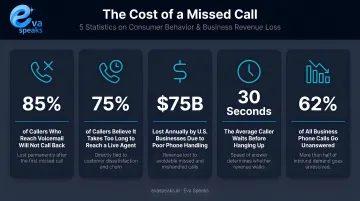
The industries hit hardest are exactly those where urgency drives the call: plumbing emergencies, legal deadlines, medical questions, real estate inquiries with competing offers in play. One missed Friday-night call can mean a lost client relationship that took months and hundreds of dollars in marketing to create.
Those losses don't have to be inevitable. Human answering services can cover after-hours calls, but they cost significantly more and introduce inconsistency. AI voice handles the same calls at a fraction of the cost, with no scheduling constraints and no variability in how callers are greeted.
Here is how the main after-hours call handling options compare:
| AI Voice Agent (EvaSpeaks) | Live Answering Service | Voicemail / No Answer | |
|---|---|---|---|
| Features | Fully conversational, booking, routing, 24/7 | Human agent answers, takes messages | Passive message recording |
| Best-fit Business Size | SMB to mid-market | Any, especially regulated industries | Very small businesses |
| Key Strengths | Always on, zero dropped calls, instant response | Human empathy, complex conversations | Zero setup cost |
| Implementation Complexity | Low - hours to deploy | Low - outsource | None |
| Integration Capability | CRM, scheduling, ticketing | Manual or limited API | None |
See exactly how AI keeps your calls covered overnight. See How AI Handles After-Hours Calls
Best AI Voice Options for After-Hours Call Answering
These five platforms were selected specifically for after-hours use cases — not general call handling. Evaluation criteria included:
- Voice naturalness and conversational quality
- Customization depth and routing control
- Escalation capabilities (AI-only vs. human backup)
- Pricing transparency
- Compliance posture (SOC 2, HIPAA, GDPR)
Eva Speaks
Eva Speaks is a voice AI platform that combines LLM integration with configurable call-flow scripting — built for businesses that need more than a basic IVR for after-hours coverage.
The platform processes voice recordings for real-time AI responses, supports customizable routing rules and office hours configuration, and captures call transcripts and metadata — including caller ID, call duration, and routing outcomes — for every interaction.
| Feature | Details |
|---|---|
| Key Features | LLM integration, customizable call-flow scripts and routing rules, real-time AI responses, call transcription, office hours scheduling |
| Best For | Businesses needing deeply configurable voice AI with custom routing logic |
| Pricing | Subscription-based; contact evaspeaks.ai for current plan pricing |
Standout: LLM integration enables genuinely conversational responses rather than rigid menu navigation — callers interact naturally rather than pressing through options. EvaSpeaks also supports time-based routing rules and office hours configuration, so businesses can deploy it specifically for after-hours coverage and have it hand back to live staff during the day — a low-risk way to start with AI call handling before expanding its scope.
Watch the full call flow in action. Watch AI Call Flow Demo
Retell AI
Retell AI is a developer-friendly platform for building and deploying customizable voice agents. Technical teams get full control over agent behavior, call logic, and post-call analysis.
| Feature | Details |
|---|---|
| Key Features | Customizable voice agents, SIP trunking (Twilio, Telnyx, Vonage), call transfer, post-call analysis, knowledge base integration |
| Best For | Businesses with technical teams wanting full control over voice agent behavior |
| Pricing | Pay-as-you-go: $0.07–$0.31/min depending on infrastructure and LLM choices; Enterprise uses custom volume pricing |
Standout: Supports time-based activation — businesses can schedule AI agent coverage for specific hours or days only, making true after-hours-only deployment straightforward.
Synthflow AI
Synthflow takes a no-code approach, letting non-technical teams deploy AI voice agents through a drag-and-drop visual builder — no engineering resources required.
| Feature | Details |
|---|---|
| Key Features | No-code visual builder, 30+ language support, CRM integrations (HubSpot, Salesforce, Zapier), inbound and outbound call handling |
| Best For | SMBs and non-technical teams wanting fast, affordable after-hours voice automation |
| Pricing | Pay-as-you-go starting at $0.09/min for the Synthflow Voice Engine; typical all-in PAYG setups run $0.15–$0.24/min depending on LLM and telephony stack |
Standout: SOC 2, GDPR, and ISO 27001 compliance included on PAYG plans; HIPAA compliance available on Enterprise — solid compliance posture for a no-code tool at this price point.
Smith.ai
Smith.ai runs a hybrid model: AI handles initial screening and intake, with over 500 North American live agents available as an escalation layer. That makes it a strong fit when some interactions genuinely require human judgment.
| Feature | Details |
|---|---|
| Key Features | AI + live human backup, lead qualification, appointment booking, CRM integrations (HubSpot, Salesforce, Zapier), call summaries and transcripts |
| Best For | Businesses in high-stakes industries (legal, professional services) that need AI speed with human backup |
| Pricing | Self-service AI Receptionist plans starting at $95/month (approx. 2 calls/day); guided annual plans from $500/month |
Key limitation: Smith.ai explicitly states it is not HIPAA-compliant and cannot handle calls involving protected health information. Healthcare businesses should look elsewhere.
Rosie AI
Rosie is built for small businesses that want simple, reliable after-hours coverage without a complex setup process. No steep learning curve — just message-taking, lead capture, and bilingual handling.
| Feature | Details |
|---|---|
| Key Features | Bilingual answering (English/Spanish), call transcripts, message taking, spam filtering, Zapier integration, real-time email/SMS notifications |
| Best For | Small businesses needing simple, bilingual after-hours coverage with minimal setup |
| Pricing | Professional plan at $49/month for up to 250 minutes; Scale at $149/month (1,000 min); Growth at $299/month (2,000 min) |
Standout: Spam detection filters low-value calls before they're logged, keeping after-hours records clean and actionable.
What to Look for in an After-Hours AI Voice Solution
Most AI calling platforms aren't designed with after-hours scenarios in mind. The criteria below help you identify which tools will actually hold up when your office is closed.
Voice Naturalness and LLM Integration
A robotic, stilted voice increases hang-ups. After hours, you rarely get a second chance to re-engage that caller. Look for platforms backed by large language models that maintain context across a conversation rather than following pre-set script paths. The caller shouldn't be able to identify where the scripted response ends and improvisation begins.
Customizable Call Flows and Escalation Logic
After-hours calls often carry urgency. A burst pipe. A legal deadline. A medical question. Your AI must be configured to recognize these signals — through keywords, caller intent, or request type — and act accordingly:
- SMS alert to an on-call staff member
- Routing to a backup phone number
- Flagging the call for priority follow-up in your CRM
Platforms that only take messages and promise a callback aren't enough for industries where urgency is the norm.
Scheduling and Time-Based Activation
Most businesses don't need AI voice coverage all day — just outside defined business hours. Look for platforms that support conditional call forwarding or SIP trunking-based scheduling (automated rules that activate the AI only during specific time windows), so the AI covers nights, weekends, and holidays while human staff handle daytime calls.
CRM Integration
After-hours calls are only valuable if the information captured flows into the right systems before your team is back online. Prioritize platforms that sync call summaries, transcripts, and caller data directly to your CRM — HubSpot, Salesforce, Jobber, or whichever tool your team actually uses. Manual data transfer from a dashboard creates gaps.
Pricing Model and Compliance
Per-minute pricing works well for businesses with unpredictable call volumes; subscription plans are easier to budget for consistent volume. Confirm the pricing structure matches your actual usage patterns before committing.
For healthcare, legal, and financial services businesses, compliance certifications are non-negotiable requirements:
- SOC 2 — data security baseline for most business software
- HIPAA — required for any platform handling protected health information
- GDPR — applies if you serve customers in the EU
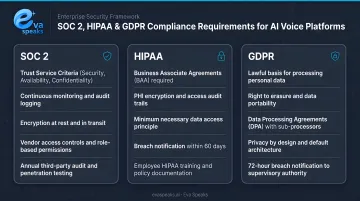
Note that not every platform carries all three. Smith.ai is explicitly not HIPAA-compliant; Rosie requires users to execute their own BAA. Retell AI and Synthflow AI carry more formal compliance documentation.
See how businesses in your industry are using after-hours AI. See Industry Use Cases
Frequently Asked Questions
What is the best AI for answering calls?
It depends on your needs. Eva Speaks and Retell AI suit businesses with complex routing requirements, offering deep customization and LLM-backed conversations. Rosie AI is better for small businesses that need simple, low-setup coverage.
What is an AI receptionist after hours?
An AI after-hours receptionist is a voice AI agent that activates outside business hours to answer calls, capture caller information, respond to common questions, and route urgent situations. It functions like a live receptionist without requiring any staff to be on duty.
Can AI be used to answer phone calls?
Yes. AI voice agents can answer inbound calls, hold natural conversations using LLM technology, book appointments, take messages, and escalate to humans when needed, handling routine interactions without any human involvement.
How much does an AI voice answering service cost?
Pricing varies by model. Per-minute plans start as low as $0.07–$0.09/minute; subscription plans typically range from $49–$95/month at entry level; hybrid AI-plus-human services like Smith.ai start higher. Most providers offer free trials or demos before committing.
What features should I look for in an after-hours AI voice solution?
Prioritize LLM-backed conversational quality, configurable escalation logic, time-based routing, and CRM integration. Compliance certifications — particularly HIPAA for healthcare — are also essential depending on your industry.
Can AI voice agents handle urgent after-hours calls?
Yes. Leading platforms detect urgency through keyword recognition or sentiment analysis, then trigger configured actions such as SMS alerts to on-call staff, backup number routing, or priority flagging. Genuine emergencies don't get lost to voicemail.
Have specific questions about your setup? Talk to an AI Communication Expert
Conclusion
After-hours AI voice answering has become a competitive baseline for any business that receives meaningful call volume outside business hours. The cost of one missed high-intent call — in industries like home services, legal, or real estate — routinely exceeds a full month's subscription to any platform on this list.
Evaluate options based on your escalation requirements, call volume patterns, integration stack, and compliance needs. Use free trials to test voice quality and call flow configuration before committing.
For businesses that need an AI voice solution combining LLM-powered conversations with fully configurable call-flow scripting and routing logic, Eva Speaks is built around that combination. Visit evaspeaks.ai to see what a configured after-hours workflow looks like for your business.