AI call bots with automatic transcription and call tagging solve this directly. They convert every spoken interaction into structured, searchable text and automatically categorize calls by intent, outcome, or sentiment—no manual work required. The result is a call log that actually functions as business intelligence rather than an archive you ignore.
This post breaks down how transcription and tagging work technically, what they enable operationally, and what to look for when evaluating platforms like Eva Speaks for your business.
Key Takeaways
- AI call bots use speech-to-text (STT) models to convert calls into written transcripts—either in real time or after the call ends
- Call tagging uses AI (including LLMs) to label calls by outcome, intent, topic, or sentiment—automatically, without agent input
- Together, they turn raw call data into searchable records—ready for QA reviews, CRM updates, agent coaching, and compliance audits
- Recording consent laws vary by state—always configure your call bot greeting to include a compliant disclosure
- The best platforms combine accurate transcription, flexible tagging, and integrations that act on call outcomes
How Automatic Call Transcription Works
The transcription pipeline starts the moment a call connects. The AI call bot captures live audio, applies noise reduction to clean the signal, then passes it through a speech-to-text (STT) model that converts spoken words into written text.
Two processing modes handle this differently:
Real-Time vs. Post-Call Transcription
Real-time (streaming) transcription generates text as the conversation happens. This enables live use cases:
- In-call guidance prompts for agents
- Compliance alerts triggered mid-conversation
- CRM field population before the agent hangs up
Post-call (batch) transcription processes audio after the call ends. It typically produces cleaner, more structured output—better suited for QA review, performance coaching, and analytics where speed matters less than accuracy.
A 2024 peer-reviewed ASR study found that batch transcription averaged 9.37% Word Error Rate compared to 10.9% for streaming, confirming that post-call processing delivers a measurable accuracy advantage.
Speaker Diarization and Accuracy
Speaker diarization is the system's ability to identify who said what—labeling speech as "Agent:" or "Customer:" throughout the transcript. Without it, you have an unattributed wall of text that's difficult to analyze at scale.
What diarization gets right—or wrong—comes down to the conditions under which audio is captured and processed:
| Factor | Impact on Transcription |
|---|---|
| Audio quality and network stability | High—poor connections introduce deletion errors |
| Overlapping speech | High—simultaneous speakers confuse most STT models |
| Accents and speaking pace | Moderate—models vary in dialect robustness |
| Industry-specific vocabulary | Moderate—custom terms (medical, legal, insurance) increase error rates without vocabulary tuning |
Microsoft classifies call-center transcription as typically achieving less than 30% Word Error Rate, with 5–10% WER representing good performance. Audio conditions and vocabulary tuning explain most of the gap between those two ends of the range.
How AI Call Tagging Works — From Labels to Business Intelligence
Once a transcript exists, AI models analyze the text and apply structured labels. These tags can represent:
- Outcomes: "resolved," "escalated," "no answer," "transferred to billing"
- Intent: "billing inquiry," "cancellation request," "appointment booking"
- Sentiment: "frustrated," "satisfied," "neutral"
- Custom categories: anything specific to your business workflows
Older systems relied on keyword matching: flag the call if it contains the word "cancel." Modern LLM-powered tagging understands context. A caller saying "I've been waiting three weeks and this is unacceptable" gets tagged as high-frustration or churn risk even if none of those exact words appear in the tag dictionary. Eva Speaks combines LLMs with customizable call-flow scripts to make this kind of contextual classification possible.
Types of Call Tags Businesses Use
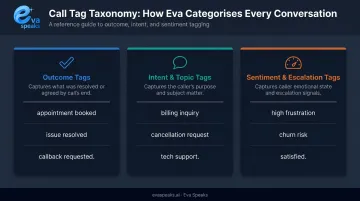
| Tag Type | What It Captures | Example Values |
|---|---|---|
| Outcome | How the call ended; feeds CRM records without manual disposition codes | "appointment booked," "issue resolved," "callback requested" |
| Intent & Topic | Why the customer called; drives routing analysis and FAQ prioritization | "billing inquiry," "cancellation request," "tech support" |
| Sentiment & Escalation | Emotional signals and churn risk; lets QA filter to flagged calls directly | "high frustration," "churn risk," "satisfied" |
If 30% of calls are tagged "billing inquiry," that's a signal worth acting on — either your invoicing process has friction, or a self-service option is missing.
How Tags Trigger Downstream Workflows
Tags feed directly into downstream systems. When connected to the right integrations:
- A call tagged "escalation required" automatically routes a follow-up task to a supervisor
- A call tagged "appointment booked" pushes a confirmation into the CRM
- A call tagged "complaint" initiates a quality review queue
This closes the gap between a call ending and the next business action beginning. Eva Speaks supports third-party integrations so businesses can connect their existing tools and run automated post-call workflows without rebuilding their current systems. To hear how a tagged AI call sounds in practice, you can Listen to Sample AI Call.
Transcription + Tagging in Action: Key Use Cases
Quality Assurance at Scale
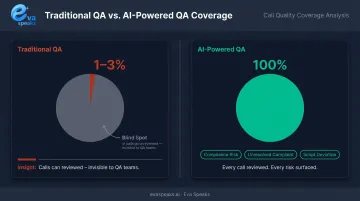
Traditional manual QA typically reviews only 1–3% of interactions, leaving organizations blind to the other 97%. AI-powered QA closes that gap—when every call is transcribed and tagged, teams can filter directly to calls flagged as "compliance risk," "unresolved complaint," or "script deviation" instead of sampling randomly. Reviewing 3% of calls means most problems never surface at all.
CRM and After-Call Work Reduction
After-call work (ACW) is one of the most consistent productivity drains in contact centers. When tagged transcripts automatically populate CRM fields, create follow-up tasks, and generate case notes, agents don't have to do it manually.
Five9 data shows agents can spend up to six minutes on ACW per call—and that automated summarization reduced ACW by 40% for one major carrier. At scale, those minutes add up fast across hundreds of daily calls.
Coaching and Performance Improvement
Tag filters let managers pull calls by agent, outcome type, or sentiment category. That makes coaching specific and evidence-based — instead of "I heard your tone was off on a few calls," a manager can show an agent that their calls are disproportionately tagged "pricing objection unresolved" and work through those conversations directly.
Business Intelligence and Trend Spotting
When every call is tagged and searchable, macro patterns become visible:
- A spike in "repeat complaint" tags signals a recurring product issue
- A drop in "first-call resolution" tags for a specific product line flags a training gap
- Seasonal shifts in intent tags reveal when to staff up or adjust messaging
The call log becomes a live feedback channel — surfacing product issues, training gaps, and demand shifts as they happen. You can See Industry Use Cases to see how specific industries are using call tagging data to improve operations.
Is It Legal to Record and Transcribe Calls with AI?
Yes—in most cases, though the specifics depend on where your customers are calling from and what industry you're in.
U.S. Federal and State Requirements
Under federal law (18 U.S.C. § 2511), recording a call is permitted if one party to the conversation consents. Since your business is a party to its own calls, federal law generally allows recording without notifying the other party.
State law is where it gets complicated. These states require all-party consent—meaning every person on the call must be notified before recording begins:
- California
- Connecticut
- Delaware
- Florida
- Illinois
- Maryland
- Massachusetts
- Montana
- Nevada
- New Hampshire
- Pennsylvania
- Washington
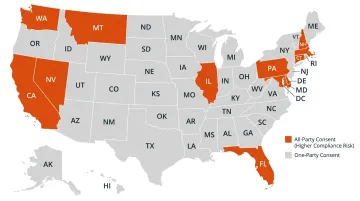
If your business takes calls from customers in any of these states, your AI call bot's greeting must include a clear disclosure. Something like: "This call may be recorded for quality and training purposes." Businesses are responsible for configuring that language—Eva Speaks' documentation places this compliance responsibility on the customer, so make sure your call-flow script includes it.
International and Industry-Specific Rules
Outside the US, GDPR requires informed and specific consent before recording. The European Data Protection Supervisor recommends that organizations inform callers before any recording begins and avoid blanket recording policies without a case-by-case justification.
Beyond geography, the industry you operate in adds another compliance layer regardless of location:
- Healthcare: Any AI call bot storing or processing transcripts containing protected health information (PHI) likely requires a HIPAA Business Associate Agreement (BAA) with the vendor
- Finance: FINRA Regulatory Notice 24-09 confirmed that existing supervision, governance, and books-and-records obligations apply when member firms use generative AI tools — and AI call center software is increasingly used to flag fraud patterns in real time
If your business operates in healthcare, finance, or legal services, consult legal counsel before deploying AI transcription—the vendor agreement alone won't cover your compliance obligations.
What to Look For in an AI Call Bot with Transcription and Tagging
Not all platforms are built equally. These three criteria separate ones that deliver operational value from those that look good on a feature sheet but fall short in practice.
Here is how AI call bots with auto-tagging compare to call recording tools and manual analysis:
| AI Call Bot (EvaSpeaks) | Call Recording Software (Chorus, Gong) | Manual Review | |
|---|---|---|---|
| Features | Voice AI + auto-transcription, intent tagging, real-time CRM push | Recording + conversation intelligence, deal analysis | Human review of recordings |
| Best-fit Business Size | SMB to mid-market customer-facing teams | Mid-market to enterprise sales teams | Any size |
| Key Strengths | Handles AND records calls, zero extra tooling, instant CRM log | Deep sales intelligence, coaching features | Full human interpretation |
| Implementation Complexity | Low | Low to Medium | None |
| Integration Capability | CRM, ticketing, scheduling native | Salesforce, HubSpot, major CRMs | Manual |
Accuracy and Customization
Raw transcription accuracy matters, but customization matters more in practice. Look for:
- Custom vocabulary support for product names, industry terminology, and internal jargon
- Flexible tagging logic that maps to your specific outcomes and workflows—not just preset generic categories
- The ability to adjust tagging rules as your business evolves
A platform that transcribes accurately but can't tag "service cancellation inquiry" as a churn risk isn't delivering intelligence—it's just delivering text.
Integration Depth and Workflow Triggers
Transcription and tagging deliver their real value when connected to your existing stack. Each tag should be able to trigger an automated action:
- CRM field update
- Follow-up task creation
- Escalation alert
- Scheduling confirmation
Eva Speaks supports customizable call-flow scripts and routing rules alongside third-party integrations, so call outcomes connect directly to the tools your team already uses rather than sitting unused in a siloed call log. For businesses that want AI-generated transcription and call tagging without building a custom analytics stack, Eva Speaks packages those capabilities into a single platform — meaning the call record, the intent classification, and the downstream workflow trigger all come from one system rather than requiring separate tools stitched together.
Compliance and Data Security Controls
Before deploying any AI call bot, confirm it includes:
- Built-in consent language delivery in the greeting script (or the ability to configure it)
- Role-based access controls limiting who can view transcripts
- Configurable data retention policies
- Clear documentation of where transcript data is stored
Eva Speaks stores data primarily in U.S. data centers and implements industry-standard security measures. For businesses operating across multiple states with different recording consent requirements, confirming these controls upfront prevents compliance issues down the line. Platforms with built-in call center software fraud protection add another layer by monitoring for anomalous call patterns alongside standard data security controls. To see how Eva Speaks handles transcription and tagging for your specific use case, you can Request Live Demo.
Frequently Asked Questions
How much does an AI call bot with transcription and tagging cost?
Pricing varies by call volume, features, and deployment model. Common structures include per-minute usage (typically $0.07–$0.31/minute across platforms), per-conversation pricing, monthly SaaS subscriptions, and custom enterprise tiers.
Which AI call bots can record, transcribe, and tag call outcomes?
Several platforms offer this combination, including AI call bot providers that integrate LLMs for intelligent categorization. Compare platforms on: tagging customization depth, real-time vs. post-call processing, CRM integration breadth, and compliance tooling.
Is it legal to use AI to record and transcribe phone calls?
Yes, in most jurisdictions—provided proper consent disclosures are given. Federal law in the US permits one-party consent recording, but 12 states require all-party consent. Configure your AI call bot's greeting to include a clear disclosure statement before recording begins.
What's the difference between call transcription and call tagging?
Transcription converts spoken audio into written text. Call tagging uses AI to analyze that text and apply structured labels—outcome, intent, sentiment. Transcription is the raw input; tagging is the intelligence layer that makes the data actionable.
How do AI call bots differ from meeting transcription tools for this use case?
Meeting transcription tools (Otter.ai, etc.) are built for video conferences. AI call bots are purpose-built for phone-based customer interactions and include call routing, outcome tagging, CRM integration, and compliance features that meeting tools don't offer.