Introduction
Most business calls don't arrive between 9 and 5. A homeowner discovers a burst pipe at 10 PM. A prospective legal client finally finds time to call after putting the kids to bed. A patient needs to reschedule an appointment before work the next morning.
These calls happen — and most businesses miss them entirely.
According to Moneypenny's small business call report, 69% of callers sent to voicemail hang up without leaving a message. Meanwhile, CallRail's 2025 consumer survey found that 82% of people will call a competitor if a business doesn't answer — and 21% do it immediately.
After-hours gaps are where leads disappear — not dramatically, but steadily, one unanswered call at a time.
This guide covers how AI receptionists handle after-hours calls in practice: what happens when a call comes in at 11 PM, how the system responds, and what your team sees the next morning.
See how AI keeps every after-hours call covered. See How AI Handles After-Hours Calls
Key Takeaways
- 69% of callers hang up rather than leave a voicemail, making after-hours coverage critical for lead capture
- AI receptionists answer calls, hold real conversations, qualify intent, and log everything — without any human involvement
- They activate via call forwarding, route emergencies separately, and push structured data directly into your CRM
- Unlike voicemail or IVR menus, they answer questions, book appointments, and escalate emergencies in real time
- Home services, healthcare, legal, and property management see the strongest ROI — their after-hours calls are high-intent and time-sensitive
What Is an After-Hours AI Receptionist?
An after-hours AI receptionist is a software-based voice agent that answers inbound calls outside business hours, holds real conversations using natural language processing, and executes pre-configured actions — all without any human involvement.
How It Differs from IVR and Voicemail
Most businesses have tried one of two older alternatives — and found them lacking:
| Technology | What It Does | What It Can't Do |
|---|---|---|
| Voicemail | Records a message | Interact, qualify intent, or take action |
| IVR menus | Routes calls via keypad input ("press 1 for sales") | Understand naturally spoken intent or respond contextually |
| AI receptionist | Holds a real conversation | — |
As IBM's conversational AI documentation explains, IVR relies on automated menu inputs — it cannot parse what a caller actually means. Voicemail is worse: as Moneypenny data shows, most callers won't even bother leaving one.
An AI receptionist works differently:
- Listens to what the caller actually says
- Interprets intent using natural language processing
- Responds conversationally, even when callers ramble, pause, or ask unexpected questions
- Takes action — booking an appointment, escalating an emergency, or logging a follow-up
Why This Technology Exists Now
Three converging technologies made this possible: advances in large language models (LLMs), low-latency voice synthesis, and cloud telephony infrastructure. Together, they enable systems that handle nuanced, unpredictable conversations reliably at scale.
Eva Speaks, for example, combines LLMs for understanding and reasoning, premium text-to-speech for natural voice output, and accurate speech-to-text for transcription — giving it the ability to adapt in real time to whatever a caller actually says. For businesses that have historically relied on voicemail as their after-hours solution, the shift to AI-based answering doesn't require replacing the entire phone system — Eva Speaks activates through call forwarding from an existing business number, so the transition is operationally lightweight.
How AI Receptionists Handle After-Hours Calls
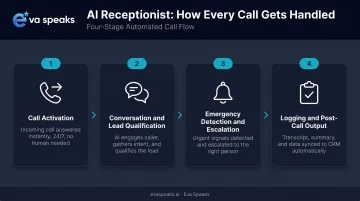
An after-hours AI receptionist works through a defined sequence of stages. Each one builds on the last to turn an unanswered call into a captured, qualified, and actioned lead.
Stage 1: Call Activation
The AI activates through one of three methods:
- Time-based forwarding — calls after a set hour (say, 6 PM) automatically route to the AI
- Conditional forwarding — calls unanswered after a certain number of rings transfer to the AI
- Full 24/7 deployment — the AI handles every call, with routing rules determining what happens next
No new phone number is required in most setups. The business keeps its existing number; call forwarding handles the handoff. Pickup is immediate — callers don't sit through a long ring cycle before hitting voicemail.
Stage 2: Conversation and Lead Qualification
Once connected, the AI greets the caller using the business's name and a customized script. From there, it listens — not for keypad tones, but for natural speech.
Using NLP, the system interprets caller intent even when phrased informally, mid-thought, or with incomplete information. It then works through a pre-configured call-flow to:
- Ask qualifying follow-up questions ("Is this an emergency, or would you like to schedule a callback?")
- Capture caller name, contact number, and reason for calling
- Answer FAQs from a business-specific knowledge base
- Handle interruptions and clarifying questions without losing context
Eva Speaks' conversational AI, for example, tracks context across multi-turn conversations and adjusts tone to match the business's brand voice. When caller intent is unclear, it asks a follow-up question rather than stalling the conversation.
Stage 3: Emergency Detection and Escalation
Not every after-hours call is routine. A well-configured AI receptionist separates urgent calls from standard ones without staff intervention. Businesses define emergency keywords in advance — terms like "flooding," "no heat," "chest pain," or "burst pipe." When the AI detects these triggers, it follows a separate response path:
- Transfer the call directly to an on-call number
- Send an urgent SMS alert to designated staff
- Provide the caller with immediate guidance while the team is notified
Non-emergency calls take a different path: the AI books a callback slot, schedules an appointment into a connected calendar, or takes a structured message. On-call staff stay focused on genuine emergencies rather than screening every after-hours call manually.
Stage 4: Logging and Post-Call Output
After the call ends, the AI generates:
- A full transcript with speaker labels, timestamps, and extracted data points (caller name, intent, requested action, appointment details)
- Structured records that push automatically into connected CRM platforms like Salesforce, HubSpot, or GoHighLevel
- Calendar bookings confirmed directly into Calendly, Google Calendar, Acuity, or industry-specific scheduling systems
Staff arrive the next morning to an organized call log with clear priorities. Because the AI already captured contact details and intent during the call, follow-ups take minutes rather than requiring another round of phone tag.
Watch an AI receptionist handle a real after-hours call. Watch AI Call Flow Demo
How the Main After-Hours Call Handling Options Compare
Not all after-hours solutions deliver the same outcome. Here is how the three most common approaches stack up across the dimensions that matter most to growing businesses:
| AI Receptionist (EvaSpeaks) | Live After-Hours Answering | Voicemail / No Answer | |
|---|---|---|---|
| Features | Full AI conversation, booking, triage, CRM sync, 24/7 | Human agents, message-taking, escalation | Passive message recording |
| Best-fit Business Size | SMB to mid-market | Any, especially regulated industries | Very small operations |
| Key Strengths | Zero missed calls, consistent, instant response | Human empathy for distressed callers | Zero cost |
| Implementation Complexity | Low - hours to deploy | Low - outsource | None |
| Integration Capability | CRM, scheduling, EHR native | Manual or limited | None |
EvaSpeaks is designed to be flexible and easy to configure - businesses connect it to existing phone systems via call forwarding, build custom call-flow scripts without engineering support, and go live in hours rather than weeks.
Key Features That Power After-Hours AI Receptionists
Not all AI receptionists are built equally. The following features determine whether a system handles real-world after-hours calls well or breaks down when callers don't follow a script.
LLM-Based Natural Language Understanding
Conversation quality comes down to the language model underneath. LLM-powered systems:
- Maintain context across a full multi-turn conversation
- Handle interruptions and topic shifts without losing track
- Recognize pauses without interpreting silence as a hang-up
- Respond to informal, colloquial phrasing rather than requiring precise commands
This is the core differentiator from older voice bots. Rigid keyword-matching systems fail the moment a caller says something unexpected. Eva Speaks' platform is built on LLMs specifically to enable adaptive, real-time responses that older systems couldn't handle.
Customizable Call-Flow Scripts and Routing Rules
Every industry has different urgency thresholds, staff structures, and caller expectations. Effective AI receptionists give businesses direct control over:
- Greeting language and brand tone
- Follow-up questions the AI asks based on caller responses
- Emergency keywords that trigger escalation
- Which staff numbers receive urgent alerts and under what conditions
Eva's dashboard lets businesses build call-flow scripts, set routing rules per department, and configure different behaviors for business hours versus after-hours — all without engineering support.
Calendar and CRM Integration
Eva connects directly to the platforms businesses already run on:
- Scheduling: Calendly, Google Calendar, Acuity, Epic, athenahealth, Clio, AppFolio, Mindbody
- CRM: Salesforce, HubSpot, GoHighLevel
When these integrations are active, the AI checks live calendar availability during the call, books the appointment, and pushes the caller's details directly into the CRM — without a staff member touching the record.
AI-Generated Transcription
Every conversation becomes searchable, structured text. This serves multiple purposes:
- Businesses can review call quality and identify recurring caller questions
- The AI's knowledge base can be refined based on real call data
- Healthcare and legal clients get a reliable documentation trail for compliance purposes
The stakes are real: 69% of callers hang up rather than leave a voicemail. Every after-hours call the AI captures and transcribes is a lead that would otherwise disappear entirely.
Ready to see how it works for your business? Request Live Demo
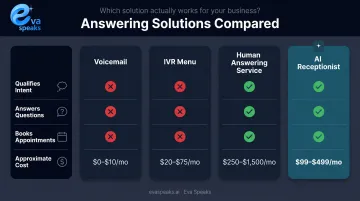
After-Hours AI vs. Traditional Answering Solutions
| Solution | Qualifies Intent | Answers Questions | Books Appointments | Cost (approx.) |
|---|---|---|---|---|
| Voicemail | No | No | No | Minimal |
| IVR Menu | Partially (routing only) | No | No | Low |
| Human answering service | Yes | Partially | Sometimes | $250–$1,725/month |
| AI receptionist | Yes | Yes | Yes | Varies by platform |
Human answering services — Ruby's published pricing runs from $250/month for a starter plan to $1,725/month for 500 minutes — carry real cost along with real inconsistency. Agent quality varies, mistakes happen, and coverage gaps remain a persistent problem.
AI receptionists handle volume without variability. The script, tone, and qualification questions stay consistent whether it's 2 PM or 2 AM.
Where Human Involvement Still Matters
AI receptionists don't eliminate the need for human staff. They filter and prioritize. Some situations still require a person on the line:
- Complex emotional conversations requiring genuine empathy
- Sensitive case discussions (detailed legal strategy, difficult medical diagnoses)
- Judgment calls that fall entirely outside any pre-configured logic
The real payoff is that your team only handles those situations — not every after-hours call from someone asking about business hours.
Industries That Benefit Most from After-Hours AI Call Handling
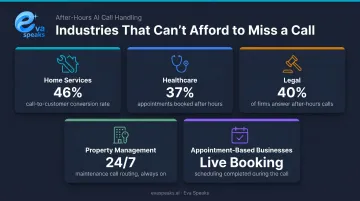
Across the industries where AI call handling delivers the clearest ROI, one pattern holds: after-hours callers aren't browsing — they have an active need and are ready to act. The businesses that answer those calls capture the job. Those that don't, hand it to a competitor.
High-Priority Industries
Home Services (Plumbing, HVAC, Electrical)
Invoca's analysis of 60 million phone conversations found a 46% call conversion rate for home services — among the highest of any category. After-hours emergency calls in this vertical are where jobs are won or lost based purely on who picks up.
Healthcare
Zocdoc's platform data shows 37% of appointments are booked between 5 PM and 9 AM, and 17% on weekends — most scheduling demand happens outside typical office hours. Eva's healthcare configuration routes urgent calls to on-call clinicians and books directly into EHR systems including Epic, athenahealth, and Dentrix.
Legal
Clio's 2024 secret-shopper study of 500 U.S. law firms found only 40% answered phone calls, and 48% were unreachable by phone entirely. For legal practices, a missed after-hours call rarely means a callback — it means a prospective client hired someone else. Eva's legal configuration handles intake questions, performs conflict checks where integrated, and routes emergency criminal matters to on-call attorneys.
Property Management
Tenant maintenance calls don't follow business hours. Eva's property management setup qualifies maintenance requests, routes urgent issues to on-call teams, and integrates with platforms like AppFolio, Yardi, and Buildium.
Appointment-Based Businesses (Dental, Veterinary, Wellness, Salon)
For any business that runs on scheduled appointments, every unanswered after-hours call is a booking that went to a competitor. Eva integrates with Mindbody, SimplePractice, Jane, Boulevard, and similar platforms — checking live availability and confirming appointments during the call, not the next morning.
See how businesses in your industry are using after-hours AI. See Industry Use Cases
Conclusion
An after-hours AI receptionist does more than answer calls. Done right, it:
- Activates on a set schedule without manual intervention
- Holds a natural, context-aware conversation
- Captures and qualifies leads in real time
- Escalates genuine emergencies to the right person
- Delivers a clean summary to your team before the morning shift starts
All of that happens with zero human involvement between call pickup and morning briefing.
When those features are in place — LLM-based conversation, customizable routing, CRM integration — businesses stop losing leads to voicemail and stop routing on-call staff to calls that never needed a human. Eva Speaks provides exactly that: AI call handling configured to your workflow, for practices and businesses across healthcare, legal, property management, automotive, and more.
Frequently Asked Questions
What happens when a caller has a true emergency after hours?
Businesses configure emergency keywords in advance (words like "flooding," "no heat," or "chest pain"). When detected, the AI can transfer the call to an on-call number, send an urgent SMS alert to staff, or provide the caller with immediate guidance. Eva Speaks' system supports SMS, voice, and existing paging systems for emergency notification.
Will callers know they're talking to an AI?
Modern AI receptionists use natural voice synthesis and conversational phrasing that many callers don't immediately identify as automated — especially when customized with the business's name and tone. Most callers simply appreciate that someone answered instead of voicemail.
How is an after-hours AI receptionist different from voicemail or an IVR?
Voicemail records a message with no interaction. IVR routes callers through rigid keypad menus but cannot answer questions or qualify intent. An AI receptionist holds a real conversation, answers FAQs, books appointments, and escalates emergencies — all in real time during the call.
Can an AI receptionist book appointments after hours?
When integrated with a calendar tool, the AI checks live availability and books appointments directly during the call — no callback required. Eva Speaks supports Calendly, Google Calendar, Acuity, and industry-specific platforms including EHR systems for healthcare and legal practice management tools.
How long does it take to set up an after-hours AI receptionist?
Most platforms are configured within a few hours. Setup covers call-flow scripts, knowledge base, and routing rules — all connected via call forwarding to existing business numbers. No new phone hardware required.
What industries benefit most from after-hours AI call handling?
Home services (plumbing, HVAC, electrical), healthcare, legal, property management, and appointment-based businesses (dental, veterinary, wellness clinics, salons) see the strongest results. All share the same trait: high-intent callers with time-sensitive needs who won't wait until morning to be helped.