Most businesses assume routing is just a numbered menu. In practice, effective routing involves conditional logic, time-based rules, fallback paths, and — increasingly — caller intent. Each layer requires deliberate configuration, and skipping any one of them creates gaps that callers will find.
This guide walks through exactly how to build custom call routing rules: what to prepare beforehand, how to configure each component step by step, which parameters have the biggest impact on caller experience, and the mistakes that break otherwise solid setups.
Key Takeaways
- Custom routing uses conditions like time of day, caller input, and department availability to direct calls to the right person or team
- Map your call flow visually before touching any platform settings; skipping this step causes most configuration failures
- Rule priority, fallback paths, and input method (keypad vs. AI natural language) are the variables that determine routing quality
- Test every path — including fallback and after-hours transitions — before enabling the service for live callers
- AI-powered services like Eva Speaks route calls based on caller intent, not just button presses, cutting menu friction and misdirected calls
What Is Custom Call Routing for an Answering Service?
Custom call routing is a defined set of rules that tells your answering service what to do with every incoming call: directing it to a specific team member, department, voicemail, or automated response based on conditions your business controls. It's fundamentally different from generic routing, where all calls go to a single number or are answered in the order they arrive.
The word "custom" matters here. Unlike a basic phone menu, custom rules can apply multiple conditions simultaneously (time of day, caller selection, department availability) making the system responsive rather than rigid.
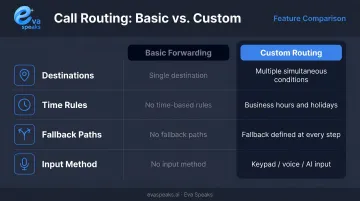
Standard call forwarding vs. custom routing:
| Feature | Basic Forwarding | Custom Routing |
|---|---|---|
| Conditions supported | One destination | Multiple, simultaneous |
| Time-based rules | None | Business hours, holidays |
| Fallback paths | None | Defined at every step |
| Input method | None | Keypad, voice, or AI |
Modern AI-powered services add another layer. EvaSpeaks, for example, uses large language models (LLMs) to understand what a caller actually says during the conversation, then routes the call accordingly. A caller who says "I need to reschedule my appointment" goes straight to scheduling without pressing a single button. This is a meaningful step beyond traditional IVR — and unlike enterprise contact center platforms, EvaSpeaks can be configured by a non-technical business owner through its dashboard, without requiring a software engineer to modify routing logic.
Want to see intent-based routing in action? Watch AI Call Flow Demo
What You Need Before Building Your Call Routing Rules
Two things determine whether your routing setup actually works: whether your platform supports true conditional routing, and whether you've documented your own call patterns before touching any settings.
Platform Requirements
Confirm your answering service supports all of the following. Without them, true custom routing isn't possible:
- Conditional logic — not just "forward to X," but "forward to X if condition Y is met"
- Multiple ring groups or extensions — separate destinations for different departments
- Business hours configuration — automatic rule switching based on time of day and day of week
- Fallback and overflow paths — defined actions when no one answers or queues fill up
Eva Speaks builds all four into its Smart Call Routing service — overflow handling, on-call rotations, and after-hours behavior each configured as separate rule sets from your daytime logic.
Internal Information to Collect
Before touching settings, document:
- Every department or individual who receives calls, with their direct contact information
- Business hours for each team (they often differ — sales vs. support vs. after-hours on-call)
- The most common reasons callers contact your business (new inquiries, support, billing, emergencies)
- Any priority caller categories — VIP accounts, emergency lines, high-value leads
Missing even one of these creates gaps in your routing logic. SQM Group research finds that unnecessary transfers and holds directly reduce first-call resolution rates — every misroute chips away at caller trust.
How to Set Up Custom Call Routing Rules Step by Step
Step 1: Define Your Call Types and Ideal Destinations
List every distinct type of call your business receives:
- New inquiries or leads
- Existing customer support
- Appointment booking or rescheduling
- Billing or account questions
- Emergencies or urgent escalations
For each type, document the ideal destination and whether it requires a live person or can be handled by voicemail, AI, or automated response. This routing decision map anchors every step that follows.
Step 2: Map Your Call Flow Before Touching Settings
Create a visual call flow diagram before configuring anything. Use paper, a whiteboard, or a flowchart tool — the medium doesn't matter. What matters is tracing every path a caller might take, including what happens when things don't go as planned.
A basic call flow map covers:
- Entry: caller dials your number
- Greeting: branded welcome message plays
- Menu or AI prompt: caller states their need or selects an option
- Routing condition: system evaluates rules and directs the call
- Destination: live agent, voicemail, or overflow queue
- Fallback: defined behavior when no one answers
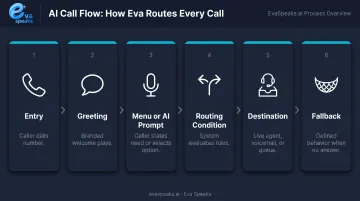
Even straightforward businesses typically need 3–5 distinct paths when you account for after-hours, no-answer, and invalid input scenarios. Skipping this step is how routing loops and dead ends get built into live systems.
Curious how AI manages calls outside business hours? See How AI Handles After-Hours Calls
Step 3: Configure Business Hours and Time-Based Conditions
Time-based routing automatically switches call behavior based on when the call arrives. Set this up before building any other rules, since it affects how every other path behaves.
Key settings to configure:
- Business hours — days and times when live agents are available
- After-hours routing — direct to AI agent, voicemail, or on-call staff
- Holiday overrides — specific dates with separate routing behavior
- Time zone — must match your business location exactly
Critical: Test time-based rules at the exact boundary time. A rule set to activate at 5:00 PM should be tested at 5:00 PM, not 4:45 PM. One-hour errors from time zone mismatches are common and easy to miss until a caller hits them.
After-hours paths should always capture caller information — never just play a message and disconnect. According to a CallRail survey of 1,000 U.S. consumers, 78% have abandoned a business after an unanswered call. A voicemail or AI message collection keeps those callers from going elsewhere.
Step 4: Build Your Routing Rules and Configure Caller Prompts
With your map and time conditions in place, configure the actual rule logic:
- Assign each menu option to a specific destination or ring group
- Set ring duration before fallback triggers (see the Key Parameters section for guidance)
- Configure voicemail and overflow paths for unanswered calls
- Build separate rules for after-hours, holidays, and emergency escalations
If your system supports AI-based routing — as EvaSpeaks does through its dashboard call-flow builder — you can go further than menu selections. Routing conditions can include caller intent, language, VIP status, and location, letting callers describe what they need in plain language rather than navigating a numbered menu. EvaSpeaks handles the full session from initial greeting through routing and data capture — all of which makes it a flexible tool for businesses that want to replicate the capabilities of a staffed answering service at a fraction of the infrastructure cost.
When writing caller-facing prompts:
- Keep main menus to 3–4 options maximum
- Use plain language that matches how callers naturally describe their needs
- Always include an option to reach a live person or leave a message
- Avoid routing-speak — "Press 2 for billing inquiries" works; "Press 2 for accounts receivable department" doesn't
Step 5: Test Every Rule Path Before Going Live
Before enabling the service for live callers, test every path — including the ones you don't expect callers to use:
- Place test calls from multiple device types — mobile and landline behave differently
- Walk every menu path — don't just test the main path, test each option
- Trigger fallback conditions intentionally — call after hours, press nothing, press an invalid option
- Test boundary times — call at exactly 5:00 PM, not 4:58 PM
- Verify voicemail and overflow destinations — confirm they're active and receiving correctly
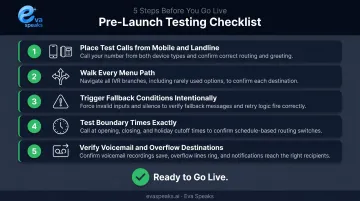
Document any path that behaves unexpectedly. Adjust rules before going live — it's far easier to fix a configuration issue during testing than to diagnose it while callers are encountering it.
Not sure which routing setup fits your business? Get a Customized Workflow Recommendation
Key Parameters That Affect Your Routing Rules
Routing rules don't live in a vacuum. How you configure these four parameters determines whether calls reach the right person — or fall through the cracks.
Rule Priority and Conflict Handling
When multiple conditions apply to the same call — a VIP caller ID rule and an after-hours time rule — the system needs a defined hierarchy to decide which wins. Without explicit priority settings, most platforms default to unpredictable behavior.
Set rule priority explicitly, and document which conditions take precedence. For most businesses, emergency and VIP rules should override time-based rules, not the other way around.
Caller Input Method: Keypad vs. AI Natural Language
DTMF (keypad) routing requires callers to press a number to navigate. It's reliable and universally understood, but it forces callers to self-categorize — which they frequently get wrong.
AI-based routing allows callers to state their need conversationally. The system interprets intent and routes accordingly. This works especially well for businesses with diverse or unpredictable call types.
According to Call Centre Helper, the average IVR abandonment rate hovers around 15%. Most of that drop-off happens when callers can't find their category in a menu or give up navigating multiple levels. Natural language routing cuts that friction considerably.
Here is how traditional IVR, standard AI routing, and EvaSpeaks compare across the factors that matter most for routing quality:
| Factor | Traditional IVR | Standard AI Routing | EvaSpeaks |
|---|---|---|---|
| Input Method | Keypad (DTMF) only | Basic voice or NLP | Conversational AI via LLMs |
| Implementation Complexity | Requires developer configuration | Moderate setup; vendor-dependent | Non-technical dashboard setup |
| Best-fit Business Size | Large enterprises with IT teams | Mid-size businesses | SMBs to enterprises |
| Key Strengths | Reliability, universal compatibility | Reduces keypad friction | Intent-based routing, full session handling |
| Integration Capability | Limited; custom builds required | Varies by platform | CRM, scheduling, EHR, and telephony |
Fallback and Overflow Logic
Every routing rule needs a defined "what if." What happens when:
- No one answers at the primary destination?
- The queue is full?
- The caller doesn't respond to a prompt?
The tiered fallback model most platforms support looks like this:
Primary destination → Secondary ring group → Voicemail with message capture → Alert notification to on-call staff
Systems with no fallback chain have the highest rate of abandoned calls. Configure each tier, then test each one independently.
Ring Duration and Sequential vs. Simultaneous Ringing
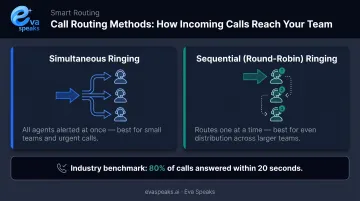
Simultaneous ringing alerts all agents at once — better for small teams and urgent call types where speed matters most.
Sequential (round-robin) ringing routes to agents one at a time — better for larger teams handling standardized queries where even distribution matters more than raw speed.
On ring duration: Call Centre Helper puts the global average speed of answer at 28 seconds, with the standard benchmark being 80% of calls answered within 20 seconds. Set ring duration long enough to give agents a realistic chance to answer — overly short timers trigger fallback even when someone is available.
Ready to put these parameters to work? Explore AI Call Automation
Common Mistakes When Configuring Call Routing Rules
Map before you build. Configuring rules directly in the platform — without diagramming the call flow first — produces missing paths, unintended loops, and fallback conditions that route callers nowhere useful. Always diagram the full flow before touching any settings.
Overloading menus with too many options. ICMI's foundational IVR guidance caps menus at five options; Call Centre Helper recommends four or fewer. Beyond four, callers struggle to hold all choices in working memory. Keep main menus to 3–4 options and use sub-menus only when necessary.
Leaving fallback rules undefined. Most routing problems that surface after launch trace back to calls with no defined next step. Every rule path must terminate in an action: voicemail, message capture, or transfer. A caller who hits silence or gets disconnected has been failed by the configuration.
Treating routing rules as a one-time setup. Rules configured at launch become outdated quickly. Establish a review cadence — quarterly at minimum — and update immediately when any of these occur:
- New hire or staff departure
- Department restructure
- Seasonal hours change
- New phone number or extension added
Troubleshooting Common Answering Service Routing Issues
Even well-configured routing encounters issues after launch. Diagnose the cause before adjusting settings, since incorrect changes often create new problems.
Calls Routing to the Wrong Department or Person
Likely cause: Menu option assignments don't match current extensions, or a rule conflict causes the wrong condition to trigger. This can also happen when callers use a keypad shortcut that bypasses the intended menu path.
What to check: Audit each menu option's assigned destination. Verify no rule is unintentionally overriding another. Confirm that any "dial by extension" feature isn't allowing callers to skip routing logic.
Callers Getting Stuck in Loops or Experiencing Dropped Calls
Likely cause: A routing path has no fallback action, causing the system to repeat the same prompt or terminate the call when no condition is met. Overflow destinations that are offline or at capacity can trigger the same problem.
What to check: Trace every rule path to confirm it ends in a defined action. Test overflow and voicemail destinations independently. Verify that at least one ring group member is always available or a voicemail backup is active.
After-Hours Rules Not Activating at the Correct Times
Root cause: Time zone misconfiguration — the platform's clock is set to a different time zone than the business location, causing rules to trigger an hour early or late. Holiday overrides not set in advance can also cause gaps in coverage.
How to fix it: Verify the platform's time zone setting matches your local time exactly. Place a test call at the exact switchover time. Set holiday routing rules at least 48 hours before the holiday arrives.
Frequently Asked Questions
What is custom call routing for answering services?
Custom call routing is a set of configured rules that direct incoming calls to specific destinations based on conditions like time of day, caller input, or department availability. It differs from basic call forwarding, where all calls go to a single predetermined number regardless of context.
Can answering services automatically answer phone calls?
Yes. Modern AI-powered answering services like Eva Speaks answer calls 24/7 without human involvement at the initial touchpoint: greeting callers, collecting intent, booking appointments, and escalating to a live agent only when defined triggers are met.
What script should an answering service use when answering calls?
The script should include a branded greeting, 3–4 available options, and a clear fallback instruction such as "stay on the line to leave a message." For AI-based routing, use language that mirrors how callers naturally describe their needs — not internal category names.
How do I set up after-hours call routing rules?
Configure a time-based condition in your answering service platform that switches routing behavior outside business hours — typically to a voicemail, an AI agent, or an on-call contact. Always test the rule at the exact transition time to catch time zone errors before callers encounter them.
What is the difference between IVR and AI-based call routing?
IVR routing requires callers to press a number to navigate a fixed menu. AI-based routing allows callers to state their need in natural language and routes them based on interpreted intent. AI routing reduces menu drop-off and handles a wider variety of call types without forcing callers to self-categorize.
How do I test my call routing rules before going live?
Place test calls from multiple device types and walk through every menu path — including fallback and after-hours conditions. Intentionally trigger edge cases: no caller response, invalid input, and calls at the exact boundary between business and after-hours. Fix every path that doesn't resolve correctly.