Introduction
MSPs are running lean. A typical team juggles 24/7 SLA commitments, high inbound call volume, and technicians who'd rather be solving complex problems than answering the same password reset questions on repeat. Voice AI looks like an obvious fix — and it is, when the deployment is done right.
Most integration projects fail not because the technology falls short, but because teams deploy before defining scope, skip PSA connections until after go-live, or treat initial setup as a finish line rather than a starting point.
This guide covers what a correct Voice AI integration actually looks like for MSPs: how to scope workflows, connect your existing systems, define escalation rules, and keep performance from drifting after launch. The practices here apply whether you're running a five-person shop or managing hundreds of endpoints — a single well-scoped deployment can cut after-hours call volume and eliminate a significant share of Tier 1 ticket overhead.
See how MSPs are putting voice AI to work for their clients. See Industry Use Cases
Key Takeaways
- Map workflows before selecting a platform — tightly scoped agents outperform vague, broad deployments
- Connect PSA and CRM on day one, not as a post-launch upgrade
- Build conversation flows from real call transcripts, not guesses about how clients speak
- Define escalation triggers and handoff rules before the agent handles a live call
- Schedule recurring post-launch reviews; Voice AI performance drops without active maintenance
What Voice AI Integration Actually Means for MSP Platforms
There's a meaningful difference between a standalone voice bot and a properly integrated Voice AI layer. A standalone bot answers calls in isolation — it collects information, maybe reads a script, and either transfers the call or ends it.
An integrated Voice AI layer does something more useful: it reads client context from connected systems, takes action across PSA and CRM during or immediately after the call, and syncs data autonomously so no technician has to touch the record manually. For MSPs, that difference determines whether Voice AI actually reduces workload or just adds another tool to manage.
Why Integration Matters More for MSPs
MSPs have specific characteristics that make isolated voice deployments particularly weak:
- Diverse client bases — every caller may be from a different company, with different SLAs, account history, and escalation rules
- After-hours commitments — SLA coverage doesn't pause at 5 PM, and human teams can't staff for it economically
- Repetitive Tier 1 volume — password resets, status checks, and basic triage pull technicians away from billable work
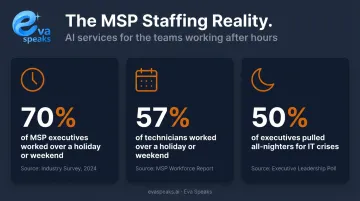
According to Kaseya's 2023 MSP Benchmark Survey, 70% of MSP executives and 57% of technicians worked over a holiday or weekend, and 50% of executives pulled all-nighters to handle IT crises. That's not a staffing problem Voice AI solves by taking messages — it's a workload problem that only gets better when the AI can act, not just listen.
Voice as a Workflow Layer
When Voice AI connects to ticketing, scheduling, and CRM, a single call can result in a created ticket, an updated client record, and a routed escalation — without a technician touching any of it. At that point, voice stops being a phone feature and starts functioning as a workflow layer — one where the measure of success is work completed, not calls answered.
Best Practices for Integrating Voice AI with MSP Platforms
Scope the Workflow Before You Select a Platform
The most common integration failure: deploying a voice agent without deciding what it will actually own.
Before evaluating any platform, MSPs should answer one question — what specific workflow is this agent handling? Options include:
- After-hours Tier 1 triage
- Appointment scheduling and dispatch
- Lead follow-up and qualification
- Password resets and standard FAQ handling
Pick one. Build for that. Vague deployments — agents that "handle general support" — lead to scope creep, inconsistent caller experiences, and performance that's hard to measure.
Each agent needs clear success criteria before platform evaluation begins. What's the target call resolution rate? What escalation frequency is acceptable? Without defined criteria, there's no way to know if the deployment is working.
Build Conversation Flows from Real Call Data
Conversation logic built from assumptions consistently underperforms logic built from actual call transcripts. Before designing a single flow, pull your top 10–15 call reasons from your PSA. These categories reveal:
- How clients describe problems (their language, not your taxonomy)
- Which intents cluster together
- Where callers tend to drop off or ask follow-up questions
When the AI matches how clients actually speak, intent recognition improves and drop-off decreases. If you design flows based on how you think clients speak, expect high misfire rates and frustrated callers pushing immediately to human escalation.
Connect CRM and PSA Systems on Day One
Voice AI without live PSA and CRM access is functionally blind. It can't pull client history, identify the account's SLA tier, pre-populate a ticket, or update a record. This connection needs to happen before the agent goes live. Waiting until week three to discover data isn't flowing creates rework and erodes early adoption.
The efficiency case is clear. Forrester's 2025 TOPdesk TEI study found that automation and self-service features saved 2.25 minutes per ticket, and auto-recognition technology saved at least one minute per call compared to manual intake. Ticket-processing time dropped from 100% of technician time to 50% by year three after automation.
EvaSpeaks handles this through LLM-integrated call processing: call transcriptions feed directly into ticketing workflows so a completed call becomes an actionable support record with no manual handoff. EvaSpeaks is also designed to deploy without requiring MSPs to replace their existing telephony: it connects to current phone infrastructure through standard SIP and cloud telephony integrations, which means the implementation scope is limited to configuration and integration rather than a full communications platform migration.
Here is how the main voice AI integration approaches compare for MSP platforms:
| Turnkey AI (EvaSpeaks) | CPaaS API Build | Human Answering Resell | |
|---|---|---|---|
| Features | Full voice AI, CRM sync, ready-to-white-label | Fully programmable voice API | Human agents via reseller |
| Best-fit Business Size | SMB-focused MSPs | Engineering-heavy MSPs | Any MSP size |
| Key Strengths | Fast time to value, no dev needed, scalable | Maximum flexibility | Human quality signal |
| Implementation Complexity | Low - pre-built connectors | High - developer required | Low |
| Integration Capability | PSA tools, CRM, ticketing native | Custom, any system | Limited |
Define Escalation Triggers Before Go-Live
Three questions every MSP must answer before deployment:
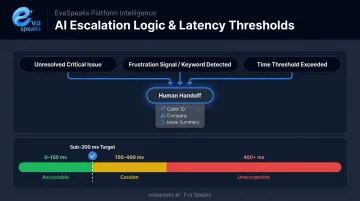
- When does the AI hand off to a human? Define conditions — unresolved critical issues, specific keywords, caller frustration signals, or elapsed time without resolution.
- What context gets passed at handoff? The receiving technician needs caller identity, company, issue summary, and anything collected during the interaction — not a cold transfer.
- How is the transfer logged? Every escalation should create a record in your PSA automatically.
Undefined escalation paths are a leading source of caller frustration. On the latency side, response delays compound the problem. ITU-T G.114 standards classify one-way delay above 400 ms as unacceptable for general network planning, and Deepgram's voice AI benchmarks show sub-300 ms end-to-end response time mirrors human conversation timing; delays exceeding one second reliably disrupt conversational flow. Treat latency benchmarks as a required checkpoint during platform selection.
Customize Call Flows and Routing Rules Per Client or Vertical
MSPs rarely serve a single type of client. Healthcare clients have different priorities than legal firms; a retail SMB has different urgency signals than a financial services company.
Platforms built for MSP use cases support separate call flows, routing rules, and escalation logic per client account, rather than a single generic script applied across all callers. This matters for:
- Priority routing — server-down alerts handled differently from routine how-to questions
- Vocabulary matching — healthcare clients use different terminology than manufacturing clients
- Escalation thresholds — a critical infrastructure client may warrant immediate human escalation for any unresolved issue; a smaller account may not
Eva Speaks supports this through configurable call-flow scripts and routing rules set at the client level, so each account runs on logic built for its context.
Establish a Weekly Review Cadence Post-Launch
Voice AI performance degrades without active maintenance. New call types emerge, client vocabulary shifts, edge cases accumulate — and an agent tuned at launch becomes progressively less accurate.
First 60 days: weekly reviews. After performance stabilizes: biweekly.
Each review should audit four things:
- Intent accuracy — are the right intents being matched, or are misfires increasing?
- Escalation rate — is it trending up (signal of degraded handling) or holding steady?
- Call resolution rate — what percentage of calls resolve without human involvement?
- Knowledge base coverage gaps — which call types are hitting dead ends?
Want AI configured for your MSP's service stack? Get a Customized Workflow Recommendation
Key Systems Voice AI Needs to Connect To
PSA and Ticketing Platforms
PSA integration — ConnectWise, Autotask, HaloPSA — is the highest-priority connection for MSPs. The agent should create, categorize, and route tickets during or immediately after a call. Without this, the caller interaction and the support queue stay disconnected: the technician sees a ticket with missing context, or no ticket at all.
CRM Platforms
CRM connection is bidirectional. Before a call, the AI should pull client history and account details. After the call, it should write back : log outcomes, update contact records, and trigger follow-up workflows. Without this sync, callers repeat themselves on every contact and escalating agents lack context.
VoIP and Telephony Infrastructure
Voice AI doesn't replace your phone system. It integrates with existing SIP trunks, hosted PBX systems, and UCaaS platforms using standard protocols by layering AI capabilities onto current telephony infrastructure rather than requiring a rebuild. This reduces deployment risk and shortens time to go live.
Scheduling and Calendar Tools
A high percentage of MSP inbound calls involve scheduling: technician dispatch, maintenance windows, quarterly reviews. To handle these end-to-end, the AI needs:
- Read and write access to confirm, reschedule, or cancel appointments in real time
- Calendar platform integration (Google Calendar, Microsoft 365, or PSA-native scheduling)
Without this access, the agent collects intent but can't complete the transaction, forcing a human follow-up that eliminates the automation value.
Security and Compliance
Non-negotiable requirements before deployment:
- Encryption for API communications and voice streams
- Full audit logs of all interactions
- Configurable data retention policies
For MSPs serving regulated industries, compliance frameworks must be verified before deployment. HHS HIPAA Technical Safeguards require audit controls (45 CFR 164.312(b)) and transmission security (45 CFR 164.312(e)(1)) for any system handling ePHI. Cloud providers that store or transmit ePHI are classified as business associates, which means a signed BAA is required.
AICPA's SOC 2 framework covers Security, Availability, Processing Integrity, Confidentiality, and Privacy. Any cloud communication platform storing call data should be evaluated against these criteria before go-live.
Top Use Cases to Deploy First
After-Hours and Overflow Support Triage
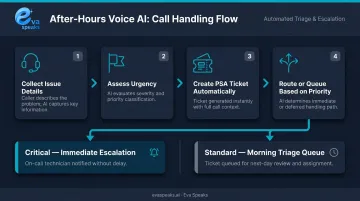
This is the most common and lowest-risk first deployment. During off-hours, the AI handles inbound calls by:
- Collecting issue details from the caller
- Assessing urgency based on predefined criteria
- Creating a PSA ticket automatically
- Escalating critical issues immediately or queuing lower-priority ones for morning triage
Given that 50% of MSP executives reported pulling all-nighters to address IT crises, after-hours AI handling offers the highest immediate ROI — it absorbs the volume that currently wakes people up at 2 AM.
Tier 1 Support Intake
Voice AI handles the repetitive information-gathering phase: identifying the caller and company, collecting required fields, running standard diagnostic questions, and generating a documented ticket before a technician touches the issue.
Technicians begin with context already captured rather than spending the first several minutes gathering it. That shift directly reduces per-call labor cost — and compounds across dozens of daily tickets.
Lead Follow-Up and Client Onboarding
Speed on lead follow-up is where most MSPs lose ground. The MIT/InsideSales.com foundational study found that the odds of contacting a lead drop 100 times when comparing response at 5 minutes versus 30 minutes — and qualification odds drop 21 times over the same window.
Voice AI closes this gap by automating outbound follow-up for new prospects, onboarding check-ins, and renewal reminders. That makes this the only use case in the set that directly expands revenue rather than just protecting margins.
Common Mistakes MSPs Make During Voice AI Integration
Three integration mistakes consistently derail Voice AI rollouts for MSPs — and all three are avoidable.
Launching Without a Structured Knowledge Base
Voice AI produces generic, unhelpful responses when it lacks context. Before go-live, MSPs need:
- Top 15 call categories mapped and labeled
- Client account data loaded into the system
- Escalation contacts configured for each tier
- Basic FAQ content populated with real call language
Without this foundation, callers hit dead ends and escalate immediately — defeating the purpose of automation.
Treating Deployment as a One-Time Setup
MSPs who configure and move on typically see measurable performance decay within 30–60 days. Intent accuracy drifts, new call types go unhandled, and edge cases accumulate without anyone reviewing them. The "set and forget" mindset is the single most common reason Voice AI underperforms three months post-launch.
Ignoring Latency During Platform Selection
High response latency makes voice interactions feel broken. Key thresholds to know:
- 0–150 ms one-way delay: acceptable per ITU-T G.114
- Above 400 ms: unacceptable for general network planning
- Sub-300 ms end-to-end response time: natural-feeling threshold per Deepgram's benchmarks
Evaluate these numbers before signing a contract, not after callers start complaining.
Watch how AI handles real client call flows. Watch AI Call Flow Demo
Frequently Asked Questions
What is the best practice when integrating artificial intelligence?
Scope precisely before selecting a tool. Define which workflow the AI will own, what success looks like, and how it connects to existing systems — before any platform evaluation begins. Vague deployments consistently underperform tightly scoped ones.
Which AI is best for voice interaction?
No single platform is universally best. The right choice depends on PSA compatibility, LLM integration depth, customizable call-flow support, and latency benchmarks. In MSP environments, purpose-built telephony platforms with native PSA integrations consistently outperform general-purpose tools.
What are 5 use cases where voice interaction would be most helpful?
For MSPs: after-hours support triage, Tier 1 intake and ticket creation, scheduling and technician dispatch, lead follow-up and qualification, and FAQ handling for common requests like password resets and status updates.
Do I need to replace my existing phone system to add Voice AI?
No. Voice AI integrates with existing SIP trunks, hosted PBX, and UCaaS platforms using standard protocols — it layers onto current telephony infrastructure rather than replacing it, so adoption doesn't require a rip-and-replace project.
How do I measure Voice AI performance after deployment?
Track four metrics: intent recognition accuracy, call resolution rate, escalation frequency, and caller drop-off rate at specific points in the conversation flow.
How long does it take to integrate Voice AI with an MSP platform?
Basic deployments with a single scoped workflow can go live in days to a few weeks. Full integration with PSA, CRM, and telephony typically takes 4–8 weeks, depending on the cleanliness of existing data and system access.