Introduction
Support teams are under real pressure. According to Intercom's 2024 survey of over 2,000 customer service professionals, 87% said customer expectations increased over the prior year — and that was before AI became mainstream. Meanwhile, agents spend less than half their working time actually talking to customers, with the rest absorbed by administrative tasks.
The math doesn't work. More inquiries, higher expectations, and a workforce stretched thin by repetitive work — automation is how support teams close that gap without burning out their people.
Here's what this guide walks you through:
- What customer service automation is (and what it isn't)
- The key tools across voice, chat, and ticketing
- A practical five-step implementation roadmap
- Best practices and pitfalls drawn from real deployment patterns
- The metrics that tell you whether it's actually working
Key Takeaways
- Customer service automation uses AI, ML, and NLP to handle routine support tasks without a human agent for every interaction
- Core tools span AI chatbots, IVR systems, automated ticketing, self-service portals, and CRM integrations
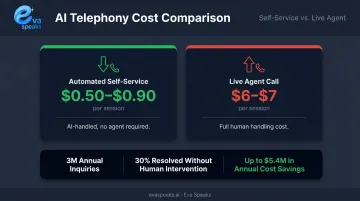
- Telephony self-service costs $0.50–$0.90 per session vs. $6–$7 for a live call — the cost case is clear
- Automation only works long-term when it includes clear human escalation paths and regular performance tuning
- Track automation resolution rate, CSAT, and escalation rate together, not in isolation
What Is Customer Service Automation?
Customer service automation uses technology — AI, machine learning, natural language processing (NLP), and robotic process automation (RPA) — to handle customer interactions and routine support tasks with minimal human involvement.
The goal is not to eliminate agents. It's to remove the tasks that shouldn't require them.
The Automation Spectrum
Automation exists on a wide range, from simple to sophisticated:
- Rule-based autoresponders — trigger pre-written replies based on keywords or form fields
- FAQ chatbots — match customer questions to predefined answer sets
- Conversational AI — understands intent, retains context across a session, and adapts responses dynamically
- Agentic AI systems — retrieve live data, execute actions (like order updates), and escalate based on conversation signals
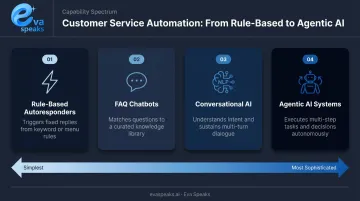
Gartner predicts that by 2028, at least 70% of customers will use a conversational AI interface to start their customer service journey — a shift that makes the distinction between these tiers matter more than ever. Where your business sits on this spectrum should reflect your inquiry complexity, team size, and customer expectations — not which vendor demo happens to look the most polished.
Key Tools and Technologies for Customer Service Automation
Most businesses use a combination of tools rather than a single platform, because different tools handle different parts of the customer journey. Here's a breakdown of the main categories.
AI Chatbots and Virtual Assistants
AI chatbots use NLP to interpret customer intent and respond to FAQs, guide troubleshooting steps, or hand off to a live agent when needed.
The distinction between basic and advanced chatbots is real. Keyword-matching bots break the moment a customer phrases something slightly differently. Conversational AI — built on large language models — retains context throughout a session, handles follow-up questions, and adjusts based on what the customer has already said.
Adoption is growing fast. Gartner reports that 85% of customer service leaders planned to explore or pilot customer-facing conversational AI in 2025. That said, 64% of customers still say they'd prefer companies didn't use AI for customer service — which means trust and transparency aren't optional design elements.
IVR and AI-Powered Phone Systems
Traditional Interactive Voice Response (IVR) routes callers through menu trees using keypad or voice inputs. It works for simple routing but frustrates customers when the menu doesn't match their need. The data reflects this: 32% of calls entering self-service are transferred out to an agent anyway, and 76% of contact center respondents agree self-service doesn't offer what customers need.
Modern AI phone systems are a different category. Rather than static menus, they use real-time conversational AI to understand caller intent, respond naturally, and apply configurable routing logic. Eva Speaks, for example, provides AI-enabled call handling and transcription with customizable call-flow scripts and routing rules. Compared to heavy enterprise contact center platforms that require lengthy procurement and IT involvement, EvaSpeaks is designed to deploy quickly with low infrastructure needs — making it a practical option for businesses that want intelligent phone handling without a full contact center buildout. It integrates with large language models (LLMs), text-to-speech, and speech-to-text, so businesses can tailor the call experience to their workflows without rebuilding from scratch.
The practical difference: a traditional IVR asks callers to press 2 for billing. An AI phone system understands "I have a question about my last invoice" and routes accordingly.
Watch how AI phone automation handles real customer calls. Watch AI Call Flow Demo
How the Main Automation Approaches Compare
Not every automation option fits every business. Here is how AI-powered voice automation, chatbot-only, and traditional human support stack up across the factors that matter most for customer service operations:
| AI Voice + Automation (EvaSpeaks) | Chatbot / Text-Only AI | Traditional Human Support | |
|---|---|---|---|
| Features | Voice conversations, scheduling, CRM sync, email/SMS follow-up | Text chat, FAQ deflection, ticketing | Phone + email, full-service |
| Best-fit Business Size | SMB to mid-market | Any size | Any size |
| Key Strengths | Voice is preferred by most callers, 24/7, no overages | Low cost, asynchronous | Empathy, nuanced issues |
| Implementation Complexity | Low | Low to Medium | None (hire) |
| Integration Capability | CRM, ticketing, scheduling native | CRM, helpdesk | Manual or CRM |
Automated Ticketing and Helpdesk Systems
Automated ticketing categorizes, prioritizes, and routes incoming support requests across channels — email, chat, social — so the right agent gets the right issue at the right time.
Key features to evaluate:
- SLA-based escalation — flags tickets breaching response time thresholds
- Context preservation — attaches prior interactions so agents don't ask customers to repeat themselves
- Omnichannel support — treats a customer's email, chat, and phone history as one unified thread
Self-Service Portals and Knowledge Bases
Knowledge bases let customers solve problems without contacting support — reducing inbound volume before it starts. The catch: static FAQ pages underperform. Gartner found only 14% of customer service issues are fully resolved in self-service.
AI-powered search and recommendation features close much of that gap. When a portal can interpret a customer's question and surface the most relevant article — rather than returning a list of keyword matches — resolution rates climb and ticket deflection improves measurably.
Workflow Automation and CRM Integration
Workflow automation handles the invisible work: updating customer records after an interaction, triggering follow-up emails, generating performance reports. This is where a significant chunk of agent time is currently going — Salesforce data shows reps spend only 46% of their time with customers, with the rest eaten by administrative tasks.
CRM integration is what separates generic automation from useful automation. Without access to customer history, an automated system can only respond with "How can I help you?" With it, the same system can say "I see your order shipped on Tuesday — here's the tracking link." Same tools, entirely different outcome — driven entirely by what data the system can access. EvaSpeaks demonstrates this principle in practice: its integrations with platforms like Salesforce, HubSpot, and GoHighLevel mean that every AI-handled call can reference real customer context, not just follow a script.
Benefits of Customer Service Automation
24/7 Availability and Faster Resolution
Automated tools handle inquiries around the clock, with no shift schedules and no staffing gaps. For businesses serving customers across time zones, that consistent availability alone can justify the investment.
Salesforce research found 88% of service professionals say conversational AI accelerates resolution times. A Forrester TEI study of Zendesk's Advanced AI modeled 3 minutes lower handle time per inquiry in their composite case — neither figure is a universal benchmark, but the directional signal is consistent across vendors and methodologies.
Cost Savings and Scalability
The cost gap between automated and live service is hard to ignore. ContactBabel's 2024 US Contact Center Decision-Makers' Guide puts telephony self-service at $0.50–$0.90 per session, versus a mean of $6–$7 for a live service call. At scale, that difference compounds fast.
Scalability matters too. Automation absorbs volume spikes — seasonal surges, product launches, outage events — without requiring proportional headcount increases. A vendor-commissioned Forrester TEI model found a composite organization handling 3 million annual inquiries resolved 30% without human intervention after deploying AI agents.
Better Agent Focus and Reduced Burnout
Contact center attrition is a serious operational risk. ICMI data shows 54% of contact centers experience attrition rates between 21% and over 50%, and only 54% of agents stay past two years.
Automation's role here isn't just efficiency — it's sustainability. When agents aren't spending their shifts answering the same five questions repeatedly, they can focus on work that actually requires human judgment: complex problems, escalations, and high-value relationships. Agents who do more meaningful work stay longer — and customers who reach them get better service.
See it live for your specific customer service use case. Request Live Demo
How to Implement Customer Service Automation
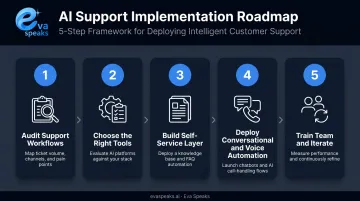
Step 1 — Audit Your Current Support Workflows
Map your existing interactions before choosing any tools. Identify your highest-volume, most repetitive requests — FAQs, order tracking, password resets, appointment booking. These are your best first automation candidates.
Also flag the emotionally sensitive or account-critical issues that should stay with human agents. Billing disputes, service failures, and complaints all belong in this protected category.
Step 2 — Choose the Right Tools for Your Needs and Scale
Match tool capabilities to what your audit surfaced. Key criteria to evaluate:
- NLP/NLU quality — can it understand intent, or just match keywords?
- Omnichannel support — does it unify voice, chat, and email?
- CRM and helpdesk integration — will it have access to customer history?
- Compliance certifications — SOC 2, GDPR readiness, and applicable U.S. state privacy laws (relevant if you handle California, Colorado, Virginia, or other state consumer data)
- Scalability — a tool handling 100 tickets well may buckle at 10,000
One practical note: only 18% of support executives say their current tools fully support their needs all the time, per Intercom. Replacing tools mid-deployment is expensive. Evaluate thoroughly upfront.
Step 3 — Build Your Self-Service Layer First
Before deploying conversational AI, build out your knowledge base and FAQ portal. This establishes the knowledge foundation that chatbots and virtual agents will draw from and immediately reduces inbound volume with relatively low implementation complexity.
A weak knowledge base is the root cause of most chatbot failures — the AI can only be as good as the content it references.
Step 4 — Deploy Conversational and Voice Automation with Clear Escalation Paths
Roll out on your highest-traffic channels first. When configuring chatbots or AI phone systems, build escalation triggers in from day one:
- Repeat queries on the same issue
- Negative sentiment or frustration keywords
- Unresolved loops after two or more attempts
- Complex account-level issues
The full interaction context — transcript, issue summary, customer history — must transfer to the agent at handoff. Forcing a customer to repeat themselves after escalating from a bot is one of the fastest ways to lose their trust.
Want a deployment plan tailored to your support team? Get a Customized Workflow Recommendation
Step 5 — Train Your Team and Iterate
Automation requires ongoing management — not a one-time rollout. Agents need to understand how automated tools work alongside them, what triggers escalation, and how to pick up conversations mid-stream.
Beyond training, run the customer experience yourself quarterly:
- Go through the bot flows end to end
- Call the IVR as a new customer would
- Submit a support ticket and track the full resolution path
You'll catch gaps that analytics alone won't surface.
Best Practices — and Pitfalls to Avoid
Design for Escalation from Day One
Every automated interaction needs a clear, visible path to a human. The most common failure in chatbot deployments is trapping customers in unhelpful loops with no exit. Define the signals — repeated questions, frustration language, account complexity — that should automatically trigger a handoff, and never make customers hunt for the option to speak with a person.
Personalize Wherever Possible
Generic automation frustrates customers. "How can I help you?" from a bot that has access to a customer's order history is a design failure. Integrate your automation tools with CRM data so responses can reference past interactions, account status, or purchase history. The technology to do this exists. The gap is almost always in integration, not capability.
Start Small, Prove Value, Then Expand
A phased rollout reduces risk and builds internal confidence:
- Automate one high-volume workflow first
- Measure its impact on resolution time and CSAT
- Use that data to justify — and scope — the next phase
This is easier to course-correct than a broad rollout, and it gives stakeholders concrete proof before committing further.
Pitfall: Over-Automating Sensitive Interactions
Sensitive interactions — disputed charges, service failures, formal complaints — need human judgment, not automated responses. Set explicit rules for what automation should never handle independently. Treat these boundaries as policy, with escalation logic built directly into your workflows.
Pitfall: Neglecting Ongoing Maintenance
AI models and knowledge bases go stale. Outdated responses and broken escalation paths erode customer trust quickly — sometimes more than having no automation in place. Schedule quarterly audits to update content, test workflows end-to-end, and retrain AI on recent interaction data.
Measuring the Success of Your Automation Strategy
The Six KPIs That Matter
| KPI | What It Measures | What a Change Signals |
|---|---|---|
| CSAT | Customer satisfaction with the interaction | Quality of the overall experience |
| First Contact Resolution (FCR) | % of issues resolved in one interaction | Effectiveness of automation at solving problems |
| Automation Resolution Rate | % of sessions resolved without human help | Automation self-sufficiency |
| Escalation Rate | % of automated sessions transferred to an agent | Where automation falls short |
| Average Handle Time (AHT) | Time to resolve an interaction | Efficiency of combined human + automated workflows |
| Ticket Volume Deflection | Reduction in inbound tickets | Self-service and automation's capacity impact |
Only 14% of contact centers currently measure deflection rate, and 13% measure self-service accessibility — meaning most businesses lack visibility into how their automation is actually performing.
Read Metrics Together, Not in Isolation
A high automation resolution rate paired with a declining CSAT score is a red flag. It means your system is closing tickets without genuinely solving problems — detectable by checking whether a ticket is reopened by a human within 24 hours.
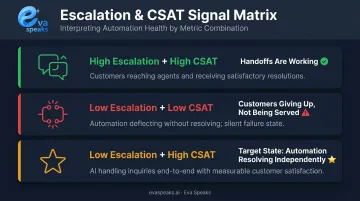
Escalation rate and CSAT together tell a clearer story:
- High escalation + high CSAT: handoffs are working — customers reach agents who resolve the issue
- Low escalation + low CSAT: customers are giving up, not being served
- Low escalation + high CSAT: automation is resolving issues independently — the target state
Establish a Baseline Before You Launch
Measure your current CSAT, FCR, AHT, and ticket volume before deploying anything. Without a baseline, you can't calculate ROI or identify which workflows actually improved — and by the time you realize it's missing, there's no going back to capture it.
See how other businesses are measuring and scaling this. See Industry Use Cases
Frequently Asked Questions
What is customer service automation?
Customer service automation uses AI, machine learning, and RPA to handle routine support tasks — FAQs, ticket routing, order tracking — without requiring a human agent for every interaction. It's designed to handle high-volume, low-complexity work so agents can focus on issues that need human judgment.
How is automation used in customer service?
Common applications include chatbots answering FAQs, IVR and AI phone systems routing calls, automated ticketing triaging support requests, self-service portals enabling customers to resolve issues independently, and email autoresponders acknowledging and categorizing inquiries.
What are the best platforms for automating customer support?
Categories include AI chatbot platforms, helpdesk tools, contact center software, and AI phone systems. For voice-specific automation, EvaSpeaks handles AI call routing and transcription — and because it is built around flexible deployment rather than enterprise-only infrastructure requirements, it is accessible to businesses that need intelligent call handling without committing to a full contact center platform. Prioritize CRM integration and omnichannel support when evaluating any option.
What is customer intelligence for automation?
Customer intelligence is the use of data from past interactions, purchase history, and behavioral signals to help automated systems deliver context-aware responses. In practice, this means a bot can greet a customer with relevant context rather than starting from zero — already aware of recent orders, open tickets, or likely call reasons.
How do you reach a live person on an automated phone system?
Saying "agent," "representative," or pressing "0" often works on traditional IVR systems. Well-designed AI phone systems surface the escalation option early and clearly, so you're not hunting for it. For businesses building call flows, that visible path to a human is also a core best practice.