CRM phone integration solves this directly. When your phone system connects to your CRM, every call — caller details, duration, transcript, outcome — gets pushed to the right contact record the moment the call ends. No copy-pasting, no forgotten notes.
This article covers 7 tools that auto-log calls to your CRM, what data each captures, and how to choose the right one for your team. You can Watch AI Call Flow Demo to see how Eva Speaks handles a real call and automatically generates a structured CRM record.
Key Takeaways
- CRM phone integration automatically logs call data — caller details, transcripts, outcomes — into your CRM without manual input
- Tools range from AI-powered platforms like Eva Speaks to cloud phone systems and built-in CRM calling features
- Standard auto-logged fields include caller name, phone number, call duration, recording, and disposition; AI tools add transcripts and summaries
- Integration method matters — native API connections sync in real time, while Zapier-based bridges can introduce delays
- The right tool depends on your CRM, call volume, and whether you need AI-driven call handling or basic logging
What Is CRM Phone Integration and Why Auto-Logging Matters
CRM phone integration is a direct connection between your phone system — whether VoIP, an AI platform, or a cloud call center — and your CRM. When a call ends, that connection automatically writes the call activity to the relevant contact or deal record. No human data entry step involved.
The business case is concrete. Poor data quality costs organizations an average of $12.9 million per year, according to Gartner research. A significant portion comes from CRM records that are incomplete, outdated, or never updated after phone interactions.
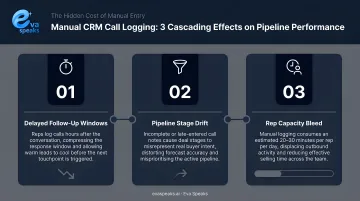
When reps log calls manually — or skip logging entirely after a busy day — the effects compound:
- Follow-ups get missed on active deals
- Deal stages go stale without recent activity timestamps
- Reporting loses accuracy, skewing pipeline forecasts
The tools below span multiple categories — from native CRM dialers to standalone AI call platforms — selected for integration depth, CRM compatibility, auto-logging accuracy, and practical deployment.
7 CRM Phone Integration Tools That Auto-Log Calls
These tools were evaluated on integration reliability, supported CRMs, AI transcription capability, and overall fit across business sizes and call volumes. Use the breakdown below to match each tool to your team's size, existing CRM, and call handling needs.
Eva Speaks
Eva Speaks is an AI-powered communication platform that handles inbound calls using real-time conversational AI that transcribes conversations, processes caller intent through large language models (LLMs), and pushes structured call data to connected CRM systems. It's built for businesses that want intelligent call handling, not just basic call tracking.
The platform combines LLM, text-to-speech (TTS), and speech-to-text (STT) technologies to generate real-time AI responses during calls, not just post-call processing. Businesses can configure call-flow scripts, routing rules, and office hours to control what data gets captured. Third-party integrations connect Eva Speaks to existing tools and systems.
| Category | Details |
|---|---|
| Key Features | AI-powered transcription, real-time call handling, customizable routing and call-flow scripts, LLM-driven call processing, third-party platform integrations |
| CRM Compatibility | Connects with third-party platforms via integration tokens; contact Eva Speaks directly for current CRM connector specifics |
| Best For | Businesses seeking AI-driven inbound call handling with structured call data capture and minimal manual intervention |
Sales teams that want to see Eva Speaks auto-logging a real call to their CRM can Request Live Demo.
HubSpot Calling
HubSpot's native calling feature is built directly into the HubSpot CRM with no third-party setup or middleware required. Every call made through the browser is automatically logged on the contact, company, deal, or ticket record the moment it ends, including duration, outcome, and rep notes.
Call recording and transcription are available on Sales Hub Professional and Enterprise, and Service Hub Professional and Enterprise tiers. Custom call outcomes let teams define their own disposition labels, which are captured per call and visible in reporting dashboards.
| Category | Details |
|---|---|
| Key Features | Native in-CRM calling, auto-logged call records, call recording and transcription (higher tiers), custom call outcomes, association to contacts/deals/tickets |
| CRM Compatibility | HubSpot CRM (native); external CRM users require Zapier or API setup |
| Best For | Teams already on HubSpot who want zero-friction call logging within their existing workflow |
Salesforce with Open CTI and Einstein Conversation Insights
Salesforce's approach to CRM phone integration operates on two layers. Open CTI is a browser-based JavaScript framework that connects third-party VoIP providers to Salesforce without requiring software installation. Einstein Conversation Insights (ECI) sits on top, providing AI-generated call summaries, transcripts, and keyword detection that sync automatically to activity timelines in Sales Cloud.
ECI detects specific signals in calls — pricing mentions, competitor names, objections, follow-up commitments, and custom keywords — and surfaces them in dashboards alongside transcript snippets. It's available as a standalone product and included in Sales Cloud Unlimited. Compatible telephony providers are available through the Salesforce AppExchange, which lists both Aircall and JustCall as verified integrations.
| Category | Details |
|---|---|
| Key Features | Open CTI framework, Einstein AI transcripts, keyword and competitor detection, auto-logged call summaries, action item extraction, AppExchange partner ecosystem |
| CRM Compatibility | Salesforce Sales Cloud and Service Cloud (native); requires a compatible VoIP partner from AppExchange |
| Best For | Enterprise sales and service teams on Salesforce needing AI-enriched call data and deep pipeline visibility |
JustCall
JustCall is a cloud business phone system built specifically for sales and support teams, with over 100 native CRM integrations — including HubSpot, Salesforce, Pipedrive, Zoho CRM, Freshsales, Zendesk, and Intercom. Calls, SMS, and voicemails are logged to the matching contact record in real time, without middleware.
Disposition codes let teams tag call outcomes, which are written back to the CRM record. The power dialer automates outbound call sequences with call data logged automatically after each interaction. Call summaries, sentiment analysis, and call scoring are gated to Pro Plus and above.
| Category | Details |
|---|---|
| Key Features | 100+ native CRM integrations, AI call summaries and sentiment (higher tiers), power dialer, disposition code tagging, SMS and voicemail logging |
| CRM Compatibility | HubSpot, Salesforce, Pipedrive, Zoho CRM, Freshsales, Zendesk, Intercom, and 100+ others |
| Best For | Sales teams running high call volumes who need automatic CRM logging across multiple platforms |
Aircall
Aircall is a cloud call center platform with 200+ integrations, designed for fast-growing sales and support teams. Its HubSpot integration, for example, logs call duration, agent comments, call outcomes, and links to call recordings directly to HubSpot Contacts, Deals, and Tickets in real time.
Call summaries, key topics, action items, and sentiment analysis are available as add-ons (AI Assist or AI Assist Pro), not included in base plans. Basic call recording is separate from those AI features. A shared call inbox gives teams full visibility into call activity across the group from a single view.
| Category | Details |
|---|---|
| Key Features | Real-time CRM call logging, 200+ integrations, shared inbox, call tagging, AI summaries and sentiment (add-on), voicemail handling |
| CRM Compatibility | HubSpot, Salesforce, Zendesk, Intercom, Pipedrive, Microsoft Dynamics, Zoho CRM, ActiveCampaign, and others |
| Best For | Growing teams that need a shared phone system with real-time CRM sync across both sales and support functions |
Ringover
Ringover is a VoIP and business communication platform with embedded CRM sync. Its CTI screen pop feature surfaces a caller's CRM contact history automatically when a call connects before the agent says a word. Post-call, Ringover logs the call with timestamp, recording, and interaction history to the connected CRM.
AI transcription and call summaries (via the Empower add-on) push summary and transcript links to the comments section of CRM activity records. At least one Empower license is required for this feature. Native CRM integrations include HubSpot, Salesforce, Zoho, and Pipedrive.
| Category | Details |
|---|---|
| Key Features | Automatic call logging, pre-call CRM contact pop-ups, AI transcription and summaries (Empower add-on), power dialer, call coaching tools |
| CRM Compatibility | HubSpot, Salesforce, Zoho CRM, Pipedrive, Zendesk, Odoo, Bullhorn, and others |
| Best For | Sales teams that want pre-call CRM context and post-call automatic logging in a single VoIP platform |
Zoho CRM with PhoneBridge
Zoho's PhoneBridge framework is a built-in telephony integration layer that connects Zoho CRM with 50+ phone systems and cloud PBX providers. Partners include RingCentral, Ringover, GoTo, JustCall, Amazon Web Services, Zadarma, Exotel, Yeastar, and Twilio. The framework enables click-to-call, call pop-ups, and automatic logging of caller details, missed calls, and voicemails directly within the CRM interface.
PhoneBridge is available on Zoho CRM Professional, Enterprise, and Ultimate editions — not on Free or Standard plans. For teams already in the Zoho ecosystem, it's the most cost-efficient path to call logging without changing phone providers.
| Category | Details |
|---|---|
| Key Features | PhoneBridge framework, click-to-call, call pop-ups, automatic logging of caller details and missed calls, 50+ phone system support |
| CRM Compatibility | Zoho CRM (native); bridges to RingCentral, JustCall, Ringover, Twilio, GoTo, and others |
| Best For | SMBs on the Zoho ecosystem seeking affordable, native call logging without changing their existing phone setup |
What Data Gets Auto-Logged to Your CRM?
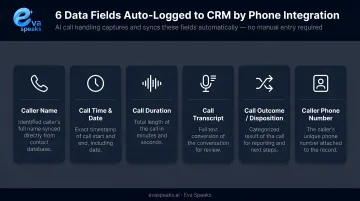
The standard fields most CRM phone integration tools capture automatically:
- Caller name and phone number — matched to an existing contact or created as a new record
- Call date and time — timestamped at the moment the call occurs
- Call duration — total talk time in minutes and seconds
- Call recording — stored and linked to the call record (where enabled and legally permitted)
- Call outcome / disposition — categorized as lead, support request, no answer, etc.
- Tags or notes — agent-added context synced alongside the call record
Basic Logging vs. AI-Enhanced Logging
The gap between these two categories directly shapes what your team can actually do with call data. Eva Speaks falls firmly in the AI-enhanced category — its LLM integration processes calls in real time, generating structured transcripts and summaries rather than raw metadata, so CRM records reflect what was actually discussed rather than just call duration and caller ID.
Basic tools capture metadata — duration, caller ID, outcome tag — which covers compliance and activity tracking but nothing about the conversation itself.
AI-enhanced tools go further:
- Full transcripts with speaker separation
- Structured call summaries (customer impression, next steps, objections)
- Keyword and competitor detection
- Sentiment scoring
- Action item extraction
For sales teams using call data to coach reps, forecast deals, or personalize follow-ups, a structured AI summary gives managers something to act on — a duration log does not. The Salesforce ECI feature, for example, surfaces competitor mentions and pricing discussions directly in the activity timeline — data that a basic CTI log would never capture. To hear what an AI-enhanced call with automatic logging sounds like, you can Listen to Sample AI Call.
Comparing CRM-Integrated Phone Answering Service Types
Here is how AI-native, hybrid, and traditional CRM-integrated answering services compare:
| AI-Native (EvaSpeaks) | Hybrid (Live + AI) | Traditional Answering Service | |
|---|---|---|---|
| Features | Automated intake, real-time CRM sync | Human agents + AI assist | Human agents, manual CRM logging |
| Best-fit Business Size | SMB to mid-market | Mid-market | Any size |
| Key Strengths | Zero overages, instant CRM updates | Human judgment when needed | Familiar, established |
| Implementation Complexity | Low - native CRM connectors | Medium | Low |
| Integration Capability | HubSpot, Salesforce, Zoho, and more | Varies by provider | Manual or limited API |
How These 7 Tools Were Evaluated
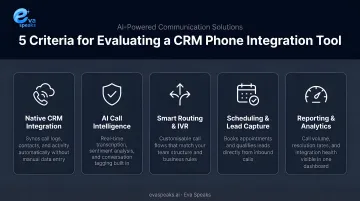
Core criteria used:
- Integration depth — native API vs. middleware-dependent (Zapier or webhooks)
- CRM breadth — number and range of supported CRM platforms
- Auto-logging accuracy — reliability of data sync and field mapping
- AI capability — whether transcription and summaries are included or add-on
- Business fit — suitability for SMB, mid-market, or enterprise use cases
Two factors worth verifying before you commit:
Real-time vs. scheduled sync. Native integrations push data instantly via direct API, with no third-party dependency. Zapier-based integrations poll on a schedule: every 15 minutes on the free plan, down to every 1 minute on paid plans. During an active deal, that gap can mean stale data at the wrong moment.
Inbound and outbound coverage. Some tools handle outbound call logging well but fall short on inbound, particularly for calls that arrive outside business hours or go missed entirely. Confirm both directions work before committing. Teams that want a recommendation based on their specific CRM and call mix can Get a Customized Workflow Recommendation.
Conclusion
Manual call logging is a process tax your team pays after every single call. Auto-logging tools eliminate it — and the better ones don't just save time, they capture structured call data no rep could consistently produce by hand.
The right choice depends on your existing CRM, call volume, and what you actually need logged. If basic metadata is enough, a native CRM calling feature or mid-tier VoIP tool covers your needs. If you need AI-generated summaries, sentiment scoring, and structured caller intent data, you need a tool built around that capability from the start.
Businesses that need AI-powered inbound call handling, real-time transcription, and customizable routing with call data pushed directly into their CRM workflow should take a look at Eva Speaks, which is built specifically for that use case.
Before committing, run any shortlisted tool against your real call workflows:
- Confirm whether the integration is native or Zapier-dependent
- Verify inbound calls are covered — not just outbound
- Check that logged data maps to the fields your team actually uses
Frequently Asked Questions
What are CRM integrations?
CRM integrations are connections between a CRM and external tools — phone systems, email platforms, marketing software — that sync data automatically, eliminating manual entry and keeping customer records current across every touchpoint.
Which CRM is best for call centers?
Salesforce (with Open CTI and Einstein Conversation Insights) and HubSpot are widely used in call center environments due to their native call logging, workflow automation, and reporting depth. Zoho CRM with PhoneBridge is a strong option for cost-conscious teams. Teams with high call volume and complex routing needs will generally get more out of Salesforce; smaller teams often find HubSpot sufficient.
What data does CRM phone integration auto-log from calls?
Standard auto-logged fields include caller name, phone number, call date and time, duration, recording link, and call disposition or outcome. AI-enabled tools add transcripts, call summaries, sentiment scores, and extracted action items — though coverage varies by tool and subscription tier.
Does CRM phone integration work with VoIP systems?
Yes — most CRM phone integration tools are built specifically for VoIP, with native connectors for major providers or API/webhook support. Traditional landline setups generally require a VoIP migration first before auto-logging becomes possible.
What is the difference between native CRM integration and Zapier-based integration?
Native integrations connect directly via API, syncing call data in real time with no third-party dependency. Zapier-based integrations, by contrast, use an automation layer that polls for data on a schedule — as infrequently as every 15 minutes on free plans — and can break if either platform updates its API.
Can AI handle CRM call logging without a human receptionist?
Yes — AI-powered platforms like Eva Speaks can handle inbound calls, transcribe conversations in real time, and push structured data to a connected CRM automatically, no human receptionist required. For high-stakes or complex escalations, configuring a human fallback transfer is still a practical safeguard.