Introduction
Attorneys juggle client communications, court deadlines, billing, and document storage simultaneously—and one missed filing deadline can mean a lost case or a malpractice claim. According to the Thomson Reuters Institute's 2023 small-law-firm report, attorneys still spend 9% of their time on administrative tasks rather than billable work.
That gap is wider than most firms realize. The ABA's 2023 Practice Management TechReport found that only 53% of attorneys currently use case management software—meaning nearly half are still relying on spreadsheets, email chains, and memory.
Legal case management software closes that gap. It consolidates case files, deadlines, billing, client communications, and team tasks into one platform—reducing administrative drag and giving attorneys more time to practice law.
With dozens of platforms on the market, this guide covers the 8 best legal case management tools, what features matter most, and how to choose the right fit for your firm.
Key Takeaways
- Legal case management software replaces scattered spreadsheets with one centralized platform for cases, deadlines, billing, and client communication.
- The 8 tools covered: Clio, MyCase, PracticePanther, Filevine, Smokeball, CASEpeer, CosmoLex, and Rocket Matter.
- The right tool depends on firm size, practice area, and workflow—there's no universal best option.
- Key features to evaluate: document management, time tracking, trust accounting, client portals, and workflow automation.
- Most platforms offer free trials—always test with your actual team before committing.
See how AI call automation integrates with legal workflows. Explore AI Call Automation
What Is Legal Case Management Software?
Legal case management software is a digital platform that helps law firms store, track, and manage all case-related information—documents, deadlines, contacts, billing records, and client communications—in one centralized system accessible by everyone on the team.
Attorneys, paralegals, and support staff across practice areas use these tools to reduce administrative overhead, avoid missed deadlines, and maintain compliance with bar regulations. The ABA classifies case management software as "legal-specific software," distinguishing it from general productivity tools like spreadsheets or project managers.
Not all platforms are built the same. The tools below cover the most widely used and consistently well-reviewed options for US law firms, each with distinct strengths depending on your practice area and firm size.
8 Best Legal Case Management Software Tools for Law Firms
These tools were selected based on feature depth, practice area fit, pricing transparency, integration capabilities, and user feedback across verified review platforms including G2, Capterra, and Software Advice.
Clio
Clio is the most widely adopted cloud-based legal practice management platform in the US, endorsed by 100+ bar associations including all 50 state bar associations. Its scope covers everything from client intake to final invoice, making it a strong default choice for firms of all sizes.
What sets it apart:
- 250+ third-party integrations including Microsoft 365, QuickBooks, and Zoom
- AI-powered features via Clio Manage AI (deadline extraction, document summarization, billing assistance)
- Scalable from solo practitioners to multi-attorney firms
- G2-ranked #1 in legal practice management for eight consecutive years
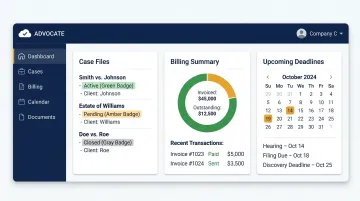
Note that advanced features—including AI tools and PI-specific modules—are gated behind higher pricing tiers.
| Best For | Firms of all sizes needing a comprehensive, scalable, all-in-one platform |
| Key Features | Case/document management, time tracking, billing, client intake, e-signatures, 250+ integrations, AI tools |
| Pricing | From $49/user/month (billed annually); advanced tiers cost significantly more |
MyCase
MyCase is built for small law firms and solo attorneys, with strong client communication tools and straightforward pricing that avoids the upsell traps common in enterprise platforms.
What sets it apart:
- Built-in client texting that stores conversations directly in the case file
- Email integration that auto-links incoming emails to the relevant matter
- Single subscription model that includes most core features without upsells
- Simpler than enterprise platforms—limited advanced customization
| Best For | Small firms and solo attorneys prioritizing client engagement and simple pricing |
| Key Features | Built-in texting, document automation, payment processing, calendar sync, task management, client portal |
| Pricing | From $39/user/month (billed annually); Pro at $89, Advanced at $109 |
PracticePanther
PracticePanther gives solo, small, and mid-sized firms code-free workflow automation with a low learning curve—no IT involvement required.
What sets it apart:
- Document automation, timekeeping, invoicing, trust accounting, and e-signatures included under one subscription
- No add-ons required for core billing and accounting features
- Gmail and Outlook sync built in
- Integration depth and customer support have drawn criticism in user reviews
| Best For | Growing mid-sized firms that want automation without a steep learning curve |
| Key Features | Custom automation workflows, Gmail/Outlook sync, time tracking, billing, role-based permissions, trust accounting |
| Pricing | From $49/user/month (billed annually); some advanced accounting features require higher tiers |
Filevine
Filevine is built for litigation-heavy practices that need deep configurability and tools to manage large volumes of complex case data.
What sets it apart:
- Custom dashboards built around any data point in your case files
- Integrated client texting that logs directly to the case
- MedChron tool for AI-assisted medical record classification and treatment timelines
- Real-time case progress tracking across the full matter lifecycle
- Configuration requires upfront investment—post-implementation changes can be difficult
- Pricing is custom-quoted, not published
| Best For | Litigation-heavy practices and firms managing high volumes of complex cases |
| Key Features | Custom dashboards, document templates, integrated texting, real-time case tracking, medical record timelines |
| Pricing | Custom pricing—request a demo and quote directly from Filevine |
Smokeball
Smokeball combines desktop functionality with cloud syncing, offering automatic time and activity tracking that captures billable work without manual entry.
What sets it apart:
- AutoTime tracks billable activity automatically in the background
- Library of 20,000+ built-in legal forms and court documents via TemplateLab
- Deep integration with Microsoft Word and Outlook
- Built primarily for Windows/PC—limited mobile functionality
- Performance analytics to identify productivity gaps across the team
| Best For | Small to mid-sized Windows-based firms focused on productivity tracking and billing accuracy |
| Key Features | Auto time tracking, Outlook/Word integration, 20,000+ legal forms, document automation, performance analytics |
| Pricing | From $149/month (not a per-user price); custom pricing for higher tiers |
CASEpeer
CASEpeer is purpose-built for personal injury law firms, designed around the full PI case lifecycle from intake through settlement.
What sets it apart:
- Medical record and provider management built natively into the platform
- Treatment tracking and lien management tools unavailable in general-purpose alternatives
- Settlement reporting and visual case progression timelines
- PI-specific intake templates and status tracking
- Offers no meaningful functionality outside personal injury work
| Best For | Personal injury law firms needing PI-specific workflows and medical record management |
| Key Features | PI-specific workflows, medical provider management, settlement reporting, lien tracking, intake templates, status tracking |
| Pricing | Basic $79/user/month, Pro $119, Advanced $149 |
CosmoLex
CosmoLex is an all-in-one case management and accounting platform that eliminates the need for QuickBooks or third-party accounting integrations.
What sets it apart:
- Native legal trust accounting, general ledger, and billing built to bar compliance standards
- Money Finder feature identifies missed billable time across the firm
- Removes the cost and complexity of maintaining separate accounting software
- The interface feels dated compared to Clio or MyCase
| Best For | Firms wanting built-in legal accounting without a separate QuickBooks subscription |
| Key Features | Trust accounting, billing, general ledger, time tracking, client portals, document management, Money Finder |
| Pricing | From $147/month for 1–3 users (annually); $49/user/month for 4+ users |
Rocket Matter
Rocket Matter is a cloud-based legal platform known for billing visibility and a Kanban-style approach to matter management that gives teams a visual pipeline overview.
What sets it apart:
- Kanban boards for tracking case progress visually across the firm
- Matter budgeting and budget-vs-actual tracking
- Detailed billing and productivity reports
- Integrations with LawPay, QuickBooks, and Office 365/Outlook
- Weaker than competitors on client intake and CRM functions
| Best For | Firms prioritizing billing visibility and project-style matter tracking |
| Key Features | Kanban workflow boards, matter budgeting, billing/productivity reports, time/expense tracking, LawPay and QuickBooks integrations |
| Pricing | Essentials $59/user/month (annually); Pro $95, Premier $115, Elite $145 |
Key Features to Look for in Legal Case Management Software
The right tool should match your firm's daily workflow—not force the firm to adapt to the software. Before evaluating any platform, identify which features are non-negotiable for your practice.
Task and Deadline Management
Missed deadlines in legal practice carry serious consequences: lost cases, malpractice exposure, and damaged client relationships. Look for:
- Calendar syncing with Outlook or Google Calendar
- Automated reminders for court dates and filing deadlines
- Shared team visibility across all upcoming obligations
- Deadline calculation tools for jurisdiction-specific rules
Document Management and Secure Storage
Reliable document management requires:
- Organized cloud storage with consistent folder structures
- Version history to track edits and restore prior drafts
- Granular permission controls by user role
- Encryption and remote access from any device
Time Tracking, Billing, and Trust Accounting
Billing accuracy directly impacts firm revenue. Prioritize:
- Both manual and automatic time logging options
- Itemized invoice generation
- Trust accounting that keeps IOLTA funds separated from operating accounts, as required under ABA Model Rule 1.15
- Platforms like CosmoLex include this natively; others like Clio handle it through QuickBooks integration

Client Communication and Portals
Modern clients expect transparency. A built-in client portal lets clients view case status, upload documents, and communicate securely—without email threads that are easy to lose.
The client relationship starts before the portal, though. Prospective clients who call after hours need more than voicemail. EvaSpeaks' AI Virtual Receptionist handles 24/7 legal intake, qualifies cases, and books consultations directly into Clio, MyCase, or PracticePanther, with call transcripts and intake data flowing automatically into the case file. Because EvaSpeaks operates through configurable call-flow scripts rather than a staffed answering service, the cost of after-hours coverage stays flat regardless of how many calls come in — which makes it particularly suitable for small and mid-sized firms that run advertising campaigns and experience unpredictable inbound volume.
See how AI handles client calls when your team is unavailable. See How AI Handles After-Hours Calls
Here is how the main options for integrating call answering into legal case management compare:
| AI-Native Answering (EvaSpeaks) | Live Legal Answering (Ruby/Smith.ai) | In-House Receptionist | |
|---|---|---|---|
| Features | 24/7 AI intake, matter routing, CRM auto-push | Human agents trained in legal intake | Full interaction, conflict check, scheduling |
| Best-fit Business Size | Solo to mid-size firms | Growing law firms | Larger practices |
| Key Strengths | Zero missed leads, instant CRM sync, no overages | Human empathy for sensitive callers | Full case knowledge, relationship |
| Implementation Complexity | Low - Clio, Filevine connectors | Low | None (hire) |
| Integration Capability | Clio, MyCase, PracticePanther native | Manual or limited API | Manual entry |
Workflow Automation and Integrations
Automating repetitive tasks—follow-ups, document generation, status updates—directly reduces administrative overhead. Evaluate:
- Native automation for routine workflows (no code required for most firms)
- Integrations with email, accounting, and e-signature tools already in use
- API openness for firms with more complex or custom tech stacks
- Whether key integrations are included or require paid add-ons

How We Chose the Best Legal Case Management Software
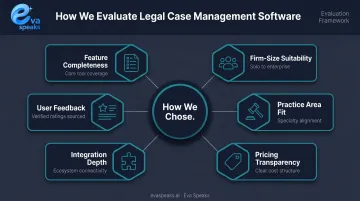
These tools were assessed across six dimensions:
- Feature completeness — core case management, billing, trust accounting, and client communication
- Firm-size suitability — whether the tool scales from solo to multi-attorney
- Practice area fit — general-purpose vs. specialty (PI, litigation, etc.)
- Pricing transparency — no hidden fees, forced add-ons, or opaque enterprise-only quotes
- Integration depth — native connections to email, accounting, and e-signature tools
- User feedback — verified reviews from G2, Capterra, and Software Advice
Those criteria shape the rankings — but how you shop matters just as much. Common buying mistakes to avoid:
- Choosing based on brand recognition without checking practice area fit
- Ignoring whether implementation support and onboarding are included
- Comparing headline prices without accounting for add-ons — some $39/month tools balloon to $80+ once accounting or texting features are included
- Skipping the trial — always test with the team members who will use the software daily
A platform with built-in accounting like CosmoLex may cost more per user upfront but less overall than a cheaper tool that requires a separate QuickBooks subscription. Total cost of ownership matters more than the headline rate.
See how it performs for your firm before you commit. Request Live Demo
Conclusion
The best legal case management software is the one that fits your firm's practice area, team size, workflows, and budget—not the one with the most integrations or the highest review score.
Quick recap:
- Clio — best for all-around use across any firm size
- MyCase — best for small firms and solo attorneys
- PracticePanther — best for automation without complexity
- Filevine — best for high-volume litigation
- Smokeball — best for Windows-based firms focused on billing accuracy
- CASEpeer — best for personal injury practices
- CosmoLex — best for built-in accounting
- Rocket Matter — best for billing visibility and project tracking
Before evaluating any platform, audit your current workflow: identify the biggest time drains, the most frequent errors, and the tools already in use. Then take advantage of free trials and involve your whole team in testing.
That evaluation process starts at intake. Case management software handles what happens inside the firm, but what happens before a lead reaches your system matters just as much. Eva Speaks' AI Virtual Receptionist answers every inbound call 24/7, routes callers by practice area and urgency, and delivers structured transcription and intake data directly into your case management platform—so no potential client is lost before the process begins. See how Eva Speaks integrates with your chosen platform.
Have questions about intake automation for your practice? Talk to an AI Communication Expert
Frequently Asked Questions
Frequently Asked Questions
What is the most reliable legal case management system?
Clio is frequently cited as the most dependable all-around platform, backed by a 99.9% uptime guarantee and endorsements from all 50 state bar associations. That said, always verify a vendor's SLA before committing.
What CRM do lawyers use?
Most lawyers use legal-specific CRM features built into platforms like Clio Grow, MyCase, or PracticePanther rather than standalone tools. These are designed for client intake, lead tracking, and matter management in a legal context, not generic sales pipelines.
What is the difference between legal case management software and legal CRM?
Case management software handles active matters—documents, deadlines, billing, and tasks—while a legal CRM focuses on the pre-client stage: intake forms, lead tracking, and converting prospects into retained clients. Several platforms, including Clio, combine both in one tool.
Is there free legal case management software available?
Open-source options like ClinicCases exist, but most reputable platforms offer free trials rather than permanent free tiers—and free tools typically lack the security compliance, support, and integrations professional legal use requires.
What features should small law firms prioritize?
Small firms and solo attorneys should prioritize ease of setup, transparent all-inclusive pricing, built-in billing and trust accounting, and a reliable client portal. MyCase and CosmoLex are frequently recommended for these criteria.
How does legal case management software handle trust accounting?
Trust accounting features keep IOLTA client funds separated from operating accounts, track retainer balances, and support compliance with state bar regulations. CosmoLex includes native trust accounting; Clio and others achieve the same outcome through QuickBooks integration.