Introduction
Every missed call is a missed opportunity. According to Forbes, 80% of callers sent to voicemail don't leave a message — they simply move on, often to a competitor.
Small businesses are especially vulnerable here. With limited staff, after-hours gaps, and no dedicated receptionist, calls slip through constantly. A prospect who hits a busy signal at 5:05 PM rarely calls back.
Auto attendant phone systems solve this by serving as a 24/7 first point of contact: they greet callers, present menu options, and route calls to the right person or department without any human intervention. Whether you run a solo consultancy or a 10-person team, the right system means fewer lost leads and a more professional caller experience from day one.
This guide covers the top five auto attendant systems for small businesses, how they compare, and what actually matters when choosing one.
See how AI phone automation works for small businesses. Explore AI Call Automation
Key Takeaways
- Auto attendants route incoming calls through menus, greetings, and extensions — no live receptionist needed on every call
- Small businesses gain 24/7 availability, consistent caller experience, and lower operational overhead
- AI-powered systems like Eva Speaks use LLMs for natural language call handling and real-time transcription, going well beyond standard keypad menus
- Top systems reviewed: Eva Speaks, RingCentral, Dialpad, Grasshopper, Ooma Office
- The right choice depends on call volume, integration needs, budget, and how much AI capability your workflow requires
What Is an Auto Attendant Phone System for Small Business?
An auto attendant is a telephony feature that automatically answers inbound calls, presents a menu of options ("Press 1 for Sales, Press 2 for Support"), and routes callers to the right department, person, or voicemail — without a live receptionist on every call.
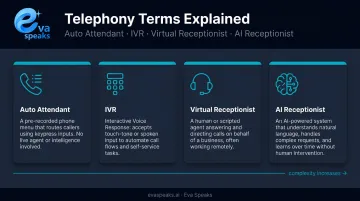
The terms auto attendant, IVR, virtual receptionist, and phone tree are often used interchangeably, but they're not identical:
- Auto attendant — the broad term for menu-based automated call routing
- IVR (Interactive Voice Response) — IBM defines IVR as broader automated telephone technology that handles both voice and keypad inputs, often with more complex logic
- Virtual receptionist — commonly used as a synonym for auto attendant in small-business contexts (Ooma, for example, calls its feature "Virtual Receptionist")
- AI receptionist — a newer category that extends beyond routing into natural-language conversations, FAQ handling, and appointment scheduling
How Auto Attendants Have Evolved
Traditional IVR systems were rigid — press a number, get routed, and hope the menu matched your actual need. Many systems still work this way. Modern AI-powered platforms understand natural language, so a caller can say "I need help with my invoice" instead of wading through four menu levels.
That shift matters because frustrated callers hang up. Conversational AI reduces that friction, keeping more inbound calls connected to an actual outcome.
Common Small Business Use Cases
- Separate sales and support calls automatically at the point of answer
- Capture caller information after hours when the office is closed
- Screen spam and robocalls before they reach your staff
- Give callers hours, location, or basic FAQs without putting them on hold
Best Auto Attendant Phone Systems for Small Business
Systems below were selected based on ease of setup, feature depth, pricing transparency, scalability, and fit for small business workflows.
Eva Speaks
Eva Speaks is an AI-powered communication platform built for businesses that want intelligent call handling rather than rigid menu navigation. The platform integrates large language models (LLMs) with speech-to-text (STT) and text-to-speech (TTS) technologies to handle inbound calls conversationally in real time.
Where traditional auto attendants push callers through rigid menus, EvaSpeaks processes natural language, so callers speak naturally instead of pressing numbers. The system handles call routing, real-time transcription, and configurable call-flow scripts, giving businesses a record of every interaction alongside automated handling. Compared to enterprise auto attendant platforms that require specialist configuration, EvaSpeaks can be set up through a non-technical admin interface — which is part of why it suits small and growing businesses that want enterprise-quality call handling without the deployment overhead.
Businesses can configure call-flow scripts, routing rules, and office hours directly through the platform. Data is stored in U.S. data centers with industry-standard security, and businesses can opt out of having their call data used for AI model training.
| Feature | Detail |
|---|---|
| Key Features | LLM-powered conversational AI, real-time transcription, customizable call-flow scripts, intelligent routing rules, STT/TTS integration |
| Pricing | Contact Eva Speaks for current pricing — subscription-based model |
| Best For | Small businesses that want AI-native, conversational call handling beyond standard IVR menus |
Watch an AI small business call flow in action. Watch AI Call Flow Demo
RingCentral
RingCentral is one of the most widely adopted cloud communication platforms, offering a full UCaaS suite with a robust multi-level auto attendant included across its RingEX plans.
For small businesses, the platform's value comes from integration breadth and AI add-on flexibility. It connects with over 330 integrations across 200+ companies, including Salesforce, HubSpot, and Google Workspace. The AI Receptionist (available as a standalone or add-on license starting at $39) goes beyond routing to answer FAQs, capture lead information, schedule appointments, and send SMS follow-ups.
It can be layered onto existing cloud, on-premises, or hybrid systems via SIP or call forwarding. Multi-location call management and a detailed analytics suite make it a strong fit for businesses already embedded in a broader software ecosystem.
| Feature | Detail |
|---|---|
| Key Features | Multi-level auto attendant, AI Receptionist add-on, video conferencing, SMS follow-ups, 330+ integrations |
| Pricing | RingEX plan pricing not publicly confirmed at time of writing — visit ringcentral.com/office/plansandpricing.html for current rates; AI Receptionist add-on starts at $39 |
| Best For | Growing small businesses needing a full UCaaS platform with strong integration support |
Dialpad
Dialpad is an AI-powered unified communications platform with a built-in auto attendant and real-time Voice Intelligence (Vi) technology. It's one of the more AI-forward options in this price range.
Starting at $15/user/month, Dialpad includes real-time call transcription and post-call summaries across all plan tiers. Live sentiment analysis (which surfaces caller emotion during active calls) is available on Advanced and Premium plans. The admin interface is clean and the IVR analytics dashboard gives teams visibility into call patterns without needing a separate tool. A 14-day free trial is available.
Note that Dialpad has updated its plan naming — current tiers are Essentials, Advanced, and Premium rather than the older Standard/Pro/Enterprise labels.
| Feature | Detail |
|---|---|
| Key Features | AI auto attendant, real-time transcription, post-call summaries, sentiment analysis (Advanced+), skills-based routing, IVR analytics |
| Pricing | Starts at $15/user/month; full tier breakdown at dialpad.com/pricing |
| Best For | Teams that want built-in AI call intelligence alongside standard auto attendant routing |
Grasshopper
Grasshopper is a lightweight virtual phone system built for solopreneurs, freelancers, and micro-businesses that need a professional business number with auto attendant functionality without the complexity of a full UCaaS platform.
Pricing starts at $14/month (billed annually) with a flat-fee model that includes unlimited users at no extra cost.
Setup is simple and the system is mobile-first, making it easy to manage from a smartphone. It works exclusively in the U.S. and Canada.
Grasshopper doesn't directly integrate with CRMs (though Zapier connections to Salesforce or Zoho are possible), and analytics are basic. If your business is growing and you need deeper routing logic or reporting, you'll outgrow it quickly.
| Feature | Detail |
|---|---|
| Key Features | Virtual receptionist, custom greetings, call forwarding, voicemail transcription, business texting |
| Pricing | Starts at $14/month (billed annually); 7-day free trial available |
| Best For | Solo operators and micro-businesses needing an affordable, no-frills auto attendant with a professional business number |
Ooma Office
Ooma Office is a VoIP-based phone system that hits the practical middle ground : more capable than Grasshopper, simpler than RingCentral, and transparently priced.
Its Virtual Receptionist is included in every plan at no additional cost , while many competitors charge extra for the same feature. The base Essentials plan runs $19.95/user/month with no contract required. Upgrading to Pro at $24.95/user/month unlocks voicemail transcription and video conferencing for up to 25 participants. There's a one-time $29.95 activation fee for new accounts.
Ring groups, call parking, and mobile/desktop apps are available on both tiers, making it a practical choice for businesses that want solid coverage without paying for features they won't use.
| Feature | Detail |
|---|---|
| Key Features | Auto attendant (all plans), ring groups, call parking, mobile/desktop apps, voicemail transcription (Pro+), video conferencing (Pro+) |
| Pricing | Essentials: $19.95/user/month — Pro: $24.95/user/month — one-time $29.95 activation fee |
| Best For | Budget-conscious small businesses that need reliable auto attendant basics without a heavy software footprint |
How We Chose the Best Auto Attendant Phone Systems
Systems were assessed across six factors: ease of setup, call routing flexibility, AI/automation capabilities, CRM integration options, pricing transparency, and scalability. A common mistake — one worth flagging explicitly — is choosing a system based on brand recognition, then discovering it lacks the routing depth or integrations your workflow actually needs.
Key Selection Factors
Multi-level IVR/routing flexibility: Does the system get callers to the right person, or do they hang up in frustration? Basic single-level menus work for very small teams; growing businesses need conditional routing and overflow logic.
AI and NLP capability: Systems that understand what callers want in natural language are fundamentally different from those that just push people through numbered menus. The UCaaS market reached $21.7B in 2024 (up 6.5% YoY), partly driven by AI feature demand — businesses that don't account for this in their buying decision will likely be switching systems again within two years.
Pricing model: Per-user, flat-fee, and per-minute structures have very different cost implications at scale. A flat-fee model like Grasshopper is economical for solo operators but doesn't scale; per-user pricing like Dialpad or Ooma scales predictably with team size.
Integration depth: A system that syncs with your CRM eliminates manual data entry and accelerates follow-up. If you're already in HubSpot or Salesforce, this factor alone may narrow your choices significantly.
Matching System to Business Type
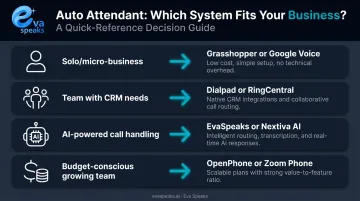
A solo consultant taking 15 calls per week needs different features than a 10-person service team handling 100+ calls. Here's how the options map to common business profiles:
| Business Profile | Best Fit |
|---|---|
| Solo or micro-business | Grasshopper or Ooma Essentials |
| Team with CRM integration needs | RingCentral or Dialpad |
| AI-powered, conversational call handling | Eva Speaks |
| Budget-conscious with room to grow | Ooma Pro or Dialpad Essentials |
Don't evaluate systems against feature lists in isolation — map them against your actual call volume and what happens when a call goes unanswered.
Not sure which system fits your business size? Talk to an AI Communication Expert
AI vs. IVR vs. Live Answering: How the Main Options Compare
Here is how the main automated phone answering options compare for small businesses:
| AI Phone System (EvaSpeaks) | IVR Auto-Attendant | Live Answering Service | |
|---|---|---|---|
| Features | Conversational AI, 24/7, scheduling, CRM sync | DTMF menus, basic routing, voicemail | Human agents, message-taking, routing |
| Best-fit Business Size | 1-50 person businesses | Larger operations | Any size |
| Key Strengths | No missed calls, 24/7, zero overages | Low cost, no staffing | Human touch, complex calls |
| Implementation Complexity | Low - hours | Medium | Low |
| Integration Capability | CRM, scheduling native | Limited | Manual or limited |
Conclusion
The best auto attendant phone system isn't the most feature-rich one — it's the one that matches your call volume, customer expectations, and existing workflows. A business that treats its phone system as a strategic tool, rather than a utility, sees better first impressions, fewer missed leads, and lower operational costs over time.
When evaluating options, prioritize scalability and AI readiness. Traditional on-premises PBX revenue declined 9% year-over-year in Q1 2025, and the shift toward cloud and AI-powered systems isn't reversing. A system that handles only keypad menus today will struggle to meet caller expectations as natural, conversational interactions become the standard.
For businesses prioritizing that scalability and AI readiness, Eva Speaks takes an LLM-backed approach to call handling — combining real-time transcription, configurable routing logic, and conversational call flows that go beyond traditional keypad menus.
Ready to see it handling your calls? Request Live Demo
Frequently Asked Questions
What is an auto attendant phone system for small business?
An auto attendant is an automated call-routing system that greets incoming callers, presents a menu of options, and directs them to the right department or person — without needing a live receptionist on every call. It's sometimes called a virtual receptionist, IVR, or phone tree.
How much does an automated phone system cost?
Basic small-business virtual phone systems start around $14–$20/month — Grasshopper starts at $14/month (flat fee) and Ooma Essentials is $19.95/user/month. AI-enhanced features or UCaaS add-ons can push costs higher; RingCentral's AI Receptionist add-on starts at $39 separately.
Is there a free automated phone answering system?
Most reputable auto attendant systems don't offer a permanently free tier. Dialpad offers a 14-day free trial and Grasshopper offers 7 days — both enough to test core features before committing.
Can AI answer my business phone?
Yes. AI-powered systems like Eva Speaks use large language models to handle inbound calls conversationally — answering FAQs, routing based on caller intent, and transcribing calls in real time. Unlike traditional IVR, callers speak naturally instead of pressing numbers through a menu.
Do businesses still use PBX systems?
Traditional on-premises PBX is declining — the market dropped 6.6% year-over-year in 2024 and fell another 9% in Q1 2025, according to Metrigy. Most businesses are transitioning to cloud-based VoIP and UCaaS platforms, which offer the same routing capabilities with lower hardware costs and built-in scalability.
What are automated phone answering systems called?
The common terms are auto attendant, IVR (Interactive Voice Response), virtual receptionist, and phone tree. IVR handles voice input and more complex interactions; auto attendant is the broader term for menu-based call routing used across most small-business phone platforms.