What goes wrong without proper configuration is predictable: callers navigate a menu and hit silence, after-hours calls ring into unmanned queues, or inbound calls never reach the auto attendant at all. These aren't edge cases — they're the direct result of skipping setup steps or leaving fallback rules undefined.
This guide covers everything from prerequisites through step-by-step configuration, common failure points, and best practices for automated PSTN call routing.
Key Takeaways
- Automated PSTN call routing uses IVR menus, call queues, and logic-based rules to direct inbound calls without a human operator
- Setup requires active PSTN connectivity (Calling Plan, Operator Connect, or Direct Routing), a documented call flow, and admin access to your platform
- Top failure points: missing overflow/timeout rules, incorrect time zone on after-hours schedules, and phone numbers assigned to the wrong routing endpoint
- AI-enhanced routing (such as Eva Speaks' LLM-powered call handling) adds context-aware responses on top of standard PSTN routing logic
- Test every routing path before going live: business hours, after-hours, and overflow
What Is Automated PSTN Call Routing?
The Public Switched Telephone Network (PSTN) is the global infrastructure — copper lines, fiber, and switching systems — that carries standard voice calls. Microsoft defines it as the network through which national, regional, and local telephone service providers connect subscribers.
Automated call routing means using pre-configured rules, menus, and logic to direct those inbound PSTN calls to the right destination — without a human operator answering each one.
This differs from basic call forwarding. Forwarding sends every call to one destination. Automated routing handles multiple scenarios simultaneously, based on conditions you set in advance.
The Four Core Building Blocks
Every automated PSTN routing setup runs on four components:
| Component | What It Does |
|---|---|
| Auto Attendant (IVR) | Answers calls, presents menu options (DTMF or speech), and routes based on selection |
| Call Queues | Holds callers until an agent is available; supports hold music and position announcements |
| Call Forwarding Rules | Redirects calls based on conditions like time of day or agent availability |
| Overflow/Timeout Handling | Defines what happens when a queue is full or a caller waits too long |
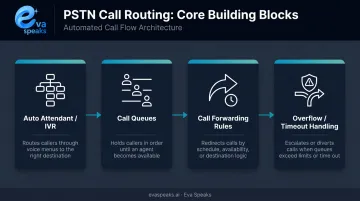
Each component handles a distinct failure point — and gaps in any one of them show up immediately as dropped calls or dead-end menus.
Watch how AI-enhanced PSTN routing handles a real call. Watch AI Call Flow Demo
Prerequisites Before You Set Up PSTN Call Routing
Don't touch platform settings until these five items are confirmed.
1. Active PSTN Connectivity
Routing rules cannot function without an active dial path. Confirm which connectivity type your organization uses:
- Microsoft Calling Plan — Microsoft acts as the PSTN operator, managing numbers and access. Requires a Teams Phone license and Calling Plan license. Microsoft provides a 99.999% reliability SLA.
- Operator Connect — A certified third-party operator handles PSTN integration through the Teams admin center. Requires a contract with a certified carrier.
- Direct Routing with an SBC — Connects any PSTN operator to Teams via a certified Session Border Controller. Gives maximum carrier flexibility but adds SBC, certificate, DNS, and routing-policy responsibilities that fall on your team or integrator.
The tradeoff is straightforward: Calling Plan reduces your infrastructure overhead; Direct Routing gives you more control at the cost of more responsibility.
2. Complete Phone Number Inventory
All Direct Inward Dial (DID) numbers, toll-free numbers, and your main business line must be provisioned, assigned, and confirmed active in your admin portal before building routing logic.
3. Documented Call Flow
Design before you build. Map every routing scenario in writing or as a diagram:
- Who answers which call type, and during which hours
- Every menu option and its destination
- What happens if no agent is available
- After-hours and holiday paths
Skipping this step typically surfaces as broken overflow paths, unanswered after-hours calls, or IVR loops that callers can't escape.
4. Platform Capability Verification
Confirm your UC or PBX platform supports your design requirements — multi-level IVR, time-based routing, holiday overrides, and queue overflow redirects — before committing to a configuration approach.
5. Correct Admin Permissions
Microsoft requires the Teams Administrator role for voice features and phone number inventory, and typically Teams Administrator plus User Administrator to create and manage resource accounts. Confirm the right roles are assigned before build day — missing permissions can stall the entire project even when connectivity is ready.
How to Set Up Automated PSTN Call Routing
Step 1 — Map Your Call Flow Diagram
Finalize the routing logic with department leads before opening any admin console. The diagram should cover:
- Greeting experience
- Every menu option and its destination
- Each department queue and its agents
- Hold behavior and position announcements
- Overflow rules and fallback destinations
- After-hours and holiday paths
This document becomes your configuration checklist.
Step 2 — Configure Your Auto Attendant (IVR)
In your platform's admin center, create the auto attendant:
- Set a business hours greeting
- Define DTMF key-press options (e.g., "Press 1 for Sales, Press 2 for Support")
- Assign a destination — call queue, user, or external number — to each option
One failure point to know: Microsoft documents that if a caller hears the menu three times without selecting an option, the call redirects to the configured operator — or drops entirely if none is defined. Every IVR branch needs an explicit fallback destination.
Step 3 — Build Call Queues Per Department
Create one queue per team or function. Configure:
- Routing method: Round Robin distributes calls evenly, Longest Idle routes to the agent waiting longest (and enables presence-based routing in Teams automatically), Simultaneous ring goes to the first available agent
- Agent alert time: Microsoft recommends a minimum of 20 seconds before the call moves to the next agent
- Hold music or position announcements to manage the caller experience
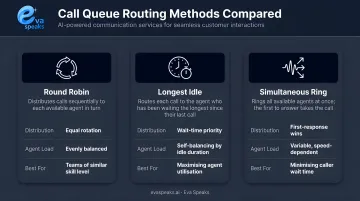
Queue timeout parameters are platform-specific — Cisco CUCM supports wait timers from 10 to 3,600 seconds with a 900-second default. Know your platform's limits before setting these values.
Step 4 — Set Overflow and Timeout Rules
Every queue needs defined fallback actions for two scenarios — overflow (maximum capacity exceeded) and timeout (caller has waited too long). For each, set a specific fallback: voicemail with a recorded message, a less busy queue, or an external number. Leaving either blank creates dead-end calls.
Step 5 — Configure After-Hours and Holiday Routing
- Create a separate call flow for calls received outside business hours
- Set accurate business hour schedules and the correct time zone in your platform — Microsoft notes that the auto attendant's time zone is used to calculate business and after-hours schedules, and by default runs 24/7 unless specific hours are configured
- Build a holiday routing table — Teams auto attendants support up to 20 holiday sets, each with up to 50 unique date ranges
Incorrect time zone settings cause more after-hours routing failures than almost any other config error. Verify it explicitly.
Step 6 — Assign Phone Numbers to Routing Endpoints
Link each DID and toll-free number to the correct auto attendant or call queue resource account in your phone number management settings. Confirm the resource account holds the correct voice routing or calling policy so inbound PSTN calls enter the intended flow.
PSTN vs VoIP vs AI-Powered Routing: How They Compare
Not all call routing approaches are equal. Here is how traditional PSTN, standard VoIP/SIP, and AI-powered cloud routing stack up across the factors that matter most for businesses evaluating their options:
| AI + Cloud VoIP (EvaSpeaks) | Standard VoIP / SIP Routing | PSTN Legacy Routing | |
|---|---|---|---|
| Features | Conversational AI routing, dynamic rules, CRM sync | SIP trunks, IVR, ACD, configurable routing | Fixed PSTN circuits, manual routing |
| Best-fit Business Size | SMB to mid-market | Mid-market to enterprise | Large enterprise with legacy infrastructure |
| Key Strengths | AI intent detection, easy rule updates, fast deploy | Lower cost than PSTN, flexible | Maximum reliability, carrier-grade SLA |
| Implementation Complexity | Low - no code | Medium | High |
| Integration Capability | CRM, EHR, scheduling native | API-based, custom | Custom dev |
A Note on AI-Enhanced Routing
Standard PSTN routing handles the structural call flow. AI-enhanced routing builds on that foundation — Eva Speaks uses LLMs, text-to-speech, and speech-to-text to handle incoming calls, resolve common queries, and route callers dynamically based on captured intent. It works on top of your existing PSTN infrastructure, not as a replacement for your carrier connectivity. For businesses that want conversational AI call handling without the complexity of a full contact center platform, this layered approach means a shorter deployment timeline and no disruption to how calls currently enter the network.
Want PSTN routing built for your specific call structure? Get a Customized Workflow Recommendation
Common PSTN Call Routing Problems and Fixes
Problem 1: Calls Reach a Dead End
Symptoms: Callers navigate the IVR or sit in a queue, then hit silence or disconnection.
Cause: Overflow or timeout rules were not configured, or the fallback destination is an unassigned number or inactive mailbox.
Fix: Audit every auto attendant and call queue for missing overflow and timeout destinations. For each queue, make sure you've covered:
- Set a maximum wait time so callers aren't held indefinitely
- Assign a live fallback destination: voicemail with a recorded message or a redirect to an active number
- Never leave overflow or timeout fields blank
Problem 2: After-Hours Calls Routing to Unmanned Queues
Symptoms: Calls received outside business hours ring through to a queue with no agents, resulting in indefinite hold or failure.
Cause: Business hours schedule was not configured, was set to the wrong time zone, or a holiday override was never created.
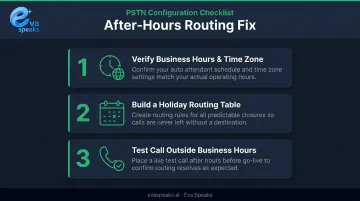
Fix: Three steps resolve most after-hours routing failures:
- Verify the business hours schedule and time zone in your auto attendant settings
- Build a holiday routing table for predictable closures
- Place a test call outside configured business hours before go-live to confirm the schedule behaves as expected
Problem 3: Inbound PSTN Calls Not Reaching the Auto Attendant
Symptoms: External callers dial your main number but the call rings through, fails, or reaches an unexpected destination instead of the IVR.
Cause: The phone number isn't correctly assigned to the auto attendant resource account, or the resource account is missing the voice routing policy needed to process inbound PSTN calls.
Fix: Work through these checks in order:
- Confirm number-to-resource-account assignment in your phone number management panel
- Verify the resource account holds the correct voice routing or calling policy
- Confirm the auto attendant is published and enabled
Best Practices for Automated PSTN Call Routing
Map Before You Build
Never configure routing while still deciding the logic. Finalize the call flow with department leads and operations stakeholders first, then translate it into platform settings in a single focused session. Conflicting rules created across multiple sessions are difficult to audit later.
Test Every Routing Path Before Go-Live
Place external test calls from a mobile or non-company phone to each DID number:
- During business hours — confirm the correct greeting and queue
- After hours — confirm the after-hours message and redirect
- Under simulated overflow — confirm the fallback destination activates
Document results so any discrepancies have a clear baseline.
Audit routing on a regular cadence. Routing configurations go stale. Staff change, departments restructure, business hours shift seasonally, and holiday schedules need annual updates. Genesys recommends reviewing IVR design documentation, testing live flows, and monitoring for red flags like high transfer rates — then updating as business needs and customer behaviors change. A quarterly check-in prevents customer-facing failures caused by routing logic that was accurate six months ago but no longer reflects reality.
Use AI-enhanced routing for smarter call handling. Static IVR menus present options and wait for a key press. AI-powered systems like Eva Speaks work differently — LLM-driven call-flow scripts identify what the caller actually needs and route accordingly, rather than forcing them through a fixed menu tree.
ICMI's 2025 research citing Gartner found that 73% of customers attempt self-service, but only 14% of issues are fully resolved that way. AI routing improves those odds, but escalation paths to live agents are still essential for anything outside its scope.
See how businesses are using automated PSTN routing today. See Industry Use Cases
Frequently Asked Questions
What is PSTN routing?
PSTN routing is the logic that determines how incoming calls are directed to the correct destination — a department, agent, voicemail, or auto attendant — from the moment they arrive at your number. It's the set of rules your phone system follows to get every caller where they need to go.
What is a PSTN call?
A PSTN call is a standard voice call made over the Public Switched Telephone Network — the infrastructure of copper lines, fiber, and switching systems that has carried phone calls for decades. Most business phone systems still connect to the outside world through PSTN, even when the internal system is IP-based or cloud-hosted.
What does automatic call routing mean?
Automatic call routing uses pre-configured rules, IVR menus, and call queue logic to direct incoming calls to the right destination without a human operator handling each call. The system routes based on caller input, time of day, agent availability, or other conditions you define in advance.
What is custom call routing?
Custom call routing is logic tailored to your business's structure — routing calls by department, language preference, or caller-selected option — rather than a one-size-fits-all IVR menu.
How do I test my PSTN call routing setup?
Place external test calls from a mobile or non-company phone to each DID number. Test during business hours, after-hours, and simulated overflow conditions — confirm each path reaches the correct destination with the right greeting, and document the results before going live.
What is the difference between an auto attendant and a call queue?
An auto attendant greets callers and presents menu options to route them to the right place. A call queue holds callers in line until an available agent can answer. The two work together — the auto attendant typically routes callers into the appropriate queue based on their selection.