Introduction
Picture this: a customer calls your support line, presses through four menu prompts, confirms their account number by keypad, explains their issue to the IVR—and then gets transferred to an agent who immediately asks, "Can you verify your account number?"
That moment of frustration isn't a design flaw. It's usually a data problem, specifically, a failure in how the IVR system communicates with the CRM.
According to Verint's 2024 State of Digital Customer Experience report, 68% of consumers reported a bad automated phone menu or IVR experience, with 58% citing too many prompts before reaching a person and 53% saying they weren't routed to a human at all. These numbers aren't about bad IVR menus—they're about systems that don't share information with each other.
IVR-CRM integration is hard to get right. The two systems were built on different architectures, operate on different data models, and often run on mismatched timelines. That gap doesn't close automatically.
This article covers the most common technical, data, security, and organizational challenges businesses run into — and practical approaches for addressing each one.
See how AI replaces the limitations of legacy IVR+CRM setups. Explore AI Call Automation
Key Takeaways
- Legacy IVR systems and modern CRM platforms use incompatible data formats and protocols, requiring middleware to connect them
- Batch sync leaves agents working with stale data; real-time sync introduces latency and concurrency risks
- Security and compliance (PCI-DSS, GDPR, CCPA) cover the full integrated system, not each platform in isolation
- Organizational challenges like staff retraining are consistently underestimated
- AI-powered IVR platforms like Eva Speaks use LLMs to reduce dependency on rigid CRM data structures
The Case for IVR-CRM Integration—and Why Getting It Wrong Is Costly
In a properly integrated setup, IVR-CRM integration works in both directions:
- Inbound: When a call arrives, the IVR queries the CRM using the caller's phone number to identify the customer, personalize menu options, and route the call to the right agent or queue
- Outbound: After the interaction ends, the IVR writes call data back—duration, disposition, menu path, transcript—to the CRM record for future reference
That bidirectional flow is only valuable when it holds. When the chain breaks, the consequences are concrete. Calls get misrouted. Agents lack context. Duplicate records accumulate. Customers repeat themselves.
The data shows exactly what's at stake:
| Metric | Figure | Source |
|---|---|---|
| CSAT lift from IVR self-service resolution | +30% vs. non-FCR | SQM Group |
| Top-box CSAT: IVR call containment | 75% | SQM Group |
| Top-box CSAT: IVR handoff without context | 53% | SQM Group |
| Mean abandonment rate: telephony self-service | 32% | ContactBabel 2024 |
| Average cost: agent-handled call | $6.91 | ContactBabel 2024 |
| Average cost: self-service session | $0.50–$0.90 | ContactBabel 2024 |
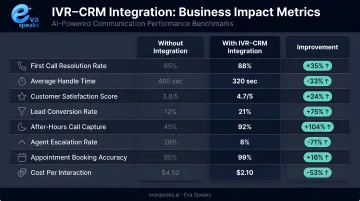
The 22-point CSAT gap between a contained IVR call and a context-free handoff is a direct measure of integration quality. So is the 13x cost difference between self-service and agent handling. Getting the integration right isn't optional—it's where the ROI lives.
Technical Compatibility and System Architecture Challenges
The API Gap Between Old and New
Many legacy IVR platforms predate REST APIs entirely. They were designed around VoiceXML 2.0—a standard built for DTMF inputs, audio dialogs, and speech prompts—while modern CRMs like Salesforce expose their data as REST resources: records, collections, queries, metadata.
Bridging that gap typically means building custom middleware or relying on third-party connectors. Each layer adds:
- A potential failure point under load
- A maintenance burden when either system updates
- Additional latency on every live call
Telephony protocol mismatches compound the problem. IVR systems operating over PSTN or SIP stacks need translation layers to interact with cloud CRM APIs—and in hybrid environments (on-premise IVR, cloud CRM, or vice versa), that translation becomes far more complex. That latency cost—added at every middleware hop—becomes especially critical during active calls, where timeout ceilings are tighter than most teams expect.
Latency Limits During Live Calls
Real-time CRM lookups during active calls have hard timeout ceilings that are less forgiving than most teams expect:
| Platform | Lookup Timeout |
|---|---|
| Amazon Connect (Lambda invocation) | 8 seconds max |
| Genesys Cloud (call flow data action) | 60 seconds max |
| Salesforce (concurrent long-running requests) | Blocks after 25 requests over 20 seconds |
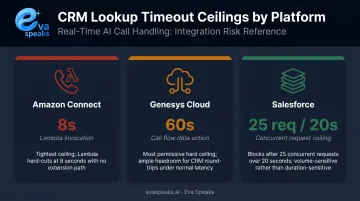
A CRM query that takes 3–4 seconds at 50 concurrent calls can start timing out at 500. Without caching, fallback logic, and load-tested infrastructure, that failure hits precisely when call volume is highest.
Data Schema Mismatches and Version Conflicts
IVR systems and CRMs often use different primary keys: one routes by phone number, the other identifies customers by account ID. The mapping layer connecting them must be maintained every time either system updates—and those updates don't always announce themselves.
Connector breakage after platform updates is a recurring operational problem. Common failure points include:
- Schema changes that invalidate field mappings without warning
- API version deprecations that break connector logic silently
- Package updates on either platform that require full regression testing
Genesys and Salesforce both publish release notes documenting integration fixes after package updates—even purpose-built connectors aren't immune.
Data Synchronization, Quality, and Real-Time Performance Issues
Real-Time vs. Batch: A Real Trade-Off
Some integrations use batch sync—updating CRM records every few minutes or hours—to reduce live-call latency risk. The downside: agents may be looking at account statuses, open tickets, or contact details that are hours out of date. For a customer calling about a just-submitted support ticket, that's a problem.
Real-time sync works—but it comes with trade-offs. Salesforce's own integration patterns distinguish between request-reply (synchronous) and batch synchronization as distinct architectural choices, each carrying different failure modes and infrastructure requirements. Synchronous calls add latency to every interaction; batch sync trades freshness for stability.
CRM Data Quality Is Already a Problem Before You Add IVR
Validity's 2025 State of CRM Data Management report surveyed 602 CRM users and found:
- 76% said less than half of their organization's CRM data is accurate and complete
- 37% reported direct revenue loss from poor CRM data quality
IVR integration doesn't fix those data gaps—it exposes them. Phone number format inconsistencies, duplicate contacts, and missing required fields don't just cause CRM headaches; they cause misrouted calls and failed caller authentication.
Bidirectional Sync Is Harder Than the Read
Writing call data back to CRM records after a call is often more technically demanding than the initial lookup. A single call can end in multiple ways:
- Completed self-service (no agent involved)
- Transferred to agent (with or without context handoff)
- Abandoned mid-menu
- Escalated after authentication failure
Each outcome requires different write-back logic, different record updates, and potentially different follow-up task triggers. When CRM workflows change—new fields, updated pipelines, restructured objects—that write-back logic breaks silently unless someone is actively maintaining it.
Want an integration designed to avoid these pitfalls? Get a Customized Workflow Recommendation
Security, Compliance, and Organizational Challenges
The Integration Layer Expands Your Attack Surface
When IVR and CRM are connected, customer PII flows continuously between them. Every integration point—API endpoint, data transit path, authentication token—is a potential exposure.
Key compliance obligations that apply to integrated systems:
- PCI DSS v4.0.1: IVR systems capturing card numbers during calls—even in transit to a CRM—can pull the entire integration into PCI scope. Tokenized processing through a compliant third-party processor keeps card data out of your environment
- GDPR: Call recordings and transcripts tied to identifiable individuals qualify as personal data under Article 4. Deletion requests under Article 17 must reach CRM records, not just the IVR platform
- CCPA: California Civil Code §1798.140 explicitly classifies "audio, electronic, visual" data as personal information. Deletion rights extend to CRM-linked recordings and transcripts
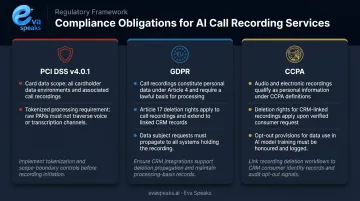
Eva Speaks stores data in US data centers, implements industry-standard security measures, and allows customers to opt out of data use for AI model training—relevant controls when the platform is integrated into a broader CRM ecosystem.
Compliance Must Be Designed In, Not Retrofitted
Many organizations build their IVR-CRM integration first, then try to add compliance controls afterward. That approach typically fails. Consent capture workflows, recording pause functionality, data retention schedules, and deletion pipelines need to be built into the design from the start—not retrofitted.
Eva Speaks places responsibility for obtaining caller consent on the customer deploying the platform. That means businesses need to map out that workflow before go-live, not after.
Organizational Challenges Are Consistently Underestimated
Getting compliance right is only half the battle. Even a technically sound integration can underperform if the people using it aren't prepared. Common failure modes:
- Agents aren't trained to use CRM-enriched call data when it appears on screen
- Existing workflows weren't redesigned to take advantage of pre-populated caller context
- IT, customer service, and sales teams have misaligned expectations about what the integration delivers
- Ongoing maintenance costs—connector updates, performance monitoring, data quality audits—aren't included in initial ROI calculations
IVR-CRM integration is not a one-time project. Without scheduled maintenance, connector drift and data quality degradation quietly erode the value of the integration—often before anyone notices.
How the Approaches Compare
Here is how legacy IVR+CRM integration, modern CPaaS integration, and AI-native solutions compare on integration complexity and outcomes:
| AI-Native (EvaSpeaks) | Modern CPaaS Integration | Legacy IVR + CRM | |
|---|---|---|---|
| Features | Native CRM connectors, real-time sync, no middleware | Custom APIs, flexible workflow | Static IVR + scheduled batch sync |
| Best-fit Business Size | SMB to mid-market | Developer teams | Large enterprise |
| Key Strengths | No integration project, instant data flow | Flexible, any system | Familiar, widely deployed |
| Implementation Complexity | Low - hours | High - developer required | Very High - months |
| Integration Capability | HubSpot, Salesforce, Zoho native | Custom via API | Custom, often fragile |
Strategies to Overcome These Integration Challenges
Start with Read-Only, Then Add Write-Back
A phased approach reduces initial complexity significantly:
- Phase 1: Read-only CRM lookup for caller identification and intelligent routing
- Phase 2: Add basic write-back (call duration, disposition, outcome)
- Phase 3: Full bidirectional sync with transcript logging and follow-up task triggers
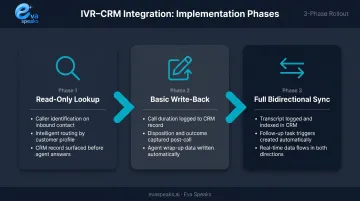
Starting small lets teams surface data quality issues before they affect call routing at scale.
Choose Platforms with Native CRM Connectors
Pre-built connectors for Salesforce, HubSpot, Zendesk, and similar platforms reduce API mismatch risk because the vendor maintains the integration. Salesforce Open CTI, for example, is a documented JavaScript API specifically designed for integrating third-party CTI systems with Salesforce Call Center. Purpose-built connectors handle versioning conflicts more reliably than custom middleware, and when something breaks after an update, there's a vendor accountable for the fix.
Consider AI-Powered IVR to Reduce Structural Dependencies
Traditional IVR systems require pristine, perfectly structured CRM data to function. A caller identified by the wrong phone number format, or a contact with a duplicate record, can cause the entire lookup to fail—and the menu logic collapses.
AI-driven IVR platforms work differently. Rather than collapsing when a field doesn't match, they interpret caller intent from natural language. EvaSpeaks takes this approach—using LLMs and customizable call-flow scripts to handle requests dynamically, without depending on exact CRM field matches to understand why someone is calling. The result is a system that degrades gracefully when data is messy rather than failing outright. This makes EvaSpeaks particularly well-suited for businesses with legacy CRM data quality issues: the AI can still provide value and route calls appropriately even when the underlying customer records are incomplete, which is a meaningful advantage over systems that require pristine CRM data to function.
Fix Your CRM Data Before You Connect the IVR
Before integration, audit your CRM for:
- Duplicate contact records (deduplicate by phone number and email)
- Inconsistent phone number formats (standardize to E.164)
- Missing required fields that IVR routing logic will depend on
- Stale records that could cause misidentification
Validity's 2025 research found that 37% of organizations reported revenue loss from bad CRM data. That figure gets worse when an IVR system is making routing decisions based on that same data.
Have questions about your specific IVR or CRM stack? Talk to an AI Communication Expert
Frequently Asked Questions
What are the most common technical challenges when integrating IVR with CRM?
API incompatibility between legacy IVR protocols and modern REST-based CRMs is the most frequent blocker. Data schema mismatches—different primary keys and field formats—create the next layer of friction. Real-time latency is also critical: CRM lookups during live calls must complete within seconds, or callers experience noticeable disruption.
Can legacy IVR systems be integrated with modern CRM platforms?
Yes, but it typically requires middleware or API translation layers that add cost, maintenance complexity, and failure risk. For many businesses, the ongoing burden of maintaining that middleware makes upgrading to a modern IVR platform a more practical long-term decision.
What are the 4 pillars of CRM?
The four pillars are people, strategy, processes, and technology. IVR integration touches all four—it affects how agents receive customer data, how routing strategies are designed, which workflows get automated, and which technical systems must stay synchronized.
How does AI help overcome IVR-CRM integration challenges?
AI-powered IVR reduces dependency on rigid data structures by interpreting caller intent through natural language rather than requiring exact CRM field matches. This means incomplete or inconsistently formatted CRM records have less impact on call routing accuracy.
What data security risks should businesses consider when integrating IVR with CRM?
The primary risks are unsecured API endpoints that expose PII during data transit and weak authentication between integrated systems. Compliance scope also expands: PCI-DSS applies when card data flows through the integration, and CCPA deletion rights must extend to CRM-linked recordings and transcripts.
How long does IVR-CRM integration typically take to implement?
Platforms with native connectors can be operational in days; custom or legacy integrations often take several months. Data preparation—deduplicating records, standardizing formats, mapping fields—and end-to-end testing are consistently the biggest time drivers, regardless of platform.