Introduction
Missed calls are a persistent problem for businesses of all sizes. Callers expect an immediate answer — and when they don't get one, many don't call back.
According to CallRail's 2025 research based on a survey of 1,000 U.S. consumers, 78% of consumers have abandoned a business after an unanswered call. That's direct, measurable revenue walking out the door.
Automated call answering services have become the standard response to this problem. They answer calls instantly, 24/7, without adding headcount. But most businesses deploy these systems without fully understanding how they work, which leads to poor call flow design and callers who hang up more frustrated than before they dialed.
This guide breaks down exactly what happens from the moment a call arrives to when it's resolved or handed off — covering the technology, the processing stages, and which system fits which use case.
Key Takeaways
- Automated call answering uses pre-recorded menus (IVR/auto attendant) or AI conversation engines to handle inbound calls without a human agent
- Every call passes through four stages: initiation, processing, routing, and post-call output
- AI-powered systems use speech recognition, NLP, and LLMs to hold real conversations, going well beyond menu navigation
- These systems run 24/7, handle simultaneous calls, and connect to CRMs and scheduling tools
- How well the system performs depends entirely on how it's configured — call flows, routing logic, and knowledge base quality all matter
What Is an Automated Call Answering Service?
An automated call answering service is a technology system that answers inbound business calls without a live human agent. It handles the caller's need — whether that's answering a question, routing to the right department, or collecting information — and either resolves it or passes the call on.
The operational gap it fills is clear: businesses can't staff phones around the clock, but callers expect immediate responses. Automated answering bridges that gap without requiring more staff.
Two common misconceptions are worth clearing up:
- Not voicemail — voicemail is passive. It records a message and stops. Automated answering actively processes input and responds.
- Not a live virtual receptionist — live virtual receptionist services use human agents working remotely. Automated answering has no human in the loop during the call.
Types of Automated Call Answering Services
Three distinct types exist, with meaningfully different capabilities:
| Type | How It Works | Best For |
|---|---|---|
| Auto Attendant | Menu-based routing ("Press 1 for sales") using keypad input | Simple call direction to departments or extensions |
| IVR System | Captures input, applies business logic, supports self-service workflows | Structured data collection, account lookups, appointment confirmations |
| AI Voice Agent | LLM-driven conversation, understands natural speech, handles unscripted inputs | Complex inquiries, lead qualification, 24/7 customer service |
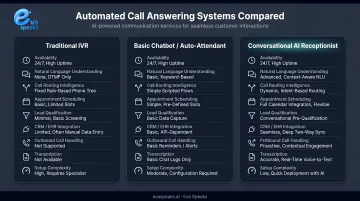
Many modern deployments combine these. An AI agent might handle open-ended intent recognition while an underlying IVR layer manages structured data collection or compliance-required steps. EvaSpeaks, for example, integrates LLMs with configurable call-flow scripts — letting businesses define specific routing rules and escalation logic on top of the AI's conversational capabilities. A key design principle behind EvaSpeaks is low infrastructure dependency: businesses can configure and deploy it without heavy IT involvement, which contrasts with enterprise-only contact center platforms that require specialist teams to maintain. You can Watch AI Call Flow Demo to see how all four processing stages work together in a real inbound call.
How Does an Automated Call Answering Service Work?
Every automated call answering service operates through the same four-stage sequence. Understanding each stage is what separates well-configured systems from ones that frustrate callers.
Stage 1: Call Initiation
When a call arrives at a business number — VoIP, landline, or cloud-based — the telephony layer detects the inbound signal and activates the answering service based on pre-configured rules.
Initiation can be set up three ways:
- Always-on — every inbound call goes to the automated system
- After-hours only — activates outside business hours, with live agents handling calls during the day
- Overflow-based — triggers when all agents are occupied or queue thresholds are exceeded
These rules are configured before any call arrives — not during the interaction. Poor initiation logic is one of the most common configuration mistakes: routing the wrong calls to automation, or failing to catch overflow scenarios, creates problems before the conversation even starts.
Eva Speaks supports configuration of call-flow scripts, routing rules, and office hours, giving businesses control over when and how the automated system engages.
Stage 2: Core Processing — Understanding the Caller
This is where the system converts the caller's input into something it can act on.
For IVR/auto attendant systems: The caller presses a keypad number (DTMF input). The system maps that input to a pre-defined outcome. No language understanding required.
For AI-powered systems, the processing chain is more sophisticated. EvaSpeaks handles this full pipeline — from speech recognition to LLM-generated response to text-to-speech delivery — in a single integrated platform, which is part of what makes it accessible to businesses that lack the engineering resources to stitch together separate components:
- ASR (Automatic Speech Recognition) — converts spoken words into a text transcript. Modern streaming ASR systems operate with latency around 100ms per audio chunk, per Google Cloud's Speech-to-Text best practices, keeping conversations feeling natural.
- NLP/Intent Recognition — the transcript is analyzed to extract intent and entities. "I need to reschedule my appointment" maps to intent: reschedule, entity: appointment.
- LLM Response Generation — generates a contextually relevant response using the identified intent, conversation history, and the business's knowledge base.
- TTS (Text-to-Speech) — the response is synthesized into natural-sounding speech and played back to the caller.
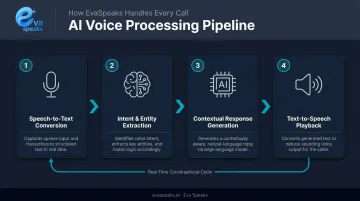
The entire loop runs in near-real time. The quality of the ASR layer matters more than most businesses realize — AssemblyAI's streaming benchmark measured a mean word error rate of 6.3% across 80,000+ audio files, and noted that errors on business-critical entities like phone numbers can be disproportionately high in some models. To hear how accurate ASR and natural responses sound in practice, you can Listen to Sample AI Call.
Stage 3: Call Routing and Control
Once the system understands the caller's need, routing rules map that intent to a specific outcome:
- Transfer to a department or specific agent
- Send an SMS confirmation
- Book an appointment via a connected scheduling tool
- Continue the automated flow for additional questions
- Escalate to a human agent with full conversation context
The difference between smooth and frustrating automation comes down to ambiguity handling. When input is unclear, well-configured systems:
- Re-prompt with a fallback sequence rather than failing silently
- Apply confidence thresholds before acting on uncertain intent
- Escalate to a human agent when a scenario falls outside the automation's scope
Stage 4: Post-Call Output
After the call ends, the system automatically generates:
- Call recording — full audio of the interaction
- Transcript — text version of the conversation
- Call summary — structured summary of what was discussed and what action was taken
- CRM record or task entry — when integrated with downstream tools
Eva Speaks captures recordings and transcriptions as part of its core service, with data stored in U.S. data centers and retained for service delivery and quality assurance. Customers can opt out of having their data used for AI model training by contacting privacy@evaspeaks.ai.
These outputs feed directly into operations: summaries inform follow-up actions, transcripts support quality review, and CRM entries ensure no caller context disappears between interactions.
The Technology Stack Behind AI-Powered Answering
Four functional layers make up a modern AI answering system:
| Layer | Function | What Affects Quality |
|---|---|---|
| Telephony | Call delivery and audio handling | Codec quality, latency, network stability |
| ASR | Speech-to-text conversion | Accent handling, background noise, WER |
| AI/NLP | Intent recognition and response generation | LLM capability, knowledge base quality |
| TTS | Text-to-speech output | Voice naturalness, prosody, latency |
Each layer contributes to how natural the conversation sounds. A strong LLM generating excellent responses still produces a poor experience if the ASR layer produces inaccurate transcripts or the TTS output sounds robotic.
The Knowledge Base Factor
The AI's ability to answer accurately depends entirely on what it has been given access to. A knowledge base typically includes:
- Business hours and location details
- Service descriptions and pricing
- FAQs and common objection handling
- Escalation conditions and transfer instructions
A thin or outdated knowledge base is the most common reason AI answering systems give callers wrong information — confidently.
IVR vs. LLM-Based Processing
The distinction matters for understanding capability limits:
Legacy IVR systems use decision trees and keyword matching. They're rigid and predictable — useful for structured, low-variability workflows. They break when callers phrase requests in unexpected ways.
LLM-based agents use probabilistic language understanding. Unlike IVR, they handle unscripted inputs and multi-turn conversations without falling apart. According to Gartner, conversational AI platforms now combine composite AI techniques — including generative AI, LLMs, prompt engineering, and retrieval-augmented generation (RAG) — to support these capabilities.
Here is how AI-powered, IVR-based, and human-staffed automated answering options compare for customer support:
| AI Automated Answering (EvaSpeaks) | Legacy IVR Answering | Human Answering Service | |
|---|---|---|---|
| Features | Natural language, scheduling, routing, CRM sync, 24/7 | DTMF menus, basic routing, message-taking | Human agents, adaptive, note-taking |
| Best-fit Business Size | SMB to mid-market | Large enterprises | Any size |
| Key Strengths | No missed calls, consistent, instant CRM updates | Widely deployed, predictable | Human empathy, complex situations |
| Implementation Complexity | Low - hours | High - IT-dependent | Low |
| Integration Capability | CRM, ticketing, scheduling native | Custom dev required | Manual or limited |
Where Automated Call Answering Services Fit in Business Operations
Understanding where automation fits in your call workflow determines how well it performs. Automated answering typically operates in one of three positions:
- Primary first contact — handles every inbound call before any human involvement
- Overflow handler — activates during peak hours when agents are occupied
- After-hours coverage — runs outside business hours with a different call flow
Many businesses use different configurations for different call windows — a live agent during core hours with AI handling overflow, and full automation overnight.
Industries Where Performance Is Strongest
Automated answering performs best in environments with high call volume and repeatable inquiry patterns:
- Home services — appointment booking, service area questions, pricing inquiries
- Healthcare intake — scheduling, hours, location, insurance questions
- Legal — lead qualification, consultation scheduling, case type routing
- Real estate — property inquiries, showing scheduling, agent routing
- Professional services — intake qualification, appointment booking, FAQ handling
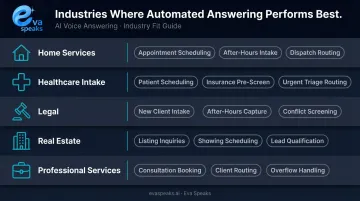
What these industries share is a predictable call structure. When most callers ask similar questions with a defined range of answers, automation handles the load without degrading the caller experience. You can See Industry Use Cases to explore how each of these industries has deployed automated call answering at scale.
When Automation Shouldn't Handle the Call
Not every call is a good fit. Performance drops in these scenarios:
- Highly emotional situations requiring empathy and judgment
- Complex multi-issue calls that require human discretion
- Callers in non-standard situations outside the configured logic
- Regulatory or compliance-sensitive conversations requiring human accountability
The answer is clear escalation paths. When a call exceeds what automation is configured to handle, a well-designed system routes it to a live agent without friction — preserving the caller experience and keeping the AI where it performs best.
Conclusion
An automated call answering service isn't a single piece of software. It's a layered system: telephony, speech recognition, language processing, response generation, and routing — each stage dependent on the one before it.
Understanding those stages changes how you configure the system. Businesses that treat automated answering as an opaque process end up with poorly designed call flows, weak knowledge bases, and escalation thresholds that either escalate too early or trap callers too long. Businesses that understand the processing chain can make informed decisions about whether IVR, AI, or a hybrid approach actually matches their call patterns. That understanding is what separates a system callers tolerate from one that actually resolves their issues. Businesses ready to see Eva Speaks applied to their own call patterns can Request Live Demo to evaluate it against a real scenario.
Frequently Asked Questions
What is an automated answering service?
An automated answering service is a technology system that answers inbound business calls without a live human agent. It handles caller inquiries through pre-recorded menus or AI-driven conversation and routes or resolves calls based on configured logic, running 24/7 without staffing requirements.
What is the difference between IVR and auto attendant?
An auto attendant handles basic call routing through menus ("press 1 for sales"), directing callers to the right department or person. An IVR goes further — it collects structured caller input, applies business logic, and supports self-service workflows. The terms are often used interchangeably, but IVR implies deeper functionality.
How does an AI answering service work?
The caller speaks, and automatic speech recognition converts the audio to text. An NLP/LLM layer identifies the caller's intent and generates a relevant response. Text-to-speech converts that response to audio and delivers it back to the caller in real time — creating a full conversation without a human agent involved.
Can automated call answering services integrate with CRM and other business tools?
Yes. Modern AI-powered systems connect with CRM platforms, scheduling tools, and messaging applications to automatically log calls, update contact records, and trigger follow-up workflows after each interaction, with no manual data entry required.
What happens when an automated system cannot handle a caller's request?
Well-configured systems include escalation rules that detect when a caller's intent falls outside the system's scope and automatically transfer the call to a human agent. The conversation context transfers with the call, so the caller doesn't have to repeat themselves from the beginning.
Are automated call answering services suitable for small businesses?
Yes, particularly AI-powered options that don't require dedicated IT resources to set up and offer 24/7 coverage that small teams can't staff manually. Entry-level AI answering plans from various providers start in the $79–$95/month range, making the technology accessible well before a business needs a full contact center.