Introduction
Picture this: a receptionist picks up the phone to reschedule a patient. Before that call ends, two more are waiting — one needs a prescription refill, another is asking about lab results. Meanwhile, three patients at the front desk are staring at the back of her head.
This is a typical Monday morning at most medical offices. And the problem isn't that phones ring — it's that every call lands in the same place, handled the same way, regardless of urgency or complexity.
Misrouted and delayed calls carry real consequences. Research from VHA primary care sites confirms that telephone access barriers may cause patients to delay or forgo needed care. Staff morale suffers too, when most of the workday is spent transferring calls rather than supporting the patients physically present.
Call routing systems address this directly, automatically sending each incoming call to the right person or department without a manual operator. This guide covers what call routing is, the types used in medical settings, how each method improves workflow, what HIPAA requires, and how to choose the right system for your practice.
Key Takeaways
- Call routing automatically directs patient calls to the right staff member or department without manual transfers
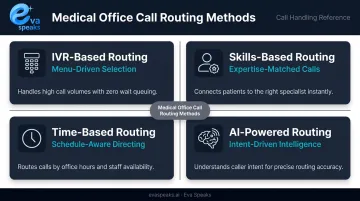
- Medical offices use four main methods: IVR menus, skills-based routing, time-based routing, and AI-powered routing
- Good routing cuts hold times, reduces abandoned calls, boosts first-call resolution, and frees up front desk staff
- A signed BAA is required from any vendor storing call recordings or transcripts to stay HIPAA-compliant
- Choosing the right system comes down to call volume, practice size, EHR compatibility, and after-hours needs
Medical offices that want to see what AI-powered call automation looks like in a clinical context can Explore AI Call Automation before reading the full routing breakdown.
What Is a Call Routing System for Medical Offices?
Call routing is the automated process of directing an incoming call to the right destination — a specific staff member, department, voicemail, or queue — based on pre-configured rules. No human operator needed to manually transfer every call.
Medical office routing differs from generic business phone routing in three critical ways:
- Clinical urgency — a patient describing chest pain must reach a provider immediately, not a billing queue
- After-hours complexity — on-call schedules change weekly, and routing logic must reflect that
- HIPAA-sensitive pathways — calls containing patient names, appointment details, or clinical information require secure handling throughout the routing chain
Medical office routing systems involve three core components:
- A VoIP or cloud-based phone system — the infrastructure that receives and transmits calls
- An IVR layer — the menu system callers interact with ("Press 1 to schedule...")
- A routing engine — the rules-based logic that sends each call to its destination
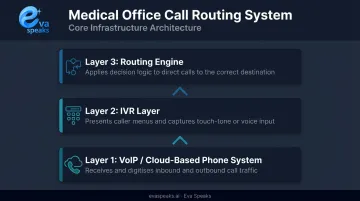
Before evaluating vendors, understand which layer each solution covers — a system with strong IVR but no intelligent routing engine still leaves staff manually handling transfers.
Why Call Routing Is a Workflow Problem Worth Solving
Most practices don't realize how much their phone system is costing them until the numbers become impossible to ignore.
An MGMA case study on Valley View Hospital clinics found that some clinics had more than 50% of incoming calls going to voicemail — against a target of 10% or lower. After phone workflow improvements, staff reduced time spent on calls and voicemail by 48 hours per month. The same practice reported a 17% increase in work RVUs, suggesting that communication bottlenecks had been suppressing clinical throughput.
The warning signs of a routing problem are easy to recognize:
- Patients being transferred multiple times for a single request
- High call abandonment during peak morning hours
- On-call providers missing after-hours clinical calls
- Front desk staff spending the majority of their shift on hold transfers instead of assisting in-office patients
These gaps carry real costs. Missed calls turn into missed appointments. Repeat calls eat into staff time that could go toward in-office patients. Urgent clinical calls that never reach a provider create liability exposure.
The problem also scales with practice growth. Add a second location, a new specialty, or two more providers, and an unstructured phone system becomes unmanageable fast. A routing system addresses today's bottleneck while giving your practice the infrastructure to handle what's coming next.
Types of Call Routing Methods Used in Medical Offices
IVR-Based Routing
IVR (interactive voice response) presents callers with a menu of options and routes them based on their selection. The "Press 1 to schedule an appointment, Press 2 for billing" pattern is the most common version most patients have encountered.
The design principle that matters most for medical offices: menus should reflect how patients describe their needs, not how the practice is internally organized. Patients say "test results" — not "clinical department." They say "I need a refill" — not "pharmacy liaison."
ICMI's contact center guidance recommends keeping menus to a maximum of five options. Beyond that, callers either guess or abandon.
Skills-Based Routing
Skills-based routing directs calls to the staff member best qualified to handle a specific request:
- Billing questions → billing staff
- Refill requests → clinical staff
- New patient inquiries → intake coordinators
- Insurance verifications → front office specialists
Beyond faster resolution, there's a proficiency benefit: staff who handle focused call types consistently become more accurate and efficient over time. The routing system creates natural specialization without requiring additional headcount.
Time-Based and After-Hours Routing
Time-based routing changes call destinations automatically based on time of day or day of week:
- During office hours → front desk queue
- After 5 PM weekdays → on-call provider pathway
- Weekends and holidays → urgent care message or answering service
For medical offices, after-hours routing isn't optional — patients don't stop having clinical needs at closing time. An after-hours caller with a genuine urgent concern who reaches a generic voicemail is both a care risk and a liability risk.
AI-Powered Call Routing
AI-powered routing goes beyond static menu trees. Using natural language processing (NLP) and large language model (LLM) integration, these systems understand what a caller is asking in their own words — without forcing them to navigate numbered menus.
A 2023 Springer review of NLP in contact center automation found that approximately 20% of callers using touch-tone routing do not reach the correct service department. NLP-based routing addresses this by interpreting intent from conversational speech rather than keypad selections.
AI routing also handles routine requests — office hours, directions, appointment confirmations — before transferring to staff, reducing the volume of calls that require a live person. Platforms like EvaSpeaks use LLM integration with customizable call-flow scripts, allowing practices to build routing logic that mirrors how they actually operate rather than requiring patients to adapt to fixed menu structures. EvaSpeaks also requires no dedicated hardware or on-premise software — it connects to the practice's existing phone number through standard telephony integrations, which is why smaller single-provider offices can adopt it as readily as larger multi-location groups. You can Watch AI Call Flow Demo to see how AI-powered intent routing handles a real patient call without numbered menus.
Here is how AI-powered, cloud IVR, and on-premise call routing solutions compare for medical facilities:
| AI-Powered Routing (EvaSpeaks) | Cloud Healthcare IVR | On-Premise Routing System | |
|---|---|---|---|
| Features | Natural language, triage routing, EHR sync, 24/7, HIPAA-compliant | DTMF menus, appointment reminders, hold queue | Fixed routing trees, limited after-hours |
| Best-fit Business Size | Clinics to large health systems | Enterprise hospital networks | Large hospital systems |
| Key Strengths | 24/7, no hold time, EHR-native, patient-friendly | Widely deployed, structured | Full control, on-premise compliance |
| Implementation Complexity | Low - EHR connectors | High - IT-dependent | Very High |
| Integration Capability | Epic, Cerner, Athena native | Custom dev required | Custom dev required |
How Call Routing Improves Medical Office Workflow
Reducing Hold Times and Call Abandonment
When calls route directly to the right person or queue, patients spend less time waiting for a manual transfer. The clinical benchmark is clear: VHA primary care research sets a telephone access standard of average speed of answer ≤30 seconds and call abandonment below 5%.
Practices that exceed those thresholds — particularly during morning peaks — are losing patients before a conversation even starts. Call abandonment isn't just a metric; it represents appointments that were never scheduled and care that may have been delayed.
Improving First-Call Resolution
First-call resolution (FCR) measures the percentage of calls resolved without a callback or repeat contact. Skills-based and AI-powered routing directly improve FCR by ensuring callers reach someone capable of handling their specific request on the first attempt.
Every unresolved call that requires a callback consumes additional staff time — the same staff already stretched thin. For medical offices, the cost isn't just operational: a patient who can't get their question answered on the first call may disengage from their care plan entirely.
Freeing Front Desk Staff for In-Office Priorities
When IVR handles directions, office hours, and appointment confirmation messages automatically, routing automation reduces the volume of calls that require a live agent. Front desk staff can focus on the patients physically standing in front of them.
Patient satisfaction in-office is shaped in part by whether staff seem present and engaged — not distracted by a phone that rings every three minutes.
Supporting After-Hours and On-Call Coverage
Effective after-hours routing ensures that clinical calls reaching the practice outside of office hours always connect with the scheduled on-call provider, not a dead-end voicemail. The escalation logic should work like this:
- Call routes to the primary on-call provider
- If unanswered within a set threshold, routes to the next provider in the rotation
- If still unanswered, prompts the caller to leave a callback number for urgent follow-up
Practices without this escalation logic rely on manual handoffs — which fail the moment a provider misses a notification. You can See How AI Handles After-Hours Calls to see how automatic after-hours escalation routing works without any manual staff involvement.
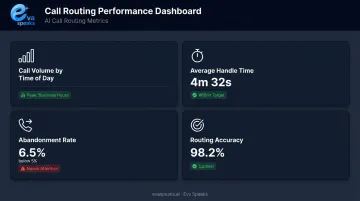
Generating Actionable Call Data
Modern call routing platforms produce performance reports that give practice managers visibility into:
- Call volume by time of day, to identify peak windows and adjust staffing
- Average handle time, to flag call types that routinely require longer resolution
- Abandonment rate, to catch routing failures before they become patient complaints
- Routing accuracy, to verify calls are reaching the right destination
Patterns in that data point directly to where adjustments are needed. A spike in abandonment on Monday mornings or a billing queue with disproportionate hold time are specific, fixable problems — once you can see them.
HIPAA Compliance Considerations for Call Routing
Call routing systems in medical offices frequently handle protected health information (PHI) — patient names, appointment details, clinical questions asked through the IVR or conveyed to staff during a transfer. That creates compliance obligations covering vendor selection, staff training, and documented policies — not just the technology itself.
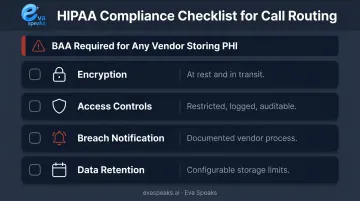
HHS guidance on audio telehealth and communication tools draws a clear line: a vendor with only transient access to PHI (a basic conduit) may not require a BAA. But any platform that stores recordings, voicemails, or transcripts tied to patient information is handling PHI — and must execute a signed Business Associate Agreement before going live.
Key compliance checkpoints when evaluating a routing platform:
- Encryption — are call recordings and voicemails encrypted at rest and in transit? HHS technical safeguards guidance lists encryption as an addressable specification under the Security Rule
- Access controls — is access to call logs and recordings restricted, logged, and auditable?
- Breach notification — what is the vendor's documented process if PHI is exposed?
- Data retention — how long are recordings and transcripts stored, and can that be configured?
One category of risk that often gets overlooked is consumer phone apps and generic business communication tools. These platforms rarely offer BAAs or healthcare-grade data protections, which means using them in a clinical context creates compliance exposure regardless of practice size.
A small single-provider office is not exempt from HIPAA. If a breach occurs, regulators won't treat "it was only used for scheduling" as a mitigating factor.
For any cloud-based routing platform that processes and stores call data — including AI-driven systems like Eva Speaks — confirming BAA availability before deployment is a required step, not an optional one. Ask vendors directly, get it in writing, and verify it covers the specific data flows your office generates. Medical practices that want to discuss HIPAA requirements and BAA availability for their specific setup can Talk to an AI Communication Expert.
How to Choose a Call Routing System for Your Medical Practice
The right system depends on factors specific to your practice. Start by assessing what your current workflows actually demand before evaluating vendors.
Key Practice Factors to Assess First
- Current daily call volume and how it breaks down by call type (scheduling, clinical, billing, general)
- Number of providers and locations
- After-hours and on-call routing complexity
- Whether EHR or practice management integration is needed to pull patient context during a call
Features to Prioritize
| Feature | Why It Matters |
|---|---|
| Customizable call-flow scripts | Routing rules should match your actual workflows, not a template |
| IVR or AI natural language handling | Reduces caller friction and misrouted calls |
| Time-based and on-call scheduling | Critical for after-hours clinical coverage |
| HIPAA-compliant call recording storage | Required if recordings are retained |
| Analytics dashboards | Needed to monitor performance and catch routing errors |
AI-powered platforms that integrate LLMs — such as Eva Speaks — let practices configure call flows without fixed numbered menu structures. This matters most when patient call types are diverse or hard to predict.
Questions to Ask Vendors
- Does the platform offer a signed BAA for healthcare clients?
- Can routing rules be updated without system downtime?
- Does the system integrate with your existing VoIP or EHR?
- What happens if the primary routing destination is unavailable — is there automatic failover?
- Can the practice opt out of call data being used for AI model training?
Implementation Approach
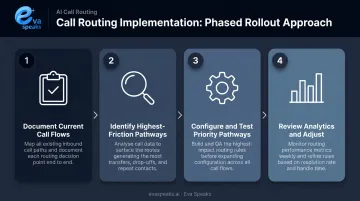
Once you've selected a vendor, a phased rollout reduces disruption and surfaces problems early:
- Document what calls come in, at what volume, and where they currently go
- Pinpoint highest-friction pathways — after-hours routing, scheduling, and billing are typically where failures are most costly
- Configure and test those pathways first, before expanding to more complex workflows
- Review performance data after 30 days and adjust routing rules based on what the analytics reveal
Frequently Asked Questions
What is a call routing service?
A call routing service automatically directs incoming calls to the right person, department, or queue based on predefined rules — eliminating manual transfers and getting callers where they need to go faster. It can include IVR menus, skills-based rules, time-based logic, or AI-powered natural language handling.
What types of call routing are most commonly used in medical offices?
The four main types are IVR menu-based routing, skills-based routing (directing calls by staff specialization), time-based routing (adjusting destinations by office hours or day of week), and AI-powered routing that uses natural language processing to route without numbered menus.
How does call routing support HIPAA compliance?
Call routing itself doesn't guarantee compliance. Any vendor storing call recordings, voicemails, or transcripts tied to patient information must provide a signed BAA. Recordings must be encrypted, and access to call logs must be controlled and auditable to protect PHI.
What is the difference between IVR and AI-powered call routing?
IVR requires callers to navigate a numbered menu by pressing keys. AI-powered routing uses natural language processing to understand spoken requests and route accordingly — reducing friction and avoiding the misrouting that affects roughly 20% of touch-tone callers.
Can a small medical practice benefit from a call routing system?
Yes. Even single-provider practices benefit from separating urgent clinical calls from routine scheduling requests and ensuring after-hours calls reach the on-call provider. A basic call routing setup can reduce missed calls and improve patient access without enterprise-level complexity.
How do I know if my current call routing setup needs an upgrade?
Watch for these signals: frequent patient complaints about hold times, staff spending most of their day on manual transfers, call abandonment rates above 5%, and after-hours calls going to a generic voicemail instead of the on-call provider.