The typical owner is a RevOps lead or IT manager, sometimes both. That's not accidental: according to G2's 2025 Buyer Behavior Report, IT is involved in 47% of software purchase decisions, and 55% of AI purchases are funded by central IT budgets. Implementation governance needs to reflect that — which means looping in whoever owns the CRM, the phone system, and customer success before configuration begins.
This guide covers the complete implementation sequence: prerequisites, configuration steps, integration setup, testing, and the most common problems teams run into after launch.
Key Takeaways
- Implementation takes 1–5 business days depending on integration depth and routing complexity
- Before starting: confirm CRM compatibility, phone system setup, U.S. compliance requirements (TCPA, CCPA), and knowledge base content
- Core steps: configure agent identity, build call flows, connect integrations, train knowledge base, assign number, then test before go-live
- Skipping pre-launch validation is the leading cause of misrouted calls and broken CRM sync
- A well-configured AI receptionist handles tier-1 SaaS inquiries automatically, so your team focuses on enterprise deals and complex support tickets
Why SaaS AI Receptionist Implementations Are More Complex Than They Appear
The hidden complexity isn't the technology — it's the caller mix.
SaaS inbound calls come from at least four distinct groups, each expecting a different response: trial users exploring the product, paying customers with support issues, enterprise prospects evaluating a purchase, and technical escalations that need a human immediately. Each group needs different routing logic. Default settings don't cover this.
When teams rush implementation, predictable failures follow:
- Enterprise prospects get routed to a generic sales queue with no priority handling
- Support escalations loop back into the wrong flow because triggers aren't defined
- Pricing answers reflect outdated tiers because the knowledge base was never updated
- Handoffs to humans drop context, leaving agents starting from scratch
HBR research found that companies contacting inbound leads within one hour were nearly 7x more likely to qualify them than those who waited. A misrouted call doesn't just delay a response — it costs a qualified lead.
Teams that treat this like a product launch — with defined goals, structured test cycles, and iteration loops built in — see measurably better outcomes than those who configure it once and move on.
Want to see what implementation looks like? Request Live Demo
How the Main AI Receptionist Approaches Compare for SaaS
Here is how different approaches to AI receptionist deployment compare for SaaS and managed services environments:
| AI-Native (EvaSpeaks) | Human-Hybrid (Smith.ai) | DIY Integration (CPaaS) | |
|---|---|---|---|
| Features | Full AI conversation, native integrations, no-code setup | AI-assisted human agents | Programmable voice APIs, custom build |
| Best-fit Business Size | SMB to scaling SaaS | Growing SMB | Engineering teams, mid-market |
| Key Strengths | Fast to deploy, predictable cost, easy to update | Human judgment when needed | Maximum flexibility |
| Implementation Complexity | Low - hours | Low | High - developer required |
| Integration Capability | CRM, helpdesk, ticketing native | Limited by agent tools | Fully custom |
Prerequisites and Setup Checklist
Get these confirmed before touching any configuration interface.
System and Infrastructure Readiness
- Phone system compatibility: Confirm whether your existing VoIP or telephony provider supports call forwarding or SIP integration with your AI receptionist platform, or whether you'll provision a new dedicated number. Not all providers are compatible out of the box.
- CRM access: Verify that your CRM (Salesforce, HubSpot, or similar) has API access enabled or native integrations available. Salesforce holds 20.7% CRM market share per IDC 2024 data and HubSpot's Smart CRM is a core data platform for lead and customer tracking — both are common SaaS stacks, and both require pre-configured API credentials before integration will work.
- Calendar tool: Confirm your scheduling tool (Google Calendar, Calendly, etc.) can be connected before configuration begins — not after.
Compliance Requirements
| Regulation | What it covers | Action required |
|---|---|---|
| TCPA | AI-generated voices on calls — FCC confirmed in 2024 that AI voice falls under TCPA restrictions | Disclose AI identity at call start |
| GDPR/CCPA | Call transcript storage and caller data processing | Confirm platform's data handling agreements and retention controls |
| HIPAA | ePHI handling for healthcare-adjacent SaaS | Require a signed BAA before routing any health-related calls |
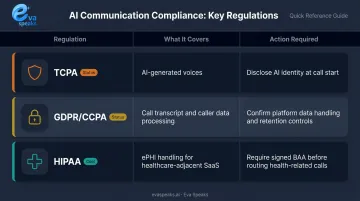
One non-negotiable: if your SaaS serves healthcare or financial services clients, verify HIPAA compliance or equivalent before proceeding. Per HHS guidance, any cloud vendor handling ePHI on behalf of a covered entity is a business associate and requires a compliant BAA.
Content and Team Preparation
Before configuration, have these ready:
- Current pricing tiers and FAQ
- Feature documentation (including version or tier-specific differences)
- Known support escalation triggers, phrased the way real callers describe them rather than internal jargon
- Product terminology the AI needs to recognize accurately
Loop in: the CRM owner, the phone system manager, and at least one customer success person who can validate call flows against real scenarios.
Not sure where to start? Get a Customized Workflow Recommendation
How to Implement an AI Receptionist: Step-by-Step
Each step builds on the previous one. Assigning a phone number before testing call flows is a consistent source of post-launch problems — don't skip ahead.
Step 1: Configure Agent Identity and Behavior
Set the agent's name, opening message, language, and tone to match your brand. For SaaS, that usually means professional but conversational — technically sophisticated callers notice when AI sounds over-scripted or evasive.
Define scope clearly:
- Handle: tier-1 inquiries, demo bookings, billing questions, support triage
- Always escalate: enterprise deal conversations, churn-risk customers, billing disputes, security incidents
Step 2: Build Call Flows and Routing Rules
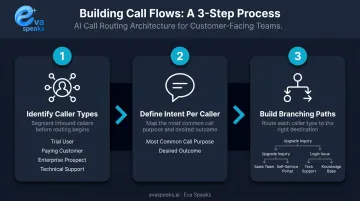
Map your inbound scenarios on paper before touching any interface:
- Identify caller types — trial user, paying customer, enterprise prospect, technical support
- Define the most common intent for each — what they're calling about and what the right outcome is
- Build branching paths — a "I want to upgrade" call routes differently than "I can't log in"
EvaSpeaks' customizable call-flow scripts and routing rules allow SaaS teams to define these branching paths without developer involvement. LLM integration handles varied caller phrasing, so callers reach the right destination without using exact keywords. In a SaaS context where technically sophisticated callers will quickly notice if an AI seems limited or scripted, EvaSpeaks' LLM-powered conversations — which adapt based on what the caller actually says — represent a qualitatively different experience from keyword-matching IVR systems.
Step 3: Connect Integrations
- CRM connection: Call outcomes, transcripts, and contact details should log automatically against the correct account or lead record. Test that calls from unknown numbers create new contact records correctly.
- Token expiration note: HubSpot OAuth access tokens expire every 30 minutes. Confirm your integration handles refresh tokens before go-live.
- Calendar connection: Verify the AI can check real-time availability and complete a booking within the same call, not via a follow-up link sent afterward.
Step 4: Train the Knowledge Base
Upload or link your core content:
- Pricing page (current version)
- Feature documentation with tier-specific details
- Onboarding FAQ and common support articles
- Escalation triggers: specific phrases or topics that route immediately to a human
For SaaS specifically, include tier-specific answers. Returning a free-plan response to an enterprise caller signals the system doesn't recognize who it's talking to.
Step 5: Assign a Number and Configure Availability
- Assign the AI to a dedicated number or configure forwarding from your main line
- Define availability mode: 24/7 primary receiver, business-hours primary with after-hours backup, or overflow handler only
Each mode has different implications for caller experience. Match the mode to your team's actual capacity — not your aspirational coverage.
See the full call flow in action. Watch AI Call Flow Demo
Testing and Validating Before Go-Live
SaaS callers are often technically literate. A failed handoff or a wrong pricing answer can cost a deal — and they'll remember it. NIST AI RMF 1.0 recommends that AI systems be tested before deployment and regularly while in operation, with validation throughout the lifecycle.
Run Structured Test Calls
Place test calls simulating each caller type in your routing map:
- New trial user asking about features
- Paying customer reporting a bug
- Prospect requesting a demo
- Caller asking something outside the AI's defined scope
- Caller asking something outside the AI's defined scope
- CRM entries and calendar bookings created during the call — integration failures show up here first, before they affect real customers
Each call should follow its intended path and trigger the correct downstream action.
Validate Escalation and Fallback Behavior
- Confirm live transfers work: calls route smoothly, the human agent receives context, and callers aren't left in silence during handoff
- Test after-hours behavior specifically — verify the AI responds correctly and takes accurate messages or completes bookings
- Confirm that team members receive notifications when after-hours interactions occur
Review Transcripts and Tune
Read every test call transcript before launch. Look for:
- Response gaps where the AI gave a generic answer
- Misunderstood intents that sent callers down the wrong path
- Escalation triggers that didn't fire when they should have
Address each issue in the knowledge base or routing scripts before the number goes live.
Common Implementation Problems and Fixes
Most implementation issues fall into three predictable categories, and all of them are avoidable with the right setup.
AI misroutes or fails to escalate technical support calls
- Why it happens: Escalation triggers were written in internal jargon that real callers don't use
- Fix: Pull language from actual support tickets, not internal documentation. Add a catch-all fallback: any question the AI can't answer with confidence should trigger escalation
CRM sync failures — call data isn't logged
- Root cause: Expired API token, incorrect webhook URL after a config change, or wrong field mapping during initial setup
- Fix: Run a deliberate test call immediately after any configuration change. Set up webhook failure alerts so sync issues surface immediately rather than going unnoticed
Knowledge base gaps cause wrong answers
- What's happening: The knowledge base was populated once and never updated as pricing or features changed
- Fix: Assign a named owner for knowledge base maintenance. Create a trigger — any pricing, tier, or feature change prompts an immediate review of related AI content
Pro Tips for a Successful Rollout
- Start narrow: Deploy for after-hours coverage and overflow first, not as the primary receiver from day one. Observe real call patterns and tune before it handles full volume.
- Disclose AI identity on every call. This is a legal requirement under TCPA for AI-generated voices, and technically sophisticated SaaS buyers will appreciate the transparency rather than resent the disclosure.
- Schedule transcript reviews at weeks one, two, and four post-launch. Eva Speaks' call transcription and real-time logging surface recurring gaps — questions missing from the knowledge base, escalation triggers that aren't firing — so you can iterate before problems compound.
- Document your call flow logic in a shared internal document from day one. When team members change or you add a second product line, you won't be rebuilding logic from memory.
See how AI handles support calls outside business hours. See How AI Handles After-Hours Calls
Frequently Asked Questions
How much does an AI receptionist cost?
Pricing models vary: usage-based platforms charge per minute of call time, while flat-rate SaaS plans bundle a call volume allowance into a monthly fee. Entry-level tools start around $30–$100/month; hybrid human+AI services run higher. High-volume SaaS businesses should watch for per-minute overage charges that can quickly inflate total cost.
Is an AI receptionist a good idea for SaaS companies?
For most SaaS businesses handling regular inbound volume — demo requests, support triage, onboarding questions — yes. It ensures no call goes unanswered and captures intent while it's fresh. Pair it with defined escalation paths for enterprise deals and complex support; it's not a substitute for human judgment on those calls.
How long does it take to set up?
Basic setup can be done in under a day. A properly configured deployment — including integrations, call flow design, knowledge base training, and test calls — typically takes 2–5 business days. Routing complexity and the number of systems being connected are the main variables.
Can an AI receptionist integrate with CRM and helpdesk tools?
Most platforms integrate with common CRMs and scheduling tools. Integration depth varies — native integrations offer more reliable field mapping than Zapier-based connections. Verify compatibility with your specific stack before choosing a platform, and confirm API access is enabled before configuration begins.
What happens when the AI can't answer a question?
A well-configured AI receptionist falls back to a defined escalation path: transferring to a human, taking a message, or sending an SMS with a follow-up link. Configuring these fallback behaviors during setup — not as an afterthought — is one of the most critical steps in any deployment.
Does the AI need to identify itself as an AI?
Yes. The FCC confirmed in 2024 that TCPA restrictions on artificial or prerecorded voice apply to AI-generated human voices. Disclosing AI involvement at the start of each call is both a legal requirement and good practice for building trust with callers.