Introduction
Integrating APIs into call center software is not a plug-and-play process. The complexity comes from multiple directions at once: authentication flows that break when token expiration, data schema differences between your CRM and the call center platform, real-time event handling that polling-based designs can't support reliably, and compliance requirements that vary by data type and region.
This work typically falls to in-house IT or developer teams familiar with REST APIs, supported by vendor documentation. Teams without API experience will hit a wall fast — especially when debugging silent failures, where data stops syncing without any visible error.
Poor integrations follow a predictable failure pattern:
- Broken CRM data sync that agents notice during live calls
- Authentication failures that lock out services mid-shift
- Performance bottlenecks from polling-heavy designs
- Compliance gaps exposing call recordings or customer PII
According to the 2024 Postman State of the API Report, 39% of developers cite inconsistent documentation as their primary API roadblock — and the average application now uses 26 to 50 APIs. Call center integrations sit firmly within that complexity range.
This guide covers what call center APIs are, how they work, the full integration process, common failure points, and best practices for production-ready implementations.
Watch how integrated call flows work in practice. Watch AI Call Flow Demo
Key Takeaways
- Call center APIs require developer-level knowledge of REST methods, authentication flows, and data mapping — this guide assumes you're comfortable with those fundamentals
- Prerequisites: API docs access, sandbox environment, valid credentials, and a data flow diagram before writing any code
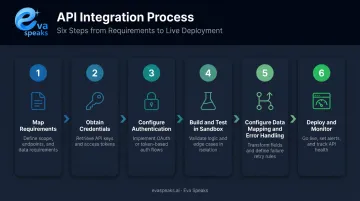
- Integration sequence: map requirements, obtain credentials, authenticate, sandbox test, configure error handling, then deploy
- The three most common failure points are authentication errors, schema mismatches, and rate limiting — all preventable upfront
- Use webhooks for real-time events; implement logging from day one, not after something breaks
Understanding Call Center Software APIs
An API is a set of rules that allows two software systems to exchange data and trigger actions. Applied to call center software: when an inbound call arrives, your CRM might fire a GET request to retrieve the caller's account history. An AI transcription service might receive a stream of call audio via WebSocket. A ticketing system might receive a POST request when a call ends, creating a support record automatically.
How APIs Work in Call Center Software
The core mechanism is the request-response cycle. Your system sends an HTTP request to the call center platform's API endpoint; the platform processes it and returns a structured response — typically JSON. Example: an inbound call triggers a GET request to the CRM API, which returns the caller's profile to the agent's screen in real time.
Webhooks work the opposite way. Instead of your system repeatedly asking "did anything happen?", the call center platform pushes data to a URL you configure when a specific event occurs — call ended, voicemail received, transcript ready. As GitHub's webhook documentation explains, webhooks receive data as it happens, rather than requiring your system to poll periodically. For call center use cases, that difference directly affects how fast agents receive context.
Main Types of APIs in Call Center Integration
| API Type | Best Fit | Key Limitation |
|---|---|---|
| REST APIs | CRM sync, call logging, routing config, reporting pulls | Schema/version changes, rate limits |
| WebSocket APIs | Live transcription, agent assist, real-time dashboards | Connection stability, backpressure |
| Webhooks | Post-call automation, queue status, CRM triggers | Delivery failures, retry/idempotency |
REST APIs handle the majority of call center integrations. The HTTP methods below apply specifically to REST-based calls — WebSocket and webhook interactions follow different protocols covered later. Core methods you'll use:
- GET — retrieve call logs, agent status, customer records
- POST — initiate calls, create tickets, send call outcome data
- PUT/PATCH — update call metadata, customer profiles, routing rules
- DELETE — remove queue entries, scheduled callbacks, configuration objects
Key API Use Cases in Call Centers
ContactBabel's 2024 US Contact Center Decision-Makers' Guide shows how widespread these use cases already are:
- CRM/routing integration: 52% of US contact centers identify customers before routing
- Screen-pop: 48% deliver customer details to agents automatically on inbound calls
- Interaction analytics: 39% use them, with 18% of those running real-time speech analytics
- Live agent assist: 27% of AI users deploy AI to suggest answers during active calls
- 66% of ICMI 2024 respondents already support AI applications in the contact center
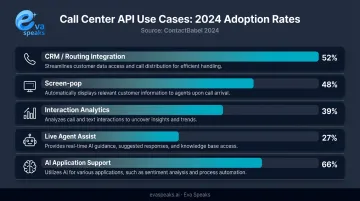
Every one of these capabilities depends on a functioning API connection — screen-pop on a CRM lookup, agent assist on live audio streaming, post-call analytics on structured outcome data. The quality of the integration determines whether these features work in production or only in demos.
Here is how AI-native, CPaaS, and native call center API integration approaches compare:
| AI-Native (EvaSpeaks) | CPaaS API (Twilio, Vonage) | Native Call Center Integration | |
|---|---|---|---|
| Features | Pre-built AI voice + CRM/helpdesk connectors, no-code | Programmable APIs for custom call flows | Built-in CTI, click-to-call, basic logging |
| Best-fit Business Size | SMB to mid-market | Engineering-heavy teams | Any size |
| Key Strengths | No dev needed, fast time to value, CRM-native | Maximum flexibility | Familiar, within existing platform |
| Implementation Complexity | Low | High - developer required | Low |
| Integration Capability | CRM, ticketing, scheduling native | Any system via custom code | Native platform only |
Want a custom integration built around your workflows? Get a Customized Workflow Recommendation
Prerequisites for API Integration
Production outages from API integrations are almost always traced back to skipped prerequisites. Before writing a single line of integration code, confirm the following are in place.
System and Environment Readiness
Required before you begin:
- Access to the vendor's complete API documentation — not a summary, the full reference
- A sandbox or staging environment with separate credentials from production
- A data flow diagram showing which systems communicate, in which direction, and triggered by what events
- Confirmed compatibility between your tech stack and the API standard (legacy on-premise systems sometimes lack REST support)
Hard stops — do not proceed if:
- API documentation is incomplete or unavailable
- Sandbox credentials cannot be provisioned
- Known compatibility gaps exist between your infrastructure and the target API
Skipping sandbox testing is the single most common cause of production outages in API integrations. Testing directly in production means your first real failure affects live calls and real customers.
Authentication Setup
Two methods dominate call center API authentication. Choose based on your integration's scope and security requirements.
| Method | How It Works | Best For | Key Risk |
|---|---|---|---|
| API Key | Key passed in request headers | Server-to-server integrations, no user accounts in scope | Keys get hardcoded into source, then rotate without warning |
| OAuth 2.0 | Token-based framework (RFC 6749) with authorization server, access tokens, and refresh cycles | Integrations acting on behalf of user accounts | More complex to implement; requires scope configuration and token lifecycle management |
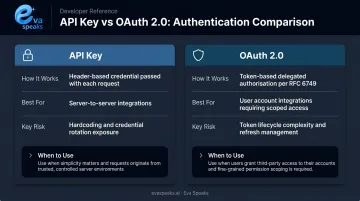
OAuth 2.0 is the more secure option for any integration touching user data. API keys are acceptable for tightly controlled, server-side workflows where credential management is enforced.
With authentication confirmed, the next step is verifying compliance requirements — these should be resolved before development begins, not during code review.
Compliance and Compatibility Checks
These checks happen before development begins, not after.
- PCI-DSS: Required if call recordings or IVR flows involve payment card data. The PCI Security Standards Council has published specific guidance for telephone-based payment card data handling.
- HIPAA: Required if call records contain electronic protected health information (ePHI). Technical safeguards must include access controls, audit controls, and transmission security.
- CCPA/GDPR: Applies when customer data belongs to California residents (CCPA) or EU residents (GDPR). Your API data flows must support consumer rights to access, delete, and opt out of data processing.
EvaSpeaks routes payment data through PCI-compliant processors and handles customer data in accordance with CCPA. For integrations involving sensitive call records or payment flows, confirm compliance requirements with their team at privacy@evaspeaks.ai before finalizing your integration design. EvaSpeaks is also notable for providing AI call handling as a managed service rather than a self-built integration — for businesses that want call center AI features without the API development overhead, it removes a significant portion of the build-versus-buy tradeoff.
How to Integrate Call Center APIs: Step-by-Step
Integration follows a defined sequence. Jumping steps (especially skipping sandbox testing or deferring error handling) creates failures that are expensive to diagnose in production.
Step 1: Map Integration Requirements
Before writing code, document exactly what needs to happen:
"When a call ends (event), send call duration, outcome, and transcript (data) to the CRM (destination) via a POST request."
Write an integration spec that captures: the triggering event, the data payload, the source system, the destination system, and the direction of data flow. One page per integration. This document becomes your testing checklist.
Step 2: Obtain Credentials and Review Documentation
Register in the vendor's developer portal and retrieve API keys or OAuth credentials. Then review:
- Rate limits per endpoint and per time window
- Endpoint structure and base URLs
- Request/response schema for each endpoint you'll use
- Error codes and their meanings
- API versioning policy and changelog
Flag any documentation gaps before proceeding. Inconsistent documentation is cited by 39% of developers as their top API roadblock — if something is unclear, get vendor clarification now rather than guessing.
Step 3: Configure Authentication
For API key auth: Store keys in environment variables or a secrets manager. Never hardcode credentials in source code.
For OAuth 2.0: Implement the full token exchange flow, store tokens securely, and build in automated refresh token logic — this step is non-negotiable. Token expiry without a refresh mechanism is one of the most common causes of integrations that work initially and then fail silently hours later.
Test authentication in isolation before building any further functionality.
Step 4: Build and Test in Sandbox
Start with the sandbox environment. Test each endpoint individually before chaining workflows, and verify:
- Request payloads match the expected schema
- Response data maps correctly to your internal data model
- Edge cases are handled: missing fields, empty responses, failed calls
Use Postman for initial endpoint testing before integrating into code. It lets you validate request/response behavior without touching your application layer.
Step 5: Configure Data Mapping and Error Handling
Map API response fields to your internal data model and document any required transformations (date format conversions, field renaming, type casting).
Structured error handling by HTTP status code:
- 401 Unauthorized — surface immediately as an alert; do not retry without investigating credentials
- 404 Not Found — non-retryable; log and alert
- 429 Too Many Requests — implement exponential backoff; do not hammer the endpoint
- 503 Service Unavailable — retry with backoff; check vendor status page
Log every API request and response with timestamps, status codes, and payload summaries. Exclude sensitive data fields from logs.
For AI-specific workflows like real-time transcription and LLM-powered routing, the data mapping step gets more complex. Platforms such as Eva Speaks ship with built-in LLM integration and configurable call-flow scripts, which cuts the manual wiring work compared to connecting AI models through custom API calls from scratch.
Step 6: Deploy and Monitor in Production
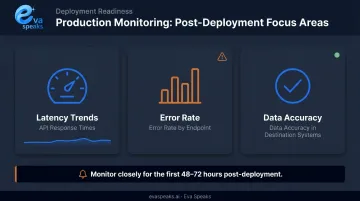
Switch to production credentials and roll out to a limited call queue or single agent group first. Monitor closely for the first 48–72 hours:
- API response times and latency trends
- Error rate by endpoint
- Data accuracy in destination systems
Set up automated alerts for error rate spikes and latency increases. Issues caught at hour two are far cheaper to fix than issues discovered at hour 72.
See how Eva Speaks handles integrated AI calls. Request Live Demo
Common API Integration Problems and Fixes
Most integration failures trace back to a small set of predictable causes. Knowing what to look for makes diagnosis — and the fix — much faster.
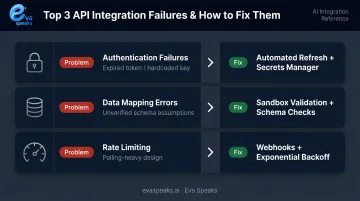
Authentication Failures and Token Expiry
Symptom: 401 Unauthorized errors, or the integration works for a period then stops.
Cause: API key hardcoded in source code and later rotated by the vendor, or OAuth access token expired with no refresh mechanism in place.
Fix: Implement automated token refresh logic for OAuth flows. Store credentials in a secrets manager. Set up monitoring alerts specifically for 401 errors — they indicate a credentials problem, not a transient issue, and won't resolve themselves.
Data Mapping Errors and Schema Mismatches
Symptom: Data lands in wrong fields, fields are missing in the destination system, or the integration fails silently.
Cause: The API response schema was assumed rather than verified against live responses. Vendor API updates without versioned change notification make this worse.
Fix: Validate payload structure against live sandbox responses before deployment. Subscribe to the vendor's API changelog. Add schema validation before data is written so unexpected field changes surface as errors rather than silent data corruption.
Rate Limiting and Timeout Errors
Symptom: Works correctly under normal load; fails intermittently at peak call volume with 429 errors or timeouts.
Root cause: A polling-based design firing too many requests per minute, or large data batches pushed synchronously without any queue.
Fix: Replace polling with webhooks where the platform supports them. For 429 responses, back off and retry with increasing delays rather than hammering the endpoint again immediately. Break large data syncs into paginated batches and process them asynchronously.
Best Practices for Call Center API Integration
Favor webhooks over polling for any real-time call center event — call start, call end, agent status change, voicemail received. Polling wastes rate limit quota and introduces latency. Well-architected call center integrations are primarily event-driven, with REST API calls reserved for on-demand data retrieval.
Implement logging and observability from day one. The Google SRE Book's four golden signals — latency, traffic, errors, and saturation — apply directly to API integrations. Silent failures, where data stops syncing without an error message, are the hardest to diagnose without proper logging infrastructure already in place.
Keep Integration Documentation Current
Maintain a shared internal document covering:
- All active endpoints and their purpose
- Data transformation logic
- Authentication methods and credential locations
- Known edge cases and their handling
- Vendor API version in use
Update this document whenever vendor API versions change. Undocumented integrations break silently when team members leave and institutional knowledge walks out with them.
Know when to build versus buy. Custom API integrations make sense when your requirements are highly specific and your team has the bandwidth to maintain them. For AI-heavy call workflows — real-time transcription, LLM-powered routing, AI call handling — purpose-built platforms handle more of the integration work for you. Eva Speaks, for example, provides configurable call-flow scripts and LLM-powered routing without requiring you to wire AI models through separate APIs, manage token refresh logic for AI service authentication, or map AI response schemas to your internal data models.
Have questions about your API integration approach? Talk to an AI Communication Expert
Conclusion
The quality of an API integration directly determines how reliably your call center operates. Poor integrations produce incomplete customer records, missed events, and agent-facing data gaps that affect both customer experience and team productivity.
Disciplined execution makes the difference: map requirements before writing code, test thoroughly in sandbox, and monitor closely after production deployment. Vendor APIs evolve, schemas change, and authentication credentials rotate on schedules you don't control. Treat your integrations as living systems — schedule periodic reviews, subscribe to vendor changelog notifications, and assign clear ownership so nothing breaks silently in production.
Frequently Asked Questions
What is an API for call center software integration?
A call center software API is a set of communication rules that allows the call center platform to share data and trigger actions with external systems. Common uses include pulling CRM records during an inbound call, logging call outcomes to a ticketing system, or streaming audio to a transcription service.
How do APIs work in call center software integration?
A system sends an HTTP request to the API endpoint — for example, to fetch a caller's account record — and the call center platform returns a structured JSON response. Webhooks work the opposite way: the platform pushes data to your configured URL when a specific call event occurs, without requiring your system to ask.
What are the main types of APIs used for call center integration?
REST APIs are most common and handle CRM sync, call logging, and routing configuration. WebSocket APIs provide persistent real-time connections used for live transcription and agent assist. Webhooks are event-driven callbacks used for post-call automation, queue status changes, and real-time notifications.
What REST API methods are commonly used in call center software integration?
GET retrieves call logs, agent status, and customer records. POST initiates calls, creates tickets, and sends data to external systems. PUT/PATCH updates call records or customer profiles. DELETE removes scheduled callbacks or queue entries.
What security best practices should I follow when integrating call center APIs?
Store credentials in a secrets manager (never in source code), use OAuth 2.0 for delegated access, and enforce HTTPS on every call. Restrict API key permissions to the minimum required scope and audit access logs regularly — especially since call data often falls under GDPR, HIPAA, or PCI-DSS requirements.
How do you test a call center API integration before going live?
Start in the vendor's sandbox, testing individual endpoints with Postman and validating that request/response schemas match your data model. Simulate edge cases — empty fields, failed calls, rate limit responses — then run a full end-to-end test with a small agent group before production deployment.