Intelligent virtual assistants (IVAs) have become a practical response. But deployment results vary widely. Businesses that rush setup often see poor resolution rates, frustrated customers, and a system that costs more than it saves.
This guide covers the exact steps to automate customer support with an IVA, what you need before you start, the variables that determine performance, and the mistakes that derail even well-resourced rollouts.
Key Takeaways
- IVAs use NLP, ML, and LLM integrations to handle routine inquiries autonomously across voice, chat, and messaging channels
- Effective automation follows a clear sequence: audit your support workflow, prepare training data, configure call-flows, then launch with an ongoing retraining plan
- IVAs work best when routine, high-volume queries make up a significant share of your support load — they don't replace human agents on complex issues
- Performance hinges on four variables: training data quality, escalation thresholds, real-time data access, and retraining cadence
- The most common failure point is deploying an under-trained IVA with no feedback loop or escalation design
How to Automate Customer Support With Intelligent Virtual Assistants
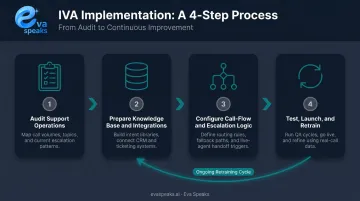
Step 1: Audit Your Support Operations and Define Automation Scope
Start with your existing ticket data. Pull 90 days of support history from your CRM or helpdesk and identify your highest-volume, most repetitive inquiry types. Order status, account resets, and billing FAQs are typical first targets — queries where answers follow a predictable pattern and human judgment isn't required.
Then define where automation deploys first:
- Choose your channels: voice, live chat, email, or messaging. Confirm whether a single IVA handles all channels or each needs its own configuration
- Set measurable goals: without a baseline deflection target, you won't know whether the launch succeeded or needs adjustment
- Document current resolution data: average handle time, escalation rate, and CSAT by inquiry type give you comparison points post-launch
Don't skip the goal-setting step. Teams that launch IVAs without defined success metrics tend to make post-launch decisions based on gut feel rather than data. If you want to see how AI-powered IVA call handling looks in a real customer support interaction, you can Watch AI Call Flow Demo.
Step 2: Prepare Your Knowledge Base and CRM Integrations
An IVA is only as good as the data behind it. Before touching any platform configuration:
Knowledge base preparation:
- Compile historical support transcripts, FAQs, policy documents, and resolution notes
- Remove duplicate entries and flag outdated content — conflicting or stale content is a leading cause of incorrect IVA responses
- Structure content by intent category, not just by product or department
Integration planning:
- Map which backend systems the IVA needs to access in real time: CRM, order management, account databases
- Confirm API availability for each system before selecting a platform; an IVA that can't pull live customer data is limited to generic responses
- Verify that your platform supports native connectors for your stack, or budget time for custom API work
Gartner found that 43% of failed self-service attempts involved customers being unable to find content relevant to their issue — a knowledge gap problem, not a technology problem. Fix the content before you configure the IVA.
Step 3: Configure Call-Flow Logic, Routing Rules, and Escalation Paths
With your knowledge base clean and integrations mapped, the next step is building the logic that governs every conversation. For each automation target identified in Step 1, build a decision tree that maps customer intents to IVA responses and defines exactly what triggers a handoff to a live agent.
Escalation triggers to configure:
- Negative sentiment detection after one or two exchanges
- Unrecognized intent after two attempts
- High-urgency keywords (billing dispute, cancel account, complaint)
- Explicit customer request for a human agent
Vague or missing escalation logic is one of the biggest IVA failure points. Customers who get stuck in loops generate negative CSAT and public complaints faster than almost any other service failure.
Platforms that combine configurable call-flow scripting with large language models — EvaSpeaks integrates both, supporting customizable scripts alongside real-time LLM responses — make it easier to update routing logic quickly without opening a development ticket. That flexibility is practical when inquiry patterns shift and you need fast adjustments. EvaSpeaks' non-technical configuration model also means that when a new product launches and call patterns change, a business operations manager can update the IVA scripts directly rather than waiting for a developer to modify the system — a meaningful advantage for businesses that need to iterate quickly. Support teams that want to see this configuration in action for their specific use case can Request Live Demo.
Step 4: Test, Launch, and Set Up a Continuous Training Loop
Before going live:
- Run end-to-end tests using real historical customer queries across every configured intent
- Test for correct responses, escalation accuracy, and failure states — what happens when the IVA genuinely doesn't understand
- Confirm fallback behavior sends customers somewhere useful, not a dead end
Soft launch approach:
- Route a limited traffic subset (10–20%) through the IVA for the first two weeks
- Monitor resolution rate and escalation frequency daily
- Patch gaps before full rollout
Post-launch training cadence: Assign someone to review flagged and unresolved conversations weekly and feed corrections back into training data. Without this loop, performance plateaus within 60–90 days. Customer language evolves, products change, and new inquiry types emerge — an IVA that isn't retrained drifts out of sync with real customer needs.
When Should You Automate Customer Support With an IVA?
IVA automation delivers the clearest ROI when a significant share of incoming support requests are transactional and don't require judgment or emotional sensitivity. McKinsey found that 50–60% of customer interactions remain transactional across more than 30 organizations — those are your automation candidates.
Strong conditions for deployment:
- High inbound volume with predictable, repeatable inquiry patterns
- Need for extended or 24/7 coverage that human teams can't cost-effectively provide
- Seasonal spikes — e-commerce businesses facing peak shopping seasons can see return rates run 17% higher than the annual average during holidays, producing short-term volume spikes that overwhelm support queues
- Rapid scaling pressure where hiring can't keep pace with growth
Where IVA automation is a poor fit:
- Highly regulated industries requiring documented human review at every step
- Support interactions that are predominantly emotionally sensitive or complex
- Organizations with no existing digital communication infrastructure to integrate with
- Teams that can't assign ownership for ongoing IVA monitoring and retraining
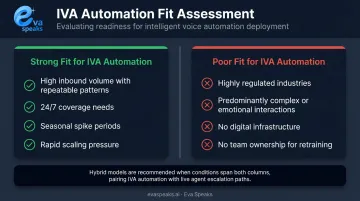
That contrast doesn't force an either/or choice. A hybrid model is the practical middle ground — IVA handles the transactional volume, human agents take everything above a defined complexity threshold. You can See Industry Use Cases to explore how businesses across different sectors have implemented this hybrid approach.
IVA vs. Chatbot vs. Human Support: How They Compare
Here is how intelligent virtual assistants (IVAs), rule-based chatbots, and traditional human support compare across the factors that matter most to businesses evaluating automation:
| IVA / AI Voice Agent (EvaSpeaks) | Rule-Based Chatbot | Human Support Team | |
|---|---|---|---|
| Features | Voice + text, conversational AI, scheduling, CRM sync | Text only, FAQ deflection, decision trees | Full multi-channel, complex judgment |
| Best-fit Business Size | SMB to mid-market | Any size | Any size |
| Key Strengths | Natural voice, 24/7, real-time CRM updates | Low cost, asynchronous, self-service | Empathy, edge-case handling |
| Implementation Complexity | Low | Low to Medium | None (hire) |
| Integration Capability | CRM, ticketing, scheduling native | CRM, helpdesk | Manual or CRM |
What You Need Before Deploying an IVA
Preparation quality determines IVA performance. Businesses that skip this phase typically see low intent recognition rates, high escalation volume, and poor CSAT in the first 90 days.
Platform and Integration Requirements
- Stack compatibility — confirm the IVA platform integrates with your CRM, ticketing system, voice infrastructure, and live chat tools. Note whether native connectors exist or custom API work is needed — this affects both timeline and maintenance costs
- Deploy on the channels your customers actually use. Deploying voice-only when your customers primarily use web chat is a common and avoidable mismatch
- Security review — 51% of service leaders cited security concerns as having delayed or limited AI initiatives, per Salesforce. Factor compliance and data governance review into your timeline from day one
Knowledge Base and Historical Data Readiness
Platform documentation from Google Dialogflow and Amazon Lex suggests a minimum of 10–20 training phrases per intent as a starting threshold — these are vendor guidelines, not universal standards, but they give a practical floor to work from.
Audit all existing documentation for accuracy before integration:
- FAQs
- Product guides
- Policy pages
- Resolution notes from closed tickets
Missing or outdated content here leads directly to fallback loops, misrouted tickets, and unnecessary escalations at launch.
Team Readiness and Escalation Protocol
Human agents need to be prepared before launch, not briefed afterward:
- Context handoff — agents must see what the IVA already collected so customers don't repeat themselves. Repeating information after escalation is a top driver of post-escalation frustration
- Designated owner — assign one person responsible for IVA performance monitoring and retraining. Without a named owner, the post-launch monitoring loop never gets executed
Key Parameters That Affect IVA Performance
IVA outcomes aren't fixed at launch. A handful of variables control whether performance compounds or plateaus over time.
Intent Coverage and Training Data Quality
If the IVA hasn't been trained on an intent category, it defaults to a fallback message or misroutes the customer. Both outcomes increase escalation rate and lower deflection.
Gartner found that 45% of customers whose self-service attempt failed said the company did not understand what they were trying to do. Intent coverage is the most direct lever you have against that failure mode. Prioritize breadth of intent categories first, then depth of training examples per intent.
Escalation Threshold Calibration
Thresholds set too high force the IVA to attempt resolution on queries it can't handle. Set too low, they eliminate the cost-efficiency benefit entirely.
Use your first 30 days of post-launch data to find the right balance. Key signals to watch:
- Escalation rate trending above your baseline after launch
- Query categories where the IVA consistently scores low confidence
- Customer satisfaction scores tied to self-service interactions
The optimal threshold shifts as intent coverage improves and your customer base's query patterns become clearer. Don't set thresholds once and walk away.
Real-Time Data Access and Response Quality
An IVA that can't pull live account or order data is limited to scripted, generic answers. Customers who ask about their specific order status and receive a FAQ response lose trust quickly.
Platforms that integrate with LLMs and support real-time data access can produce contextually accurate answers tied to actual account data. Eva Speaks' real-time AI response capability is built on this model, connecting live account data to each response — which directly improves first-contact resolution rates.
Continuous Feedback and Retraining Cadence
Retraining cadence directly determines how quickly your IVA adapts to shifting customer language, new product lines, and emerging support topics:
- Weekly retraining captures trend shifts before they become deflection problems
- Monthly retraining is the minimum viable cadence for stable performance
- Ad hoc retraining creates compounding drift — avoid it
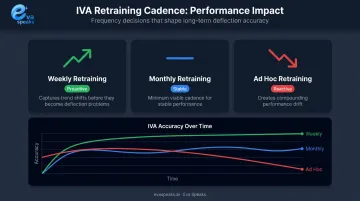
Retraining cadence is the variable most teams underestimate in long-term IVA ROI. Teams that treat deployment as a one-time project routinely see performance degrade within 90 days.
Common Mistakes When Automating Customer Support With an IVA
- Going live with too few intent categories produces high fallback rates immediately. Customers hear "I don't understand" on repeat, damaging trust before the IVA has had a fair chance to prove its value.
- Skipping a defined escalation path leaves frustrated customers stuck in loops with no exit. Few deployment failures tank CSAT scores as fast as this one.
- Treating deployment as a one-time project lets performance drift quietly. Unreviewed conversations, untrained intents, and stale knowledge base content compound until the CSAT drop is already a problem.
- Building flows that only recognize exact phrasing fails real customers immediately. Colloquial language, abbreviations, and multi-part questions are the norm — configure for intent variability, not keyword matching.
Teams that want a recommendation built around their specific support volume and escalation logic can Get a Customized Workflow Recommendation.
Frequently Asked Questions
How do I automate customer support with intelligent virtual assistants?
Audit your support volume to identify high-frequency, transactional inquiry types, then connect your IVA to your knowledge base and CRM. Configure conversation flows and escalation logic for each intent, launch with a limited traffic test, and establish a recurring retraining process before going to full rollout.
What is automation in virtual assistance?
Automation in virtual assistance uses AI technologies — NLP, ML, and LLMs — to enable a software agent to handle customer inquiries, execute tasks, and route conversations without human intervention for each interaction, interpreting intent to respond or escalate appropriately.
Which AI tools are best for automating customer support with intelligent virtual assistants?
The right tool depends on your channel mix, tech stack, and customization needs — prioritize LLM integration, configurable routing, CRM connectivity, and real-time response capability. For voice-focused deployments, Eva Speaks offers customizable call-flow scripting with LLM-backed responses.
What is the difference between a chatbot and an intelligent virtual assistant?
Rule-based chatbots respond to fixed keyword triggers and decision trees. IVAs use NLP and ML to understand intent, context, and nuance — they handle a wider range of query variations and improve over time through retraining, rather than failing whenever a customer phrases something unexpectedly.
Can intelligent virtual assistants replace human customer support agents?
IVAs are designed to handle routine, high-volume queries autonomously and escalate complex or sensitive cases to human agents. The most effective deployments use a hybrid model — AI covers transactional volume while human agents handle cases requiring judgment or emotional nuance.
How long does it take to implement an intelligent virtual assistant for customer support?
Timeline varies based on integration complexity, training data volume, and the number of configured intents. Security review is a common delay — Salesforce research found 51% of service leaders flag it as a bottleneck, so build compliance into the plan from the start.