Introduction
Running a CRM, a CPaaS platform, and multiple messaging channels simultaneously creates a coordination problem most businesses underestimate. Each system works fine in isolation — the trouble starts when a lead changes status in Salesforce but the outbound call never fires, or when a call transcript sits in Twilio with no path back to the contact record. That gap is where revenue leaks and customer context quietly disappear.
Fixing it has become a budget priority. According to Gartner, over 50% of customer service organizations will double their technology spend by 2028 — much of it aimed at connecting communication infrastructure to customer data in real time.
The urgency is justified. Salesforce's MuleSoft Connectivity Benchmark found that 72% of organizations still struggle with data silos, making CRM-CPaaS integration one of the most persistent operational challenges in enterprise tech.
What follows is a breakdown of the five best CRM integration tools for CPaaS workflows in 2026 — what they do well, where they fall short, and how to match the right one to your stack.
Key Takeaways
- CRM-CPaaS integration tools connect customer data to programmable voice, SMS, and messaging channels for automated, context-aware communication workflows
- The best tools in 2026 support real-time data sync, event-based triggers, bidirectional CRM updates, and AI-enhanced call handling
- Top picks for 2026: Zapier, Twilio Segment, HubSpot (with CPaaS integrations), Salesforce + MuleSoft, and Make
- Key evaluation criteria: CPaaS API compatibility, event-driven triggers, bidirectional sync, AI/LLM support, compliance controls
- Generic data sync tools often lack the event-driven communication logic CPaaS workflows actually require
What Is CRM Integration for CPaaS Workflows?
Standard CRM integration moves data between systems. CRM integration for CPaaS workflows does something more specific: it connects a CRM's contact records, lifecycle stages, and interaction history directly to a communication layer that can fire voice calls, send SMS, route messages, and log outcomes back to the original record — automatically.
The CRM serves dual roles here. It's the data source that triggers communication actions, and the destination that receives call transcripts, message delivery statuses, and sentiment data once those interactions complete.
A practical example: a deal stage change in HubSpot fires an outbound SMS via Twilio. From there, the sequence runs without manual input:
- The customer responds to the SMS
- The response is logged to their CRM contact record
- Conversation metadata enriches the interaction history
- A follow-up task is automatically created for the rep
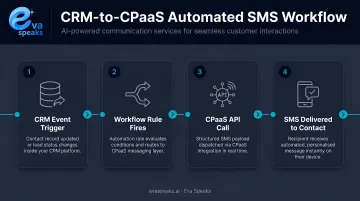
Each tool below was selected for this kind of communication-aware, event-driven capability, not general-purpose data sync.
Want to see this in action? Watch AI Call Flow Demo
Best CRM Integration Tools for CPaaS Workflows in 2026
Each tool below was evaluated on CPaaS API compatibility, bidirectional CRM sync, event-driven automation depth, AI/LLM compatibility, compliance features, and pricing scalability — across both SMB and enterprise contexts.
Zapier
Zapier is the entry point for teams that need CRM-to-CPaaS automation without engineering resources. It connects 9,000+ apps, including Salesforce, HubSpot, Zoho, and CPaaS providers like Twilio, Sinch, MessageBird, and Vonage.
For CPaaS workflows, Zaps can trigger outbound SMS or call flows from CRM events — a new lead created, a deal stage updated, a support ticket opened. CPaaS responses can be logged back into CRM records, though complex real-time workflows at high volume will push against its limits.
| Feature | Details |
|---|---|
| Key CPaaS Integrations | Twilio, Vonage, Sinch, MessageBird, and 50+ messaging/voice apps |
| Best For | SMBs and non-technical teams needing fast CRM-to-CPaaS automation |
| Pricing | Free plan (100 tasks/month); Professional from $19.99/month billed annually |
Zapier excels at straightforward trigger-action logic. Multi-step conditional workflows — if call unanswered, send WhatsApp, then update CRM status — require a more granular tool like Make.
Twilio Segment
Twilio Segment is a customer data platform (CDP) built within the Twilio ecosystem. Rather than routing through third-party middleware, Segment unifies customer and behavioral data and pushes it directly through Twilio's communication infrastructure.
The result is less integration overhead. Segment's sources-and-destinations model pulls data in from CRM systems like Salesforce and HubSpot, then routes it out to communication endpoints — enabling precise, event-driven triggers without the translation layer that external connectors require.
| Feature | Details |
|---|---|
| Key CPaaS Integrations | Native Twilio ecosystem; 450+ source connectors including Salesforce and HubSpot destinations |
| Best For | Teams already on Twilio who need deep CRM-data-to-communication automation |
| Pricing | Free tier available; volume-based pricing for paid tiers |
Best suited when your CRM data model and communication workflows both live primarily in the Twilio ecosystem. Less compelling if your CPaaS stack extends to Vonage, Sinch, or Infobip.
HubSpot (with Native CPaaS Integrations)
HubSpot takes a different approach — instead of acting as middleware, it brings CPaaS functionality into the CRM itself through its App Marketplace. Direct integrations with Aircall, Kixie, JustCall, and RingCentral let teams manage CRM-driven communication workflows inside a single platform.
HubSpot's Workflows feature supports automated SMS messages triggered by CRM events, call enrollment, and call outcome logging. Kixie, for instance, can trigger or stop HubSpot Workflows based on call outcomes or inbound activity — closing the loop between communication events and CRM records without external automation tools.
| Feature | Details |
|---|---|
| Key CPaaS Integrations | Aircall, Kixie, JustCall, RingCentral, Twilio Segment |
| Best For | Growing businesses wanting CRM and CPaaS workflow automation in one UI |
| Pricing | Free CRM tier available; CPaaS workflow automation typically requires paid Sales Hub plans |
A strong fit for sales and support teams that want tight CRM-communication alignment without assembling a multi-tool stack.
Salesforce + MuleSoft
For enterprises with complex CPaaS requirements, the Salesforce and MuleSoft combination is the standard. Salesforce provides the CRM depth — account tiers, interaction history, service cases — while MuleSoft's Anypoint Platform handles API orchestration between Salesforce and CPaaS providers at scale.
MuleSoft handles multi-step CPaaS automation that no-code tools can't manage, including:
- Routing inbound calls based on CRM account tier
- Syncing real-time voice transcripts back to Salesforce records
- Triggering multi-channel sequences from Salesforce Flow
The verified Twilio connector covers SMS delivery and voice capabilities with official support.
| Feature | Details |
|---|---|
| Key CPaaS Integrations | Twilio (verified); 500+ connectors via Anypoint Exchange |
| Best For | Large enterprises with complex CPaaS workflows requiring custom API logic and compliance governance |
| Pricing | Custom/enterprise-tier pricing for both MuleSoft and Salesforce |
Implementation complexity and cost are significant. This stack requires developer resources and ongoing maintenance — it's not something you deploy in a weekend.
Not sure which tool fits your stack? Get a Customized Workflow Recommendation
Make (formerly Integromat)
Make sits between Zapier's simplicity and MuleSoft's enterprise complexity. Its visual scenario builder offers conditional branching, fallback routing, and multi-step logic without requiring code — which makes it particularly suited to CPaaS workflows where communication paths depend on multiple variables.
A scenario like "if call not answered, send WhatsApp via Twilio; if no response within 2 hours, update CRM status and assign to a rep" is buildable in Make's interface without developer involvement. Verified integrations include Twilio, Vonage, Bird, WhatsApp Business Cloud, Salesforce, and Pipedrive.
| Feature | Details |
|---|---|
| Key CPaaS Integrations | Twilio, Vonage, Bird, WhatsApp Business Cloud; Salesforce, Pipedrive |
| Best For | Mid-market teams needing advanced multi-step CPaaS automation with visual logic building |
| Pricing | Free plan (1,000 operations/month); Core from $9/month |
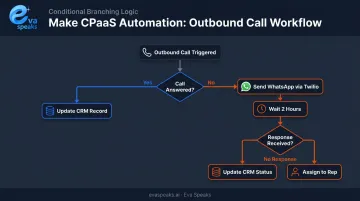
Note: HubSpot and Zoho CRM integrations for Make were not independently verified at time of writing — confirm current connector availability on Make's website.
Key Features to Look for in a CRM-CPaaS Integration Tool
CPaaS API Compatibility
The tool must natively support or offer well-documented connectors for your specific CPaaS providers. Generic HTTP/webhook support is insufficient for communication-specific workflows like call routing, message fallback, or voice transcription triggers. If your stack runs on Twilio, Vonage, and Sinch simultaneously, verify each connector is explicitly documented, not just listed.
Bidirectional, Real-Time Data Sync
CPaaS workflows generate interaction data — call outcomes, transcript snippets, delivery statuses — that must flow back into the CRM immediately. Tools that push CRM data outward without returning communication results create blind spots in customer history. According to Salesforce's State of Sales report, high-performing sales teams are 2.2x more likely to maintain a single unified customer data view — which only happens with true bidirectional sync.
Event-Driven Workflow Triggers
Batch sync is not enough. CRM-CPaaS integration tools must support event-based triggers tied to record changes — contact created, deal stage updated, support ticket opened — that fire communication actions in real time. The difference between a trigger firing in 30 seconds versus 15 minutes can determine whether a lead gets a call before going cold.
AI and LLM Compatibility
CPaaS workflows in 2026 increasingly include AI layers: call transcription, sentiment detection, intent routing, and automated response drafting. Gartner projects that 30% of Fortune 500 companies will deliver service exclusively through AI-enabled channels by 2028.
Integration tools need to pass communication outputs — transcripts, sentiment scores, intent classifications — into downstream AI processing layers and write enriched data back to CRM records. For teams building AI-first communication workflows, platforms like EvaSpeaks — which combine AI call handling, LLM integration, and real-time transcription — work best when paired with integration tools capable of routing AI-generated outputs directly into CRM fields. A key advantage of EvaSpeaks in this context is that it does not require a large enterprise infrastructure footprint: businesses can configure call flows and connect CRM integrations without a dedicated development team, which is why it fits naturally as an AI communication layer in CPaaS stacks of all sizes.
Building an AI-first communication workflow? Talk to an AI Communication Expert
Here is how the leading CPaaS + CRM integration approaches compare for businesses automating their call workflows:
| AI-Native (EvaSpeaks) | CPaaS API Platforms | Manual Integration | |
|---|---|---|---|
| Features | Voice AI + CRM sync out-of-box | Programmable APIs for custom workflows | Zapier/manual field entry |
| Best-fit Business Size | SMB to mid-market | Mid-market to enterprise developers | Very small teams |
| Key Strengths | No-code, instant CRM updates | Fully flexible, any workflow | Familiar, zero dev needed |
| Implementation Complexity | Low - native connectors | High - requires developer | Low |
| Integration Capability | HubSpot, Salesforce, Zoho + more | Any CRM via custom code | Varies by tool |
Compliance and Data Security Controls
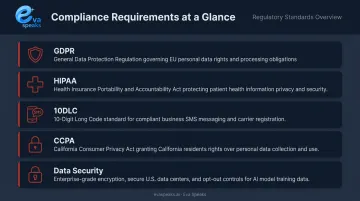
AI compatibility and raw performance only matter if your integration holds up under compliance scrutiny. CRM-CPaaS integrations move sensitive customer data across communication channels and system boundaries — these are the non-negotiable requirements:
- GDPR: Right to erasure and data access workflows across connected systems
- HIPAA: Business Associate Agreement support for healthcare contexts
- 10DLC: Campaign registration for US A2P SMS messaging
- CCPA: Opt-out and deletion propagation across integrated platforms
- Data Security: Encrypted payloads and data residency controls for regulated industries
How We Chose the Best CRM Integration Tools for CPaaS Workflows
Each tool was evaluated for CPaaS workflow fit specifically — not general CRM integration breadth. Generic ETL or reporting sync tools rarely translate well to real-time communication workflows, producing missed triggers, delayed data returns, and fragmented customer records.
Evaluation criteria:
- Native CPaaS API support or well-documented official connectors
- Real-time bidirectional sync capability (not just outbound push)
- Event-driven automation depth for CRM record triggers
- AI/LLM compatibility for transcript and enrichment writeback
- Compliance features: GDPR, HIPAA, 10DLC, CCPA
- Implementation accessibility for non-developer teams
- Pricing scalability from SMB to enterprise
- Quality of vendor documentation and support responsiveness
Each tool was also assessed across business sizes, since CPaaS workflow complexity scales with team size, channel mix, and compliance requirements. A three-person sales team operates under very different constraints than a 500-seat contact center.
Conclusion
Choosing the right CRM integration tool for a CPaaS workflow comes down to fit: your communication stack's architecture, your team's technical capacity, and your compliance obligations. Each tool covered here serves a distinct profile:
- Zapier — handles SMB no-code use cases with minimal setup
- Make — adds conditional logic for mid-market teams with complex routing
- HubSpot — consolidates CRM and communication automation under one roof
- Twilio Segment — removes middleware overhead for Twilio-native stacks
- MuleSoft — handles enterprise API orchestration at scale
Before committing to any platform, map your evaluation against three specifics: which CPaaS provider your stack runs on, what CRM data model drives your communication triggers, and which communication events need to return data to CRM records.
If your workflows involve AI-powered calls, real-time transcription, or LLM-driven customer interactions, Eva Speaks provides the AI communication middleware between your CRM and CPaaS stack, handling call routing, transcription, and AI responses while feeding structured data back into your CRM. See how Eva Speaks fits your CPaaS workflow.
Ready to see it live? Request Live Demo
Frequently Asked Questions
What are CRM automation tools?
CRM automation tools are platforms or integrations that automate repetitive CRM tasks — data entry, lead assignment, follow-up scheduling, and communication triggers — by connecting the CRM to other systems and firing actions automatically based on customer events or record changes. Zapier and Make are common examples for smaller teams; MuleSoft handles enterprise-scale automation.
What are the 4 types of CRM systems?
The four main types are Operational (sales, service, and marketing automation), Analytical (data analysis and insights), Collaborative (team and channel coordination), and Strategic (long-term relationship management). Operational CRMs typically drive the most CPaaS communication triggers.
What is the difference between a CPaaS platform and a CRM integration tool?
A CPaaS platform like Twilio or Vonage provides communication infrastructure — APIs for voice, SMS, and video. A CRM integration tool connects that infrastructure to customer data, enabling both systems to exchange information and trigger actions based on shared business logic. Each system depends on the other to close the loop between communication and customer records.
Can CPaaS platforms integrate directly with CRM systems without middleware?
Some can — Twilio Segment and HubSpot's native marketplace integrations are examples of direct CRM connectivity. Most enterprise setups benefit from a middleware layer like MuleSoft or Make that adds custom logic, fallback routing, and multi-step workflow control beyond what native connectors offer.
How does AI improve CRM and CPaaS workflow integration?
AI transcribes calls, detects sentiment, routes interactions by intent, and generates real-time response suggestions — all logged automatically to CRM records. The result is higher-quality interaction data with significantly less manual entry.
What is the best CRM integration tool for small businesses using CPaaS?
Zapier and Make are strong starting points — both offer wide CPaaS connector libraries, affordable pricing, and no-code setup. Businesses with AI-driven communication needs should also confirm their CPaaS layer supports direct AI platform integration before scaling.