Introduction
Most business phone systems were built for a desk. Remote teams, field staff, and client-facing professionals rarely sit at one — and that gap has a measurable cost.
The consequences show up fast. According to CallRail, roughly 28% of all business calls go unanswered, and customers who can't reach you rarely try twice. Meanwhile, Invoca's 2024 platform data found that less than 3% of callers who reach voicemail leave a message — meaning a missed call is, in most cases, a lost opportunity.
Those missed calls aren't a staffing problem — they're a infrastructure problem. Mobile integration solves it by extending a cloud-based phone system to employees' smartphones, so callers reach the same routing rules, the same experience, and the right person whether the team is in the office or not. This article covers what that looks like in practice, why it matters operationally, and what breaks without it.
Key Takeaways
- Mobile integration connects business phone systems to smartphones, extending call routing, voicemail, and messaging to employees anywhere
- Outbound calls still display the business number — customers never know where you're working from
- Businesses with remote or hybrid teams depend on mobile integration to maintain consistent call handling standards
- Without it, missed calls translate directly into lost revenue and uneven customer service
- Pairing mobile integration with AI-powered tools like Eva Speaks adds automated call answering and routing wherever your team works
See how AI phone automation works alongside mobile systems. Explore AI Call Automation
What Is Mobile Integration for Business Phone Systems?
Mobile integration connects a business's cloud-based phone system to employees' smartphones — so the same extensions, routing rules, voicemail, and call-handling logic that apply at a desk phone apply on a mobile device too.
It runs through VoIP (Voice over Internet Protocol), which routes calls over the internet rather than physical phone lines. That internet-based architecture is what makes device independence possible: calls aren't tied to a specific handset or location.
Location Becomes Irrelevant
Mobile integration isn't a convenience add-on — it makes location irrelevant to how your business handles communication.
With mobile integration in place:
- Incoming calls reach employees on their smartphones using the same routing rules as the office
- Outbound calls display the business number, not a personal mobile number
- Voicemail, call transfers, and extensions work identically across devices
- Call handling standards stay consistent whether someone is at a desk, at home, or on-site with a client
Here is how different approaches to mobile-integrated business phone systems compare:
| AI + Mobile Integration (EvaSpeaks) | UCaaS Mobile App (RingCentral) | Basic Mobile Call Forwarding | |
|---|---|---|---|
| Features | AI handling + mobile routing, CRM sync, after-hours AI cover | Unified app, video, messaging, routing | Simple call forward to mobile number |
| Best-fit Business Size | SMB to mid-market | Mid-market to enterprise | Very small businesses |
| Key Strengths | AI handles overflow, staff focus on priority calls | Full-feature unified comms | Zero cost, simple |
| Implementation Complexity | Low | Low to Medium | None |
| Integration Capability | CRM, scheduling, EHR | Native UCaaS integrations | None |
Key Advantages of Mobile Integration
Each advantage below connects directly to outcomes businesses track: response times, cost per user, customer satisfaction, and team efficiency.
Advantage 1: Workforce Flexibility Without Communication Gaps
Mobile integration lets employees make and receive business calls, access voicemail, and transfer calls from any location — without customers ever noticing the difference. Features like simultaneous ring (desk phone and mobile app ring together) and call flip (handoff between devices mid-call) keep coverage continuous.
This matters because the workforce has structurally shifted. Pew Research found that among U.S. workers with jobs that can be done from home, 41% were hybrid and 35% were fully remote in 2023. A Verizon Business and Omdia survey found 60% of employees currently use a mobile device for work purposes — and 51% of business and IT leaders said failing to invest in mobile collaboration would damage their business operations.
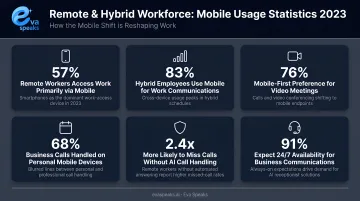
For businesses with field staff, multi-location teams, or hybrid policies, mobile integration isn't a premium feature. It's the baseline for maintaining call answer rates.
KPIs impacted: Call answer rate, missed call rate, first-call resolution rate, employee availability utilization
Highest impact situations: Healthcare, real estate, construction, professional services — anywhere employees are regularly away from their desks
Advantage 2: Faster Customer Response and Higher Service Quality
Customer expectations around response time have hardened. HubSpot's State of Service report found that 90% of customers rate an "immediate" response as important or very important, with 60% defining "immediate" as 10 minutes or less.
Mobile integration helps close that gap by making intelligent call routing follow employees to their phones — not wait for them to return to a desk. Smart forwarding rules triggered by time of day and voicemail-to-text transcription both reduce the delay between a call coming in and a customer getting a response.
Layering in AI extends this further. EvaSpeaks, for example, provides real-time conversational AI — using LLM, text-to-speech, and speech-to-text technologies — to handle incoming calls directly. When calls reach mobile devices and no one is immediately available, AI-powered platforms can respond in real time, route based on customizable call-flow logic, and handle call volume without sacrificing call quality. That combination of mobile reachability and AI handling means coverage doesn't drop during high-volume periods or off-hours. EvaSpeaks operates without on-premise hardware requirements, so businesses can add AI-powered coverage simply by connecting it to their existing phone number — no telephony infrastructure changes required.
KPIs impacted: Average response time, CSAT, call abandonment rate, NPS
Highest impact situations: Medical offices, legal firms, e-commerce support, or any operation where a delayed or missed call can mean a lost client
Watch how AI handles calls from any device or location. Watch AI Call Flow Demo
Advantage 3: Reduced Infrastructure Costs and Easy Scalability
Traditional desk-phone setups require physical lines, on-site hardware, and IT involvement every time a user is added or removed. Mobile integration eliminates most of that.
With a cloud-hosted VoIP platform and BYOD policies, businesses pay per user license rather than per hardware unit. A Samsung Business Insights analysis found that organizations issuing devices spend an average of $1,234 per employee annually, compared to $893 for BYOD companies — a meaningful difference at scale.
The ROI case for cloud migration goes beyond device costs. A Forrester Total Economic Impact study commissioned by RingCentral modeled a composite organization and found 211% ROI, with $2.68 million in three-year savings from retiring legacy on-premises systems alone, plus a 30% decrease in internal IT support tickets.
Key operational advantages:
- New users can be added in minutes, not weeks
- No physical infrastructure changes required when scaling up or down
- System updates and maintenance are handled by the provider, not internal IT
- Communication capacity scales with headcount, not capital expenditure
KPIs impacted: Cost per user/month, IT maintenance hours, time-to-onboard, total communication infrastructure spend
Highest impact situations: Rapid growth phases, seasonal hiring, multi-location expansion, or transitions away from legacy PBX systems
What Happens When Mobile Integration Is Missing
Businesses that rely on desk-only systems without mobile integration face compounding problems that often go unnoticed until they affect revenue or customer relationships:
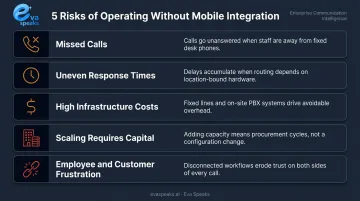
- Missed calls become routine. Employees away from their desks are unreachable through the business number. Customers who can't get through rarely call back — and almost never leave voicemail.
- Response times deteriorate unevenly. Different team members have different levels of reachability, creating inconsistent customer experiences with no reliable standard.
- Infrastructure costs stay high. Physical lines, hardware maintenance, and on-site systems continue generating costs for a workforce that's increasingly mobile.
- Scaling requires capital. Adding communication capacity means hardware purchases, installation lead times, and IT involvement — not a license addition.
- Employee and customer frustration builds. Remote employees feel disconnected from core communication systems; customers experience delays that erode trust over time.
These issues compound quietly. By the time a business notices the pattern in churn data or customer complaints, the cost is already real — and mobile integration is typically the fix that was available the entire time.
How to Get the Most Value from Mobile Integration
Mobile integration delivers its full value when treated as an ongoing operational practice, not a one-time setup task.
Keep routing rules current. Call-flow logic configured at implementation reflects how the business operated then , not now. Business hours, team structures, and staffing levels change. Review and update routing rules regularly so calls reach the right people under current conditions.
******Use your call data actively.** Call analytics from a mobile-enabled system surface patterns that inform real decisions: when call volume peaks, which time periods generate the most missed calls, and where response times drift. That data should drive staffing and routing adjustments, not collect dust in a dashboard.
******Combine reachability with intelligent call handling.** Mobile integration ensures calls reach people wherever they are. Platforms like Eva Speaks handle those calls intelligently when they arrive, using real-time conversational AI, configurable routing scripts, and built-in transcription. Together, these address both the reachability problem and the response quality problem.
The businesses that see the strongest results review their setup regularly, adjust based on what the data shows, and extend the system as the operation changes. Mobile integration isn't a destination; it's a practice.
Want a setup built around your team's mobile workflow? Get a Customized Workflow Recommendation
Frequently Asked Questions
How do mobile integrations enhance business phone systems?
Mobile integration connects cloud-based phone systems to smartphones via softphone apps, extending call routing, voicemail, and messaging to employees wherever they work. The result is higher call answer rates, faster response times, and consistent call handling regardless of location.
What is the purpose of integrating a phone provider into agency or business settings?
Integrating a phone provider centralizes communication management across teams and locations — giving businesses access to call routing, analytics, and CRM sync that a basic carrier line can't provide. This control scales across headcount and locations without requiring new hardware.
What are the tools used in business communication?
Core categories include cloud VoIP systems, mobile softphone apps, CRM-integrated calling tools, team messaging platforms, video conferencing, and AI-powered call handling. Mobile integration typically pulls several of these together into one system accessible across devices.
What is the best business phone system?
The best fit depends on team size, workforce model, and call volume — but cloud-based VoIP platforms with mobile integration, AI call routing, and CRM connectivity are the most practical choice for businesses that can't afford missed calls.
What are the three types of PBX?
The three types are traditional on-premises PBX, IP PBX (which routes calls over internet protocol), and hosted/cloud PBX. Cloud PBX is the type that enables mobile integration — call management happens in the cloud rather than on physical hardware, so it's device-independent.