Introduction
Here's a problem most law firms recognize but rarely quantify: as caseloads grow, the administrative bottlenecks grow faster.
Attorneys get pulled into intake calls during depositions. Phones ring unanswered while staff handles court-related tasks. Potential clients hang up and call the next firm on their list. According to Clio's 2024 secret-shopper study of 500 law firms, only 40% of firms answered the phone — down from 56% in 2019. Nearly half were essentially unreachable by phone.
That's a capacity problem, not an attitude one. And it compounds as call volume climbs.
Virtual receptionists address three specific constraints that prevent law firms from scaling: missed revenue from unanswered calls, lost attorney time from administrative interruptions, and the cost ceiling created by linear in-house hiring. Listen to Sample AI Call to hear how AI handles a law firm intake call.
Key Takeaways
- Virtual receptionists handle calls, conduct intake, and book consultations with no attorney time required
- 80% of prospective clients contact another attorney if they don't hear back within 48 hours
- Attorneys currently capture an average of just 3.0 billable hours per 8-hour workday — administrative interruptions are a major contributor
- An in-house legal receptionist costs $55,000–$70,000/year fully loaded; virtual receptionist plans start around $250–$330/month
- Together, faster lead capture, higher billable output, and lower overhead create compounding gains as the firm grows
What Is a Virtual Receptionist for Law Firms?
A virtual receptionist is a remote, trained professional — or AI-powered service — that answers calls, conducts client intake, schedules appointments, and routes communications on behalf of a law firm, using the firm's name and custom protocols.
Legal-focused services differ from generic call centers in ways that matter. Legal virtual receptionists are configured with practice-area-specific intake workflows, legal terminology, confidentiality requirements, and integration with case management platforms like Clio, MyCase, and PracticePanther. An intake call for a personal injury case looks nothing like one for an immigration matter — and the service needs to reflect that.
This is also front-of-house operations infrastructure. A virtual receptionist determines how much new business a firm can absorb without adding internal headcount — which makes it a growth function, not just an administrative one.
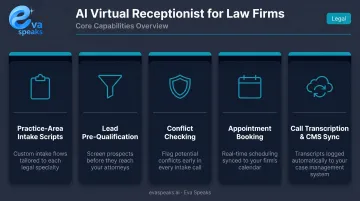
Platforms like Eva Speaks are built specifically for this role. Core capabilities typically include:
- Practice-area-specific intake question sets
- Case pre-qualification against the firm's acceptance criteria
- Conflict-checking where integrated with case management systems
- Direct appointment booking into platforms like Clio or MyCase
- Automatic call transcription with intake data synced to the firm's existing platform
Key Advantages of Virtual Receptionists for Scaling Law Firms
Three operational constraints limit law firm growth: missed revenue from unanswered calls, lost attorney productivity from administrative interruptions, and the cost ceiling that comes from needing to hire linearly as call volume rises. The advantages below map directly to each constraint and they compound when implemented consistently.
Advantage 1: 24/7 Lead Capture Without Attorney Involvement
A virtual receptionist ensures every inbound call is answered, qualified, and logged (at 2 p.m. on a Tuesday or 10 p.m. on a Friday) without requiring an attorney or in-house staff member to be available. EvaSpeaks handles exactly this scenario for law firms: it uses conversational AI to run practice-area-specific intake scripts, books consultations directly into case management systems like Clio and MyCase, and auto-generates transcripts — all without needing a human receptionist on duty.
The mechanism is straightforward. The receptionist follows custom intake scripts specific to the firm's practice areas, collects case-relevant details, pre-qualifies the lead against the firm's criteria, and books a consultation A firm that answers every call captures more leads over time without proportionally growing its team.
KPIs this moves:
- Call answer rate
- Lead conversion rate
- New consultation bookings per week
- After-hours leads captured
- Client acquisition cost
When this matters most:
- High-volume practice areas (personal injury, criminal defense, immigration) where prospective clients are comparing firms in real time
- Solo and small firms where no one covers phones during court appearances, depositions, or off-hours
Advantage 2: More Billable Hours Through Task Delegation
By removing attorneys from routine call-handling, virtual receptionists restore productive legal time currently lost to interruptions, intake calls, and scheduling tasks.
Clio's 2025 benchmarks show the average attorney captures just 3.0 billable hours in an 8-hour workday — a 38% utilization rate. After realization (88%) and collection (93%), the average attorney generates about 2.4 collected billable hours per day. That means roughly 5 hours of the workday go uncaptured, and administrative interruptions are a meaningful contributor.
Research from Gloria Mark et al. at UC Irvine found that interrupted workers complete tasks faster but experience significantly higher stress, mental workload, and time pressure — a pattern that degrades sustained focus across the workday.
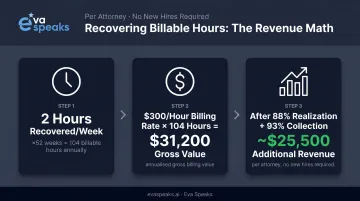
The financial math is concrete. An attorney billing at $300/hour who recovers just 2 hours per week through delegation generates an additional $31,200 in gross billable value annually.
Applying Clio's average realization and collection rates, that's roughly $25,500 in additional collected revenue per attorney — no new hires required.
KPIs this moves:
- Billable hours per attorney per week
- Attorney utilization rate
- Non-billable administrative time as a percentage of the workday
- Revenue per attorney
Who benefits most:
- Solo practitioners managing all firm functions alone
- Growing firms where attorneys are personally handling intake that a trained receptionist could manage
- Any firm where court schedules create predictable call-handling gaps during business hours. See Industry Use Cases to learn how AI helps law firms scale their client intake.
Advantage 3: Scalable Overhead vs. Linear In-House Hiring
Adding an in-house receptionist is a fixed-cost commitment: salary, benefits, equipment, office space, and coverage gaps for sick days and vacations. A virtual receptionist is a variable-cost model that scales with actual call volume and firm needs.
The cost gap is significant. Robert Half's 2026 salary guide lists the national salary range for a legal receptionist at $38,500–$48,750, with a midpoint of $42,500.
Applying the BLS December 2025 benefits multiplier of 1.43x (wages plus benefits for private-sector workers) puts the fully loaded cost at roughly $55,000–$70,000/year, before equipment and workspace.
Virtual receptionist plans for law firms typically range from:
| Provider | Starting Plan | Included |
|---|---|---|
| Ruby | ~$250/month | 50 minutes |
| Smith.ai | ~$300/month | 30 calls |
| Abby Connect | ~$329/month | 100 minutes |
AI-powered platforms like EvaSpeaks extend this cost advantage further: offering customizable call-flow scripts, smart routing, and practice-area-specific intake without the per-minute overhead of a live-agent model. Because EvaSpeaks operates on a software-based service model rather than staffed reception, it scales to handle call volume surges — such as after a marketing campaign — without the cost spikes that per-minute live answering services produce.
KPIs this moves:
- Cost per lead handled
- Receptionist overhead as a percentage of revenue
- Overhead cost growth rate vs. revenue growth rate
When this matters most:
- Firms planning to grow case volume without proportionally expanding staff
- Practices with seasonal call spikes (tax law, immigration, estate planning) that don't justify a permanent hire
- Solo attorneys evaluating their first administrative investment
Comparing Your Options: AI, Live, and In-House Reception
Here is how AI-powered, live, and in-house reception options compare for law firms focused on scaling:
| AI Virtual Receptionist (EvaSpeaks) | Live Legal Answering Service | In-House Receptionist | |
|---|---|---|---|
| Features | 24/7 AI intake, conflict pre-screening, Clio sync, scheduling | Human agents, legal training, message-taking | Full interaction, deep firm knowledge |
| Best-fit Business Size | Solo to scaling mid-size firms | Growing firms | Larger practices |
| Pricing Model | Flat monthly, unlimited | Per-minute | Salary + benefits |
| Key Strengths | Scales with caseload, zero missed leads, instant CRM push | Human empathy for distressed callers | Attorney relationships, full knowledge |
| Implementation Complexity | Low - Clio, MyCase connectors | Low | None (hire) |
| Integration Capability | Clio, MyCase, PracticePanther native | Manual or limited | Manual entry |
What Happens When Law Firms Try to Scale Without One
Growth amplifies intake problems — and for most law firms, those problems were already there.
Clio's 2024 study found that only 40% of firms answered the phone when secret shoppers contacted 500 law firms — and 48% were essentially unreachable. Among those who spoke to a live person, prospective clients were reported as nearly eight times more likely to recommend the firm than those who only received voicemail follow-up.
The scaling ceiling this creates is straightforward:
- Missed calls during depositions or court appearances = lost leads
- Attorneys who handle intake calls personally = lost billable hours
- In-house staff covering peak call hours = burnout and off-hours gaps
- More marketing spend = more calls the firm can't process
When attorney involvement is required at every intake touchpoint, growth stalls. More marketing spend drives more inbound calls, but without the infrastructure to handle them, the firm can only scale headcount — not revenue.
That infrastructure gap carries a reputational cost too. In a market where 80% of prospective clients contact another attorney after no response within 48 hours, slow or missed responses don't just lose individual leads — they hand them directly to competitors with faster intake systems.
How to Get the Most Value from a Virtual Receptionist
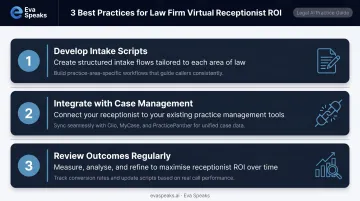
Setup quality determines output quality. Three practices separate firms that see consistent ROI from those that treat it as a set-and-forget vendor:
1. Invest in intake script development Define precisely which calls warrant an immediate attorney transfer, which require a scheduled callback, and which can be resolved at the receptionist level. With Eva Speaks, this means configuring practice-area-specific question sets, acceptance criteria, and escalation rules through the dashboard — personal injury intake gets its own workflow, separate from immigration or family law.
2. Integrate with your case management system A virtual receptionist that only emails call summaries creates extra work. One that syncs directly with Clio, MyCase, or PracticePanther automatically logs transcripts, appointment bookings, and intake data — eliminating double-entry and giving your team a single real-time view of inbound leads.
3. Review outcomes on a regular cadence Track lead conversion rates from calls handled by the virtual team. Review call transcripts for intake quality. Update scripts whenever practice areas, pricing, or intake criteria change. Scripts that haven't been touched in six months are almost always out of date.
Conclusion
Virtual receptionists drive law firm growth in three compounding ways: expanded lead capture, recovered attorney time, and a cost structure that doesn't require proportional overhead increases as case volume grows.
More leads captured at a lower per-lead cost, handled without pulling attorneys away from billable work, means intake capacity grows without overhead growing at the same rate.
For law firms serious about scaling, a virtual receptionist isn't an optional amenity. It's the foundation that makes consistent growth possible, without sacrificing attorney focus or inflating fixed costs. Request Live Demo to see how it fits your practice.
Frequently Asked Questions
How does a virtual receptionist differ from an automated phone system?
An automated phone system routes calls or plays recorded messages — it doesn't conduct structured intake or exercise judgment. A virtual receptionist (live or AI-powered) follows custom scripts, asks practice-area-specific questions, qualifies leads, and books consultations. For legal clients comparing firms in real time, that distinction directly affects whether they stay on the line or call someone else.
Can a virtual receptionist handle client intake for specialized practice areas?
Yes. Legal-focused services configure intake workflows by practice area, so personal injury intake captures accident details and injury information while immigration intake focuses on visa type and timeline. Firms provide their acceptance criteria, and the receptionist qualifies callers against those criteria before routing or booking.
Are virtual receptionists compliant with attorney-client confidentiality requirements?
Under ABA Model Rules 1.6 and 5.3, attorneys are responsible for ensuring outsourced services handle client information with appropriate safeguards. When vetting providers, confirm confidentiality training, data encryption, secure message storage, and willingness to sign a confidentiality agreement — ABA Formal Opinion 08-451 outlines the full due diligence standard for outsourced legal support.
How much does a virtual receptionist for a law firm typically cost?
Plans range from roughly $250–$330/month for entry-level tiers (50–100 minutes or 30 calls) up to $1,000–$1,400/month for higher volumes. A fully loaded in-house legal receptionist (salary, benefits, equipment, workspace) runs $55,000–$70,000/year by comparison.
When is the right time for a law firm to hire a virtual receptionist?
Watch for these signals: attorneys are personally handling intake calls, after-hours calls routinely go to voicemail, or an upcoming marketing push will exceed current call capacity. Any one of those is a measurable revenue leak.
How quickly can a law firm get a virtual receptionist service up and running?
Most providers set up within a few days to a week. The primary onboarding work is developing call scripts, configuring routing rules, and connecting to your case management system — not lengthy technical implementation. Starting with after-hours coverage only is a low-risk way to test the service before full rollout.