Introduction: Why Your Answering Service and CRM Need to Work Together
Picture this: a promising prospect calls your business at 7 PM. They get voicemail. The next morning, someone on your team listens to the message, manually types the caller's name and number into your CRM, and schedules a follow-up—but by then, it's been 14 hours. The lead already signed with a competitor who called back within minutes.
This isn't a rare edge case. Harvard Business Review research found that companies contacting prospects within one hour of an inquiry were nearly 7x more likely to qualify the lead than those who waited longer. Every hour of delay narrows that window further.
The fix isn't simply adding an answering service. It's connecting that service directly to your CRM so every call, note, and outcome syncs automatically the moment a conversation ends—no manual steps, no overnight gaps.
This guide covers:
- What CRM-integrated remote answering services are
- Why the integration matters for lead response and retention
- How it works technically
- Which features to prioritize when evaluating options
- How AI is reshaping what's possible
Key Takeaways
- Remote answering services handle inbound calls 24/7 on your behalf, using live agents, AI, or both
- CRM integration automatically logs every call into the correct customer record, eliminating manual entry entirely
- Faster follow-ups, cleaner data, and automated workflows are the primary business benefits
- Prioritize real-time sync, bidirectional data flow, custom field mapping, and workflow triggers when evaluating providers
- AI-powered services add real-time transcription and LLM-driven call summaries, making CRM records richer and more consistent—Eva Speaks is one example built around this approach
Watch how AI-powered remote answering with CRM works in a live call. Watch AI Call Flow Demo
What Is a Remote Answering Service with CRM Integration?
The Answering Service Side
A remote answering service is a third-party solution—staffed by live agents, AI, or a combination—that handles inbound calls on behalf of a business from an off-site location. Unlike an in-house receptionist, the service operates independently of your physical office.
Businesses typically use them for:
- After-hours coverage when internal staff are unavailable
- Overflow handling during peak call periods
- Full 24/7 coverage without the cost of round-the-clock staffing
Eva Speaks operates as a fully AI-powered answering service, using large language models (LLMs), text-to-speech (TTS), and speech-to-text (STT) to handle calls in real time—no human agents involved. For businesses that want 24/7 coverage without building out a staffed answering operation, this model removes the per-minute cost variability that comes with human answering services and delivers consistent call handling regardless of time or volume.
The CRM Integration Side
CRM integration, in this context, is the technical connection between your answering service platform and your CRM (Salesforce, HubSpot, Zoho, or others) that allows call data to flow automatically into the correct customer record. When a call ends, the system pushes caller name, phone number, notes, and call outcome into the CRM without anyone at your office touching it.
This is also what "remote CRM" means in practice: your CRM gets updated from outside your office, by a system that handled the call on your behalf. No one needs to be present or remember to log anything.
Why CRM Integration Matters for Remote Answering Services
The Manual Data Entry Problem
Manual call logging is the weakest link in most customer communication stacks. Validity's 2025 CRM research found that 76% of CRM users said less than half of their CRM data is accurate and complete, and 37% reported revenue loss from poor data quality. A separate Validity study found 51% of companies still relied on manual processes to correct data issues.
The pattern is predictable: an agent takes a call, writes rough notes, and enters them hours later—or forgets entirely. The result is an incomplete CRM record, leaving the sales rep who follows up working from stale or missing information.
Automated integration breaks this cycle. Every call triggers an immediate record creation or update, so the data in your CRM reflects reality, not someone's memory of a conversation from three hours ago.
The Follow-Up Speed Problem
None of that is visible when calls are logged manually—and it's completely absent when calls aren't logged at all.
How Remote Answering Service CRM Integration Works
The End-to-End Data Flow
Here's what happens on a well-integrated setup:
- Caller dials your business number
- Call routes to the remote answering service (AI or live agent)
- Information is collected using a configured script—name, reason for calling, urgency, etc.
- Call ends → integration pushes data to the CRM automatically
- CRM record is created or updated with name, number, notes, call type, and outcome
- Automated workflows trigger based on the new data (if configured)
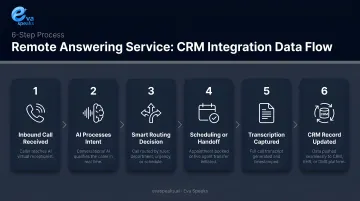
The whole sequence happens without anyone at your office taking a single action.
Three Integration Methods
| Method | How It Works | Best For |
|---|---|---|
| Native/Direct | Built-in connector between the answering service and your CRM | Fastest, most reliable; use when your CRM is supported |
| Middleware (e.g., Zapier) | Third-party tool bridges the two platforms | Broader CRM coverage; adds latency and a potential failure point |
| Custom Webhooks/API | Direct API connection built to spec | Maximum flexibility; requires technical setup |
Native integration is the preferred option when your CRM is supported. If not, middleware covers most remaining platforms—though it adds a potential failure point. API/webhook connections are worth the setup effort when neither option fits your data requirements.
Bidirectional Sync: Why It Matters for Call Quality
Most basic integrations are one-directional: call ends → data goes into CRM. Bidirectional sync also pulls data from the CRM into the answering service interface before or during a call.
Without bidirectional sync, your AI or agent answers blind. They don't know if this caller is an existing customer, what they last bought, or whether there's an open support ticket. With it, that context is available immediately—and the call quality reflects that.
What Data Gets Synced
Typical fields passed from an answering service to a CRM include:
- Caller name, phone number, email, company name
- Call date and time
- Call notes or full transcript
- Call outcome/disposition (new lead, support request, callback needed)
- Custom tags—campaign source, urgency level, call type
- Call duration
Custom field mapping lets you decide where each piece of data lands in your CRM schema. A law firm might map "call type" to a case category field; an e-commerce business might route it to an order inquiry status field. Before setup, confirm that your answering service supports mapping to custom fields—not just default contact records.
Want a CRM integration built for your call flow? Get a Customized Workflow Recommendation
Key Features to Look For in a CRM-Integrated Remote Answering Service
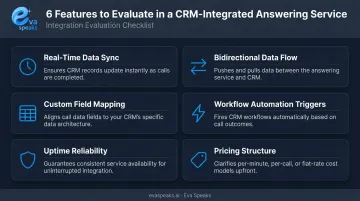
Not all integrations are equal. When evaluating providers, check specifically for:
- Real-time data sync: Call data should appear in the CRM the moment the call ends—not in batches hours later. Delayed sync means follow-up workflows fire late and records go stale during busy periods.
- Bidirectional data flow: Ask vendors directly: "Can your system pull CRM data into the agent interface during a live call?" A yes/no answer tells you a lot about how seriously they've built the integration.
- Custom field mapping: The integration needs to work with your existing CRM schema. Look for the ability to map captured data to specific fields, plus support for custom tags for segmentation.
- Workflow automation triggers: The best integrations don't just log data—they set off actions. Confirm whether new contact creation or call disposition updates can trigger lead assignment, email sequences, or ticket creation.
- Uptime reliability: Ask about uptime SLAs, redundant infrastructure, and how the system handles sync failures during high call volume. An integration that goes down at peak hours undermines everything else.
- Pricing structure: Confirm whether CRM integration is included in the base price or sold as an add-on. Some providers bundle it; others charge separately per CRM platform.
See it working with your CRM before you commit. Request Live Demo
How AI-Native, Hybrid, and Traditional Remote Answering Services Compare on CRM Integration
Not every remote answering service connects to your CRM with the same depth or speed. Here is how the three main approaches stack up across the features that matter most:
| AI-Native (EvaSpeaks) | Hybrid Live + AI | Traditional Remote Answering | |
|---|---|---|---|
| Features | AI calls + real-time CRM auto-push, scheduling sync | Human agents + AI-assisted CRM logging | Human agents, manual CRM entry |
| Best-fit Business Size | SMB to mid-market | Growing businesses | Any size |
| Key Strengths | Instant CRM updates, zero manual entry, 24/7 | Human judgment + AI efficiency | Familiar, low commitment | | Implementation Complexity | Low - native CRM connectors | Low to Medium | Low | | Integration Capability | HubSpot, Salesforce, Zoho, CRMs native | Varies by provider | Manual or limited API |
How AI Is Changing Remote Answering Service CRM Integration
From Notes to Structured Data
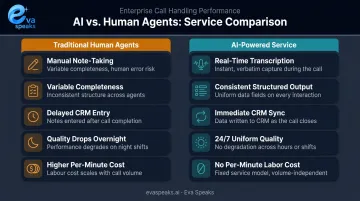
Traditional human agents take notes during or after a call. The quality and completeness of those notes varies by person, call length, and how busy the agent is. AI changes this entirely.
AI-powered answering services capture call data through real-time transcription and LLM-driven processing, producing structured output that's consistent regardless of call volume or time of day. Instead of a rough paragraph someone typed from memory, your CRM receives a structured call summary with identifiable fields.
Specific AI Capabilities That Improve CRM Data
- Real-time transcription: Converts the full conversation to text, available immediately after the call ends
- LLM-generated summaries: Surfaces key points automatically — no one needs to read a full transcript to understand what happened
- Sentiment tagging: Flags call tone to inform follow-up prioritization
- Customizable routing logic: Follows different scripts and routing rules based on caller input or call reason
These capabilities only deliver value if they're configured to match how your business actually operates. Eva Speaks applies LLM integration to handle calls with real-time AI responses, capturing transcriptions and routing outcomes automatically. Businesses configure call-flow scripts and routing rules to fit their workflows — different handling for new inquiries versus existing customers, for example.
The Cost and Coverage Implication
Better data quality matters less if coverage has gaps. Running 24/7 human agent coverage is expensive, and quality tends to slip on overnight or weekend shifts. AI-powered answering removes the per-minute labor cost while maintaining consistent data capture across every call, regardless of when it comes in.
For businesses that need round-the-clock CRM-connected phone coverage, that combination — lower cost, consistent output — is what makes always-on coverage practical rather than prohibitive.
See how AI handles your remote calls after hours. See How AI Handles After-Hours Calls
Getting Started: How to Set Up CRM Integration for Your Answering Service
Three Questions to Answer Before Contacting a Provider
Which CRM do you use, and does the provider support it natively? Native support means faster setup and more reliable sync. If your CRM isn't on their native list, ask specifically how they'd handle it—middleware or API.
What data from each call do you need captured, and into which fields? Map this out before the sales call. Knowing which fields matter prevents vague setup conversations and field mismatches after launch.
What CRM automations should a new call trigger? Lead assignment, follow-up tasks, email sequences — define these ahead of time so you can configure the integration to support them before go-live.
Typical Setup Process
- Select a provider that supports your CRM (native support preferred)
- Authorize the integration and configure field mapping
- Define call scripts and routing rules
- Run test calls to verify data flows correctly into your CRM
- Monitor the first week of live operation for field mismatches or missing data
Once your setup is underway, evaluation doesn't stop at go-live. Keep these checkpoints in mind before and after launch.
What to Watch During Evaluation
- Test bidirectionality explicitly—don't assume it's included
- Confirm whether the integration is native or middleware-based
- Check the uptime SLA and what happens during sync failures
- Verify CRM integration pricing (base vs. add-on)
- Ask whether the connection has been tested with your specific CRM version
Frequently Asked Questions
What is CRM integration?
CRM integration is a technical connection between two software systems—here, an answering service and a CRM platform—that allows data to pass automatically between them. Call details appear in the correct customer record without any manual input.
What is a remote CRM?
A remote CRM refers to accessing and updating a CRM from outside a central office. CRM-integrated answering services enable this by handling and logging calls remotely, so your customer database stays current without requiring on-site staff.
Do answering services still exist?
Yes, and they've changed significantly. Modern services combine live agents, AI, or both with direct CRM integration to handle calls 24/7 and update customer records automatically in real time.
What are the 4 types of CRM?
The four main types are: operational, analytical, collaborative, and strategic. Answering service integration most directly supports operational CRM—it automates call logging and triggers follow-up workflows tied to day-to-day customer interactions.
What data can an answering service log into my CRM?
Typical synced fields include:
- Caller name, phone number, email, and company
- Call date, time, and duration
- Call notes or transcript and outcome/disposition
- Custom tags set during setup (for example, campaign source or urgency level)
How does an AI-powered answering service differ from a traditional one for CRM integration?
AI-powered services capture and structure call data automatically through transcription and AI-generated summaries, pushing consistent CRM updates immediately after each call. Human agents write notes manually, which can vary in completeness and speed.