CPaaS adoption is accelerating sharply. According to Gartner's 2024 market analysis, the CPaaS market topped $13.5 billion in 2024, with the top five vendors representing 60% of that market. Meanwhile, helpdesk platforms like Zendesk, Freshdesk, ServiceNow, and HubSpot Service Hub are standard infrastructure across support organizations of every size. Yet the technical connection between those two layers — how a call becomes a ticket, how a ticket triggers a follow-up SMS — remains poorly understood.
This guide explains exactly how CPaaS-helpdesk integration works: the connection methods, the data that flows, and what becomes possible when the two layers finally talk to each other. Teams evaluating an AI-native approach to this integration can Request Live Demo to see how Eva Speaks handles call-to-ticket workflows out of the box.
Key Takeaways
- CPaaS tools embed voice, SMS, chat, and video into business workflows via APIs — not as standalone apps
- Integration uses three patterns: native connectors, webhook event triggers, and custom REST API connections
- Communication events automatically create or update tickets without manual data entry
- AI-assisted CPaaS platforms attach transcripts, sentiment flags, and intent summaries to tickets before an agent responds
- The result: customer context travels with every interaction, reducing repeat conversations and speeding up resolution
What Is CPaaS-Helpdesk Integration?
CPaaS-helpdesk integration is the technical connection between a Communications Platform as a Service — which handles live voice, SMS, chat, and messaging — and a helpdesk or ticketing system that tracks, assigns, and resolves customer issues. The integration creates a shared operational loop where communication events and ticket data inform each other in real time.
Without it, agents work across disconnected tools. They answer a call in one platform, then manually log it as a ticket in another. Customer history is invisible at the moment of interaction, and no communication record automatically becomes a support artifact.
What This Integration Is Not
This category has clear boundaries worth defining upfront:
- Not a CRM sync — this is about communication events feeding ticket workflows, not just contact record updates
- Not CCaaS — Contact Center as a Service is a pre-built contact center application; CPaaS provides programmable communication building blocks that developers embed into existing systems
- Not UCaaS — Unified Communications as a Service covers internal team collaboration. CPaaS-helpdesk integration is narrower: external customer communication converted into structured ticket data
The Three-Layer Architecture
CPaaS platforms operate through three layers that connect to your helpdesk:
- Communications layer — actual voice, SMS, and video delivery
- Business logic layer — rules and triggers defining when messages fire and what data gets captured
- Integration layer — connects communication channels to downstream business systems like your helpdesk
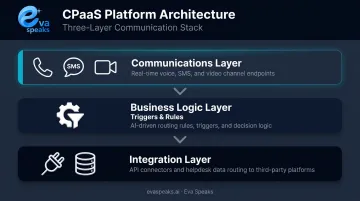
The helpdesk sits at the end of this chain, receiving structured data about every interaction. How deep that integration goes depends on the provider — some ship native one-click connectors to major platforms; others require webhook or REST API configuration from a developer.
How CPaaS Tools Connect to Helpdesk & Ticketing Systems
CPaaS-helpdesk connections aren't monolithic. They occur through distinct technical patterns, each with different setup requirements and customization potential.
Triggering the Connection
Integration begins with an event in the CPaaS platform — a call received, an SMS sent, an IVR session completed, a chatbot conversation escalated. The platform's logic layer detects these events and converts them into structured data payloads ready for handoff.
Triggers work in both directions:
- Inbound — customer-initiated contact (a call comes in, an SMS arrives)
- Outbound — system-generated messages that receive a reply (an appointment reminder that gets a response)
Both can create or update helpdesk tickets automatically based on configured rules.
Those rules execute through one of three core connection methods, each suited to different levels of complexity.
The Three Core Connection Methods
| Method | How It Works | Best For |
|---|---|---|
| Native connectors | Pre-built integrations CPaaS vendors provide for specific helpdesks (Zendesk, Freshdesk, etc.) | Fastest setup with minimal configuration |
| Webhooks | HTTP callbacks that push CPaaS event data to a helpdesk endpoint in real time when a specified event fires | Event-driven flows like "new SMS received" or "call ended" |
| REST API calls | Custom-coded connections using CPaaS or helpdesk APIs to build bidirectional data flows tailored to specific business logic | Complex field mapping, custom routing rules, historical lookups |
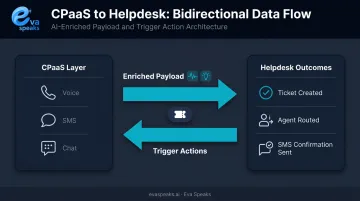
Twilio's official documentation demonstrates a concrete bidirectional example: an incoming customer SMS creates a Zendesk ticket, and when that ticket is created, Zendesk fires a webhook back to Twilio to send an acknowledgment SMS — all without human input.
Not all integration approaches deliver the same outcome. Here is how AI-native, CPaaS-built, and traditional helpdesk phone integrations compare across the dimensions that matter most for support teams:
| AI-Native (EvaSpeaks) | CPaaS Custom Build | Native Helpdesk Phone Integration | |
|---|---|---|---|
| Features | Voice AI + auto ticket creation, CRM sync, IVR replacement | Fully programmable call-to-ticket workflows | Click-to-call, basic CTI, manual tickets |
| Best-fit Business Size | SMB to mid-market | Developer-heavy teams | Any size |
| Key Strengths | No-code, instant ticket creation, zero missed calls | Maximum flexibility | Familiar, within existing helpdesk |
| Implementation Complexity | Low | High - developer required | Low |
| Integration Capability | Zendesk, Freshdesk, Intercom native | Any system via custom code | Limited to native integrations |
What Lands in the Ticketing System
A CPaaS-generated ticket record typically contains:
- Channel type — voice, SMS, or chat
- Customer identifier — phone number cross-referenced against existing records
- Interaction metadata — timestamp, duration, call status
- Transcript or message content — depending on whether transcription is enabled
- Routing history — which IVR paths or bot flows the customer went through
- Escalation flags — whether the interaction required human handoff
The quality of what lands in the ticket depends entirely on how much intelligence the CPaaS layer adds before handoff. A basic integration logs raw event data. A platform like Eva Speaks, which integrates large language models and real-time call transcription, can deliver structured summaries, intent classifications, and sentiment context as part of the ticket payload. Agents open the ticket already knowing what the customer needed and how the conversation went. This enriched data layer is particularly useful for small support teams — when a five-person team is handling all inbound contact, having AI-generated context in each ticket reduces the amount of time agents spend reconstructing call history before they can act. To see how AI-enriched ticket data looks from the agent's perspective, you can Watch AI Call Flow Demo.
What Data Flows Between CPaaS and Your Helpdesk
The real operational value of this integration lies in the specific data that travels with each ticket, not just the fact that a ticket was created.
Key Data Types in the Payload
- Customer identity — phone number, email matched against CRM records, account tier
- Interaction metadata — channel, duration, direction, timestamp
- Conversation content — call transcripts, SMS message bodies, chat logs
- Routing history — IVR paths taken, queues touched, transfers made
- AI-enriched annotations — sentiment signals, detected intent, issue classification (when the CPaaS layer includes AI processing)
Twilio's Call resource, for example, exposes fields including From, To, CallSid, CallStatus, Direction, CallDuration, RecordingUrl, and ParentCallSid — giving the receiving helpdesk granular context about exactly what happened during an interaction.
Bidirectional Flow
Data doesn't only move from CPaaS into the helpdesk. The helpdesk can push data back:
- An agent marks a ticket resolved → CPaaS fires an outbound SMS confirming resolution to the customer
- A ticket re-opens → an automated follow-up workflow re-engages the customer
- A new ticket is created → an acknowledgment message goes out immediately
This closes the loop between what happens in the ticketing system and what the customer experiences in real time.
The Customer Context Problem, Solved
That closed loop also solves a persistent pain point: repeat callers. When a customer calls back about the same issue, the ticketing system already holds their full interaction history from prior CPaaS touchpoints: the original call transcript, sentiment trend, routing path, and any escalation notes. The agent sees the full picture without asking the customer to repeat themselves.
Platforms that combine CPaaS with LLM-based analysis can take this further. Eva Speaks, for example, uses real-time AI responses and customizable call-flow scripts to classify incoming interactions by issue type, urgency, and customer profile before the ticket is even assigned — sharply improving routing accuracy before a human agent ever picks up. Support teams that want to explore this pattern for their specific helpdesk can Talk to an AI Communication Expert.
Key Capabilities Unlocked When CPaaS Meets Your Ticketing System
Automated Ticket Creation and Escalation
Any CPaaS event can automatically generate or escalate a ticket:
- An inbound call that hit voicemail
- An IVR session that ended without resolution
- A two-way SMS thread the bot couldn't resolve
- A call that exceeded a defined duration threshold
No agent intervention required. No interaction falls through the cracks because someone forgot to log it.
Omnichannel Ticket Threading
A single customer issue that started via SMS, escalated to a call, and followed up via web chat can be threaded into one continuous ticket record. CPaaS integration maps every touchpoint to the same customer identifier, so the helpdesk shows a chronological, cross-channel conversation view — not separate disconnected tickets that force agents to piece together context manually.
Several platforms support this model in practice. Zendesk handles tickets from email, calls, and messaging through a unified routing layer, with API-created tickets and SMS available via Sunshine Conversations. Freshdesk Omni covers similar ground across web, SMS, messaging, and email. That unified record also becomes the foundation for smarter routing decisions downstream.
Intelligent Routing and Prioritization
When CPaaS delivers enriched data — sentiment signals, issue type classification, customer tier — the helpdesk's routing engine uses that data to assign tickets to the right agent or queue automatically. A frustrated billing customer scores differently than a first-time product inquiry. That difference should determine routing, not luck of the draw.
SQM Group's FCR research notes that each 1% improvement in first-contact resolution increases transactional NPS by 1.4 points — a meaningful downstream effect of getting routing right the first time.
Which Teams and Industries Benefit Most
Operational Contexts With the Highest Return
Some environments get more value from this integration than others:
- High-volume support teams where manual ticket logging creates bottlenecks and missed interactions
- Multichannel contact operations managing voice, SMS, and chat simultaneously
- Industries where interaction history drives resolution — think healthcare teams attaching call transcripts to patient records, financial services firms logging notifications against customer accounts, and e-commerce teams threading order-status SMS into open support tickets
SMB Accessibility
This integration isn't exclusively for enterprise teams. Grand View Research's CPaaS market report highlights CPaaS adoption among SMEs, citing low upfront costs and pay-as-you-go pricing as key drivers. A small support team can add an SMS or voice workflow connected to their existing helpdesk without buying a full communications suite or rebuilding their infrastructure.
That affordability makes incremental adoption realistic — and it's the lowest-risk path for teams new to CPaaS-helpdesk integration.
A Practical Starting Point
- Start with inbound voice — auto-logging calls to tickets is the most common and lowest-friction first step
- Validate the data mapping — confirm ticket fields populate correctly before adding channels
- Expand to SMS and chat — once voice flows reliably, add additional channels
- Layer in AI enrichment last — sentiment scoring, transcripts, and intent classification add the most value once the base integration is stable
Each step adds capability without disrupting what already works — a practical way to build confidence in the connected stack before scaling further. Teams that want a recommendation tailored to their specific helpdesk and telephony setup can Get a Customized Workflow Recommendation.
Frequently Asked Questions
What is a CPaaS platform?
CPaaS (Communications Platform as a Service) is a cloud-based service that provides APIs for voice, messaging, video, and authentication that businesses embed into their existing applications and workflows — without building telecom infrastructure from scratch. It's the programmable communications layer that sits beneath customer-facing workflows.
Which AI support tools integrate best with existing CRM and ticketing systems?
AI-enhanced CPaaS platforms — those with LLM integration, sentiment analysis, and call transcription — tend to integrate most effectively because they deliver structured, enriched data that helpdesk systems can act on immediately, rather than raw call logs requiring manual interpretation.
How does CPaaS create helpdesk tickets automatically?
A CPaaS event (a call ends, a bot escalates, an SMS goes unanswered) fires a webhook or API call carrying structured interaction data to the helpdesk. The helpdesk maps that data to a new or existing ticket record based on configured rules — no manual input required.
What ticketing systems are compatible with CPaaS integrations?
Most major platforms — Zendesk, Freshdesk, HubSpot Service Hub, ServiceNow, and Zoho Desk — support CPaaS integration either through native connectors provided by CPaaS vendors or via REST APIs and webhooks available on both sides.
Can CPaaS integrate with both cloud-based and on-premise helpdesk systems?
Cloud-based helpdesk systems integrate most directly via REST APIs and webhooks. On-premise systems can integrate but typically require custom API development and may introduce firewall configurations or secure gateway requirements that complicate deployment.
What is the difference between CPaaS and CCaaS for customer support?
CPaaS provides programmable communication building blocks (APIs for voice, SMS, chat) that developers embed into existing workflows, offering high customization. CCaaS (Contact Center as a Service) is a pre-built, ready-to-use contact center platform. Choose CPaaS when you need precise control over how communication works; choose CCaaS when faster deployment matters more than flexibility.