Introduction
Every growing service business hits the same wall: call volume climbs faster than hiring budgets allow. The result is a familiar cascade — missed calls, overwhelmed staff, and callers who simply move on to a competitor who picks up.
Automated call handling uses AI, IVR, and intelligent routing to answer, triage, and direct inbound calls without a human operator. It's how operations teams break through that capacity ceiling without expanding headcount.
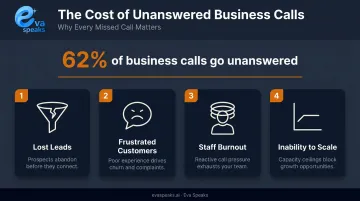
This matters now because 62% of business calls go unanswered, and every missed call represents lost revenue that adds up fast. For operations managers and SMB owners, the real question is how to implement it well enough to actually hold up under real call volume.
This article explains what automated call handling is at an operational level, how the process works end-to-end, what drives performance, and where it shouldn't be applied.
See automated call handling working live for your business. Request Live Demo
Key Takeaways
- Automated call handling uses AI, IVR, speech recognition, and routing logic to manage inbound calls without live operators, enabling 24/7 availability at scale.
- The process runs in three core stages: call reception and identification, AI intent recognition, then routing and resolution.
- Modern LLM-powered systems handle natural conversation, so callers describe what they need instead of pressing "1 for sales."
- Performance depends on call-flow design, CRM integration depth, and ongoing tuning, not just initial deployment.
- Not every call should be automated; complex, sensitive, and high-value conversations still need humans.
What Is Automated Call Handling?
Automated call handling is the use of software, AI, and telephony infrastructure to receive, interpret, and direct incoming calls without requiring a live operator at each step. Callers reach the right resource faster, and businesses handle higher volumes without proportional headcount growth.
The Core Components
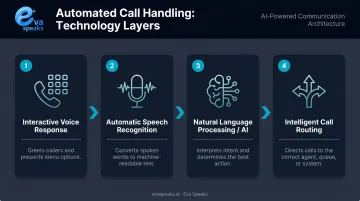
Four technologies work together in any automated call handling system:
- Interactive Voice Response (IVR): The menu and prompt layer that captures caller input and initiates routing.
- Automatic Speech Recognition (ASR): Converts spoken language into text in real time, so the system interprets natural speech — not just button presses.
- Natural Language Processing / AI: Analyzes caller intent from conversational input, enabling context-aware responses rather than rigid script branches.
- Intelligent call routing: Uses caller data, agent availability, and business rules to send calls to the right destination — a department, a self-service answer, or a human agent.
Modern AI vs. Legacy IVR
The gap between legacy touch-tone IVR and LLM-powered automated call handling is substantial. Legacy IVR forces callers through fixed menus — press 2 for billing, press 3 for support. If a caller's need doesn't match a menu option, they loop, abandon, or escalate in frustration.
AI-powered platforms like EvaSpeaks take a different approach: they integrate large language models with customizable call-flow scripts so interactions follow the caller's words, not a menu tree. A caller can say "I need to reschedule my appointment for next Thursday" and the system understands the intent, checks availability, and responds — no button press required. EvaSpeaks connects to scheduling tools and CRM platforms through standard integrations, which means this conversational scheduling capability is available to businesses without requiring them to build custom middleware.
Here is how AI-powered, IVR-based, and human-staffed automated call handling compare:
| AI Automated (EvaSpeaks) | Legacy IVR | Human Answering Service | |
|---|---|---|---|
| Features | Natural conversation, routing, scheduling, CRM sync, 24/7 | DTMF menus, basic routing, message recording | Human agents, adaptive, message-taking |
| Best-fit Business Size | SMB to mid-market | Large enterprise | Any size |
| Key Strengths | No missed calls, consistent, instant CRM update | Proven, widely deployed | Human empathy, complex calls |
| Implementation Complexity | Low - hours | High | Low |
| Integration Capability | CRM, scheduling, EHR native | Custom dev required | Manual or limited |
Terminology Clarification
That distinction matters because automated call handling is frequently confused with related terms:
- Auto-dialers handle outbound calling — the opposite direction.
- Virtual receptionists may include human agents answering on a business's behalf.
- Call center software is a broader platform category covering workforce management, analytics, and omnichannel tools.
Automated call handling refers specifically to the inbound call management process.
Why Businesses Use Automated Call Handling
Call volume at growing service businesses increases faster than headcount budgets allow. That forces a choice between missed calls, overwhelmed staff, and degraded service quality — and automated call handling is the direct fix.
What Service Businesses Specifically Need
Routine inquiries — hours, directions, appointment status, billing questions — make up the majority of inbound call volume at most service businesses. These calls don't require human judgment. They require fast, accurate answers at any hour.
Automated call handling addresses three specific demands:
- Round-the-clock availability without shift scheduling or after-hours staffing costs
- Consistent handling of high-frequency routine inquiries regardless of call volume
- Faster response times that prevent callers from abandoning or switching to a competitor
The Cost of Inaction
Those benefits matter because the baseline is costly. Research on missed business calls puts the unanswered call rate at 62% across businesses. Each missed call carries real consequences:
- Lost leads that don't call back
- Frustrated existing customers who remember the experience
- Staff burnout from high-volume repetitive calls that could be automated
- Inability to scale during peak periods (holidays, promotions, seasonal spikes)
For most service businesses, automated call handling is an operationally driven decision, not a compliance requirement. Healthcare, legal, and financial services are a different story — call recording consent, data handling protocols, and access controls shape system design from day one in those industries.
EvaSpeaks addresses this directly: all data is stored in U.S. data centers, and businesses can opt out of having call data used for AI model training, which matters in regulated contexts. For service businesses that handle calls containing sensitive customer details — home services businesses, medical practices, legal firms — EvaSpeaks provides a structured data governance model without requiring a dedicated compliance team to manage it.
See how AI handles calls after your office closes. See How AI Handles After-Hours Calls
How Automated Call Handling Works
A call arrives at the business number. Within seconds, the system has identified the caller, determined their intent, and decided whether to resolve the inquiry autonomously or hand off to a human agent — with full context already attached. Each stage matters.
Step 1: Call Reception and Caller Identification
The moment a call arrives, the system captures the caller ID, cross-references it against available customer data (via CRM integration if configured), timestamps the call, and begins preparing routing context. A caller already in the CRM may be greeted by name or routed directly to their account manager — without pressing anything. That context shapes every decision downstream.
Step 2: AI Intent Recognition
The NLP or LLM layer interprets what the caller says to determine their intent — scheduling, billing inquiry, support request, general information. Modern systems handle ambiguous or multi-part requests without forcing callers back to a menu. A caller who says "I want to change my appointment and also ask about the bill from last month" doesn't get stuck; the system parses both intents and routes accordingly.
Step 3: Routing Decision and Resolution
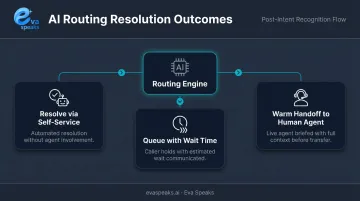
The routing engine applies predetermined criteria — caller priority, agent availability, intent category, business hours — to make a split-second decision:
- Resolve via self-service — answer the question and close the call autonomously
- Queue with wait time — inform the caller of expected hold time and hold their place
- Warm handoff — transfer to a human agent with the full interaction context passed along, so the agent doesn't ask the caller to repeat themselves
What Controls Performance
Call-flow configuration is where automated call handling succeeds or fails in practice. The key variables:
- Dead ends start at design: Poorly mapped call flows undermine even the most capable AI — the logic structure matters as much as the technology.
- CRM and scheduling integration: Without live data connections, the system can't personalize routing or resolve context-dependent inquiries on its own.
- Domain-specific training: Generic LLMs handle generic queries. Systems trained on your business's vocabulary, services, and edge cases perform noticeably better.
- Volume testing: Performance must be validated at realistic peak loads — systems that work at normal volume can degrade during seasonal spikes.
- Compliance configuration: Regulated industries require specific setups around consent, data storage, and access controls that affect design from the start.
Each variable needs periodic review — call-flow logic that handled last quarter's inquiry mix may not hold up after a product launch or seasonal volume shift.
Want a workflow built for your call mix? Get a Customized Workflow Recommendation
Common Issues and Misconceptions
"Automated Systems Sound Robotic"
Poor call quality is almost always a design failure, not a technology limitation. LLM-powered systems are capable of natural, context-aware conversations — but only if the call flows are designed to leverage that capability. A badly scripted AI sounds just as frustrating as a badly scripted human.
"Deployment Is a One-Time Technical Project"
Treating automated call handling as a set-and-forget installation is the most common operational mistake. Call flows need to be tested against real caller behavior, adjusted based on analytics, and updated as business offerings change. Systems that aren't actively maintained degrade over time, as the configured flows fall out of step with actual caller needs.
"IVR and Automated Call Handling Are the Same Thing"
IVR is one component within automated call handling — the menu and prompt layer. A complete system also includes:
- AI-driven intent recognition
- CRM integration
- Intelligent routing
- Call logging and analytics
A business running a touch-tone menu from 2015 and calling itself "automated" is missing most of what current systems actually do.
"Savings Are Immediate"
Implementation quality, integration work, and performance tuning all affect when ROI materializes. According to ROI benchmarks for conversational AI, meaningful cost reduction typically emerges after the system has been tuned through real call volume — not at launch. Businesses that expect immediate savings without accounting for optimization time will likely be disappointed.
Discover how AI call automation works for businesses like yours. Explore AI Call Automation
When Automated Call Handling May Not Be Appropriate
Automation isn't the right answer for every call type or every business.
Call Types That Should Route to Humans by Design
- Complex consultations: Legal intake, medical advice, and financial planning require human judgment and professional accountability.
- Emotionally sensitive situations — complaints, crisis calls, urgent support — where callers in distress need empathy, not a routing menu.
- High-value prospects or long-term clients where personal connection directly affects the commercial relationship.
These calls should reach humans by intent, not by default or failure.
Business Constraints That Reduce Effectiveness
- Very low call volumes: Setup and maintenance costs won't be justified by the volume handled.
- Undefined call flows: Without mapped caller needs and defined handling rules, there's nothing to automate well.
- No one assigned to monitor performance: systems without regular review degrade quietly over time.
Warning Signs of Poor Implementation
If any of these patterns are present, the system is deployed but not properly designed:
- High escalation rates that never improve after launch
- Persistent caller complaints about navigation difficulty
- Low self-service resolution rates across all inquiry types
- Call flows that mirror the internal org chart rather than how callers actually think about their needs
Conclusion
Automated call handling transforms a manual, staff-dependent function into a scalable, always-on system. Getting there requires three things done well:
- Call flows designed around how callers actually behave
- Integrations configured to pass data cleanly between systems
- Performance monitored consistently so problems surface before they compound
For service businesses facing growth, the difference between a system that works and one that erodes caller trust comes down to implementation discipline. Map your call flows before you build them, connect your CRM and scheduling tools from day one, and treat your analytics dashboard as a regular operational check — not an afterthought. That's what turns automated call handling from a cost-cutting experiment into a reliable front line for your business.
Frequently Asked Questions
What is an automated call service?
An automated call service is a technology system that answers and manages incoming calls without live operator involvement, using IVR, AI, and routing logic to direct callers to the right resource or self-service resolution. Callers get faster answers; businesses handle more volume without adding staff proportionally.
How do automated calls work?
The system receives the call, uses speech recognition and AI to interpret caller intent, then applies routing rules to either resolve it via self-service or connect the caller to a human agent. The whole sequence takes seconds, and callers experience a continuous, conversational interaction rather than a clunky manual transfer.
How is automated call handling different from a traditional IVR system?
IVR is one component within automated call handling — the menu and prompt layer. Full automated call handling also includes AI-driven intent recognition, CRM integration, intelligent routing, and analytics, making it far more capable than touch-tone menus alone.
What types of calls are best suited for automated handling?
Routine, predictable inquiries are the strongest candidates. Think appointment scheduling, hours and location questions, order status, basic billing, and department routing. Complex, sensitive, or high-value conversations should always route to human agents.
How long does it take to implement an automated call handling system?
Typical timelines run 2–4 weeks for initial setup and piloting, with ongoing optimization continuing after full deployment. Implementation speed depends on integration complexity and how clearly existing call flows are defined.
When should a business keep human agents instead of automating calls?
Human agents remain essential for complex consultations, emotionally sensitive calls, and compliance-sensitive interactions in regulated industries. Any conversation where trust or loyalty is on the line warrants a real person on the other end.