The integration work itself sits squarely in developer territory. Teams without REST API experience regularly hit the same walls: broken call flows, undelivered messages, one-way audio on voice calls, and security gaps from mishandled credentials. Catching these problems before production costs hours; catching them after costs weeks.
This guide covers the full CPaaS integration process — prerequisites, step-by-step setup, post-integration validation, and the most common failure patterns — with honest guidance on how complexity scales across API types.
Key Takeaways
- CPaaS APIs embed voice, SMS, and video into applications via RESTful interfaces — no telecom infrastructure required
- SMS is the most straightforward entry point; voice adds session state and real-time webhook processing; video requires full WebRTC infrastructure
- Before starting: confirm stack compatibility, secure credentials, verify server latency under 150ms, and complete A2P 10DLC registration for US SMS
- The most common failures — misconfigured webhooks, unregistered sender IDs, one-way audio — are all preventable with proper pre-launch checks
- Platforms like Eva Speaks add LLM-based call routing and real-time transcription on top of CPaaS infrastructure, cutting custom development for businesses that need automated call handling
CPaaS API Integration Guide
CPaaS integration broadly follows four phases: environment preparation → API authentication and configuration → feature embedding → testing and validation. Shortcutting any phase tends to surface as production failures, not development failures, making them far more expensive to fix.
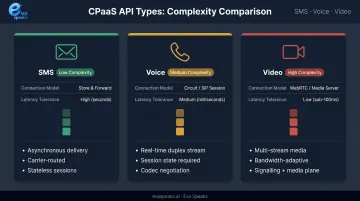
Integration complexity varies by API type:
- SMS — lowest operational surface: stateless HTTP calls, asynchronous delivery, webhook-based status receipts
- Voice — adds latency sensitivity, session state, and live call control
- Video — introduces the full WebRTC stack (signaling, STUN/TURN servers, SFU architecture), with effort multiplying per platform: web, iOS, Android
Prerequisites and Readiness Checks
Before writing a single line of integration code, confirm:
Stack and environment:
- Your application can make and receive standard RESTful HTTP calls
- Your server can process concurrent inbound webhook events without queuing delays
- Outbound UDP traffic is permitted (required for real-time voice and video)
Authentication:
- API keys or OAuth tokens from your CPaaS provider are obtained and stored securely
- Credentials are in environment variables or a secrets manager — never hardcoded in source files
Network readiness for voice and video:
- One-way transmission latency to edge nodes is under 150ms — the threshold ITU-T G.114 identifies as acceptable for most real-time voice applications
- Packet loss stays below 1% (Twilio's Voice SDK flags quality degradation above this threshold for consecutive samples)
US compliance:
- SMS: A2P 10DLC brand and campaign registration must be complete before sending live traffic; per Twilio's compliance documentation, unregistered 10DLC numbers sending to US recipients have been fully blocked since September 1, 2023
- Voice: Confirm your provider supports STIR/SHAKEN attestation, which the FCC required for US IP voice networks by June 30, 2021
How to Integrate a CPaaS API (Step-by-Step)
Step 1 — Environment setup
Install the provider's SDK or configure direct REST API access in your development environment. Set up a sandbox account to test without incurring live traffic costs. Review the provider's documentation for your specific language and framework first.
Step 2 — Authentication and endpoint configuration
Generate API credentials and store them securely. Configure base endpoint URLs for your target API type. Verify connectivity by running a health-check or test ping request to confirm the integration layer is reachable before proceeding.
Step 3 — Webhook setup
Define and expose server endpoints to receive inbound events: delivery receipts, inbound messages, call status updates. Your server must respond with an HTTP 2xx within the provider's callback timeout window.
Timeout windows vary by provider:
- Bandwidth messaging: 10-second callback timeout
- Vonage: 3 seconds to establish connection, 15 seconds for response
- Twilio: configurable up to 15 seconds total
Design webhook handlers to acknowledge quickly with a 2xx, then move slow processing (database writes, downstream API calls) to asynchronous queues.
Step 4 — Feature embedding
Write the application logic to trigger communication actions — send SMS, initiate a call, start a video session. For voice APIs, also implement call state management to handle live events:
- Mute and unmute
- Call transfer
- Recording start/stop
- IVR branching
For businesses adding AI-powered call handling — LLM-based routing, real-time transcription, intelligent escalation — building this layer from scratch is substantial work. Platforms like EvaSpeaks offer pre-built AI integration layers (configurable call-flow scripts, LLM routing, transcription) on top of base CPaaS infrastructure, removing the need to build those components custom. This is particularly relevant for businesses and developers who want AI call handling capabilities without investing months in building and maintaining a custom voice AI pipeline.
Not every team needs to build on raw CPaaS APIs. Here is how the three main integration approaches compare across the dimensions that matter most for businesses:
| AI-Native (EvaSpeaks) | CPaaS Platform (Twilio/Vonage) | Legacy Telephony (PBX/ACD) | |
|---|---|---|---|
| Features | Pre-built AI voice, CRM/EHR connectors, instant deploy | Programmable SMS/voice APIs, custom workflows | Fixed call flows, limited API access |
| Best-fit Business Size | SMB to mid-market | Mid-market with dev teams | Large enterprise |
| Key Strengths | No dev required, business-ready, CRM-native | Full flexibility, any use case | Proven, on-premise control |
| Implementation Complexity | Low - hours | High - developer required | Very High |
| Integration Capability | CRM, scheduling, EHR out-of-box | Any via custom API | Custom dev only |
Step 5 — Error handling and retry logic
- Implement exponential backoff for failed API requests; retry behavior is provider- and status-code-specific (most providers retry 5xx and timeouts but not 4xx errors)
- Log all webhook payloads for debugging
- Handle edge cases: undeliverable numbers, call drops, media codec mismatches, duplicate webhook delivery
Teams that want to skip custom development and Explore AI Call Automation as a managed service instead can see how Eva Speaks layers on top of standard CPaaS infrastructure.
SMS, Voice, and Video APIs: Understanding Integration Complexity
CPaaS exposes communication capabilities at fundamentally different complexity tiers. Choosing the right tier — and scoping the effort accurately before you start — determines whether integration goes smoothly or stalls in production.
SMS APIs
Stateless HTTP POST requests to a provider endpoint. No persistent connections, no session management. Delivery is asynchronous, with webhook callbacks for status receipts.
Best for: OTPs, appointment reminders, notifications, two-way text interactions
Key complexity driver: US compliance. 10DLC registration, opt-in/opt-out language, and sender ID governance per CTIA's Messaging Principles are prerequisites, not afterthoughts.
Voice APIs
Require persistent session state, real-time webhook processing for live call control, and server capacity to handle bi-directional RTP packet streams. SIP trunking familiarity helps. Network conditions matter in a way they simply don't for SMS.
Key complexity drivers: Latency sensitivity, STIR/SHAKEN attestation, call control event handling (transfer, record, IVR), and packet loss monitoring.
Video APIs
The most complex tier. WebRTC requires a signaling server, STUN servers (RFC 5389) for NAT traversal, and TURN relay servers (RFC 8656) for environments where direct media paths are blocked by firewalls. Multi-party calls require SFU architecture. Client-side SDKs must manage device hardware access, dynamic bitrate adaptation, and connection recovery — and that implementation work repeats for each platform you support.
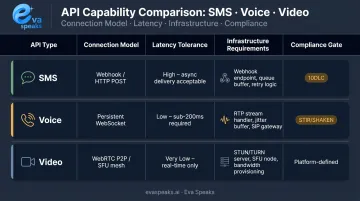
API Complexity Comparison
| API Type | Connection Model | Latency Tolerance | Infrastructure Requirements | Compliance Gate |
|---|---|---|---|---|
| SMS | Stateless HTTP POST | Not applicable | Webhook endpoint | 10DLC registration (US) |
| Voice | Session-based, real-time | <150ms one-way | Webhooks, RTP stream handling, STUN/TURN | STIR/SHAKEN (US) |
| Video | WebRTC (persistent) | Very low | STUN/TURN servers, SFU, per-platform SDKs | Varies by use case |
The global CPaaS market was estimated at USD $19.1B in 2024 and is projected to reach $86.3B by 2030, with AI-augmented communication (real-time transcription, LLM-driven routing) increasingly integrated into these platforms. For voice integrations, that means adding AI orchestration on top of session management, latency constraints, and STIR/SHAKEN compliance — plan for it before you build. You can Watch AI Call Flow Demo to see how the AI orchestration layer works on top of a CPaaS voice integration.
Common CPaaS API Integration Problems and Fixes
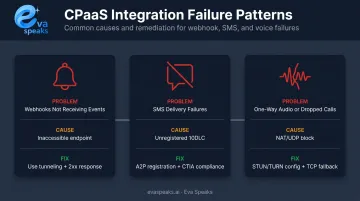
Most integration failures fall into predictable patterns. Catching them before production saves you from cascading errors that are far harder to debug once real traffic is flowing.
Webhooks Not Receiving Events
Problem: API requests send successfully, but delivery receipts or call status updates never arrive.
Likely cause: Webhook endpoint URL isn't publicly accessible (pointing to localhost), or your server is returning a non-200 response that triggers provider retry behavior — or stops retries entirely for certain status codes.
Fix:
- Use a tunneling tool (like ngrok) during development to expose local endpoints
- Confirm your server responds with HTTP 2xx within the provider's timeout window
- Check firewall rules for inbound POST requests on the webhook port
SMS Messages Failing Delivery in the US
Problem: Messages send via API but are blocked before reaching recipients.
Likely cause: Sending number not registered under a 10DLC campaign, or message content triggers carrier spam filters — keyword violations, missing opt-out language, or content patterns flagged under CTIA guidelines.
Fix:
- Complete A2P 10DLC brand and campaign registration before any live US traffic
- Review carrier content guidelines and include compliant opt-out language in all marketing messages
- Avoid content patterns associated with unwanted messaging per CTIA principles
One-Way Audio or Dropped Voice Calls
Problem: Voice calls connect but one party can't hear the other, or calls drop after a few seconds.
Likely cause: NAT traversal failure — the client's IP is behind a firewall blocking UDP traffic, preventing RTP media packets from flowing. STUN/TURN servers aren't configured or are unreachable.
Fix:
- Confirm STUN/TURN credentials are correctly passed in SDK initialization
- Configure TCP fallback for environments that block UDP
- Verify call state webhook processing completes within ~50ms to prevent session timeout
These three failure types account for the majority of integration issues reported in production. Addressing them during development keeps your integration stable when it counts. Teams evaluating whether to build on CPaaS or use a managed layer like Eva Speaks can Talk to an AI Communication Expert to compare the approaches for their specific use case.
Pro Tips for CPaaS API Integration
Load test before go-live. Start in sandbox mode and generate realistic traffic volumes before switching to production credentials. Testing at 10× expected concurrency reveals webhook bottlenecks and database slowdowns that single-call tests never surface.
Separate credentials by environment. Development, staging, and production should each have distinct API keys. The OWASP Secrets Management guidelines recommend regular rotation so compromised credentials have a short window of exposure. Use environment variables or a dedicated secrets manager — never version control.
Document before you build. According to the Postman 2024 State of the API report, 39% of developers cite inconsistent documentation as the biggest roadblock to API use. Document your webhook payload schemas and call-flow logic before writing code. Teams that skip this step spend far more time debugging integration failures months later — and that debt compounds every time a new engineer joins the project.
Evaluate purpose-built AI layers. Adding real-time transcription, LLM-driven routing, or intelligent call handling on top of a CPaaS voice API is a major engineering commitment. Platforms like Eva Speaks — which offer configurable call-flow scripts and LLM integration as a managed service — deserve serious evaluation against custom-build costs before you commit.
Conclusion
CPaaS API integration quality determines the reliability, scalability, and security of business communication. Rushed integrations don't just create launch problems — they create compounding failures that grow costlier with every user added to the system.
Treat integration as a structured engineering process. Validate prerequisites before starting and choose a CPaaS provider whose documentation and infrastructure match your API type. Test thoroughly in sandbox, then confirm post-integration functionality before any production traffic flows. Teams that follow this process ship reliable communication systems — teams that skip steps pay to rebuild them later. If you're evaluating a managed alternative to raw CPaaS, you can Request Live Demo to see how Eva Speaks compares.
Frequently Asked Questions
What are CPaaS APIs?
CPaaS APIs are RESTful interfaces that allow developers to embed real-time communication features — voice, SMS, video — directly into applications without building or owning telecom infrastructure. You call pre-built provider endpoints, and the provider handles carrier connectivity, routing, and delivery.
Is CPaaS easy to integrate?
It depends on the API type. SMS integrations are straightforward: stateless HTTP calls with webhook callbacks can be production-ready quickly. Voice and video APIs require significantly more work — session management, real-time webhooks, NAT traversal, and compliance configuration all add complexity.
What do I need before integrating a CPaaS API?
At minimum: API credentials, a publicly accessible webhook endpoint, and server latency under 150ms for real-time APIs. For US deployments, complete A2P 10DLC registration before sending SMS traffic and confirm your provider supports STIR/SHAKEN attestation for voice.
What is the difference between CPaaS and UCaaS?
CPaaS provides communication APIs that developers embed into custom applications: it requires development work but offers full flexibility. UCaaS delivers a ready-to-use platform (think Zoom or Teams) with no development required but limited customization. Choose CPaaS to build; choose UCaaS to deploy off the shelf.
What are the best CPaaS platforms?
Leading CPaaS platforms include Twilio, Sinch, Vonage, and Bandwidth. Evaluate providers on API range, US carrier infrastructure quality, developer documentation, compliance support (10DLC, STIR/SHAKEN), and pricing model — particularly how costs scale with message and call volume.
What is the best messaging API for CPaaS in the US?
The best option depends on your use case. Providers with direct US carrier connections and 10DLC compliance tooling — such as Twilio or Sinch — are widely used for A2P SMS. Businesses that also need AI-powered call handling, transcription, or intelligent routing should evaluate platforms like Eva Speaks that layer those capabilities on top of core messaging infrastructure.