AI scheduling assistants solve this by replacing manual coordination with automated logic — detecting conflicts, protecting focus blocks, and rescheduling tasks without you lifting a finger.
This guide covers the five best AI scheduling assistants available, what makes each one worth considering, and a practical framework for choosing the right fit for your workflow.
Key Takeaways
- AI scheduling assistants automate meeting booking, conflict detection, and time blocking using machine learning and NLP
- The best tools go beyond calendar apps — they reschedule automatically when priorities shift
- Top picks: Reclaim AI, Motion, Sunsama, Akiflow, and SkedPal — each suited to a different use case
- Key selection criteria: calendar compatibility, integration depth, AI accuracy, and pricing
- Pair your scheduling tool with an AI receptionist like Eva Speaks to cover inbound calls and bookings end-to-end
What Is an AI Scheduling Assistant?
An AI scheduling assistant is software that uses machine learning and natural language processing to organize calendars, find optimal meeting times, protect focus blocks, and handle scheduling coordination with minimal manual input.
Basic smart calendars operate on fixed rules — "block Tuesdays 9–11am" — with no ability to adapt. AI-driven schedulers connect to large language models to interpret user preferences, detect patterns over time, and make dynamic decisions when circumstances change.
Two Core Use Categories
Most tools fall into one of two functional modes:
- Personal calendar management — time blocking, task scheduling, focus time protection, habit scheduling
- Meeting coordination — external booking links, conflict detection, rescheduling, and availability sharing
Some tools handle both. Others specialize in one. Knowing which problem you're primarily solving narrows the field quickly.
Why Automation Matters Here
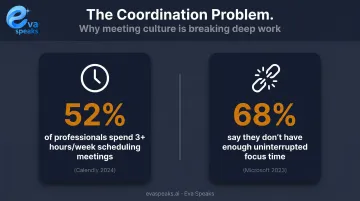
Asana's 2023 Anatomy of Work report found that knowledge workers spent 58% of their workday on coordination tasks rather than skilled or strategic work — and estimated that better processes could save employees nearly 5 hours per week.
Microsoft's 2023 Work Trend Index adds another dimension: 68% of people say they don't have enough uninterrupted focus time. Manual scheduling eats directly into that focus.
Those hours add up fast — and automating even a portion of the coordination load is where AI schedulers make a direct, measurable difference. If you want to see how AI call automation handles the customer-facing side of scheduling, you can Explore AI Call Automation.
Best AI Scheduling Assistants to Save Time and Automate Tasks
These five tools were selected based on AI scheduling accuracy, calendar integration breadth, ease of setup, pricing transparency, and real-world rescheduling performance.
Reclaim AI
Reclaim AI — now owned by Dropbox following its August 2024 acquisition — is built around one core idea: protecting your time from meeting creep. It connects to Google Calendar and Outlook, then automatically schedules and defends recurring habits, focus blocks, and tasks.
Its standout feature is Time Defense, which lets users assign flexibility levels to each scheduled block — from "Most Flexible" to "Most Defensive." When new meetings land on your calendar, Reclaim adjusts around them rather than letting them swallow your day. It's particularly effective for professionals with predictable deep-work needs who want that time protected without manual intervention.
| Details | |
|---|---|
| Key Features | Focus time automation, habit scheduling, buffer time between meetings, 1:1 meeting rescheduling |
| Best For | Professionals using Google Calendar or Outlook who want automated focus time protection |
| Pricing | Free plan available; paid plans from $12/seat/month (billed annually) |
Motion
Motion takes a broader approach: it combines task management, project tracking, and calendar scheduling into one AI-first platform. When a new meeting drops in or a deadline moves, Motion's AI Task Manager rebuilds your day automatically — analyzing deadlines, task dependencies, and priority levels in real time.
What sets Motion apart is the depth of its task-level intelligence. It doesn't just shift calendar blocks; it monitors project risk and flags tasks in danger of missing their deadlines — sometimes days or weeks out. For professionals managing complex project loads alongside heavy meeting schedules, that proactive visibility is a meaningful operational advantage.
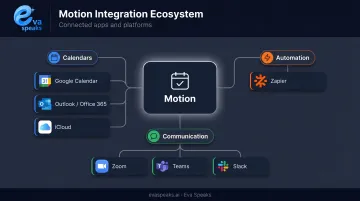
Motion integrates with:
- Calendars: Google Calendar, Outlook/Office 365, iCloud
- Communication: Zoom, Teams, Slack
- Automation: Zapier
| Details | |
|---|---|
| Key Features | AI task scheduling, automatic rescheduling, project risk tracking, AI workflow builder |
| Best For | Teams and individuals who want AI managing both their calendar and task load simultaneously |
| Pricing | From $19/seat/month (Pro AI, billed annually); $29/seat/month for Business AI |
Sunsama
Sunsama occupies a different position in this category. Where Reclaim and Motion lean toward full automation, Sunsama pairs AI assistance with intentional daily planning. Each morning, it pulls tasks from your email, calendar, and connected productivity apps into a unified view — then prompts you to consciously prioritize before the AI schedules your day.
That guided planning model has real backing. Harvard Business Review's research on timeboxing consistently supports explicitly migrating to-do lists onto the calendar and treating scheduled time as protected. Sunsama operationalizes this with AI assistance rather than replacing the human judgment that makes the method work.
Its AI assistant, Sunny, handles task creation, editing, and scheduling via text or voice. The built-in Pomodoro timer and daily journal round it out into a full productivity environment — not just a scheduling layer.
| Details | |
|---|---|
| Key Features | AI chatbot (text and voice), automated task scheduling, universal app inbox, Pomodoro timer, daily journal |
| Best For | Professionals managing tasks across multiple apps who want AI assistance without fully surrendering schedule control |
| Pricing | $22/month; $17/month billed annually (14-day free trial, no credit card required) |
Akiflow
Akiflow positions itself as a centralized command center for people managing tasks across many platforms. It pulls work from Notion, Asana, Slack, Gmail, and Outlook into a single universal inbox, then uses AI to auto-label, schedule, and reorganize tasks through a built-in chat interface.
The differentiator is breadth. Where other tools go deep on scheduling logic, Akiflow goes wide on integration — making it the strongest option for professionals who otherwise switch between five or six tools throughout the day. Its Stats feature provides a live breakdown of time spent across tasks, solo events, and meetings, giving users a clear picture of where their hours actually go.
| Details | |
|---|---|
| Key Features | Universal task inbox, AI auto-labeling, time-blocking calendar, AI chat for rescheduling, daily time reports |
| Best For | Power users managing tasks across many apps who need one AI-powered command center |
| Pricing | From $19/month billed annually; $34/month billed monthly (7-day free trial) |
SkedPal
SkedPal focuses tightly on structured, budget-aware time blocking. Users assign tasks to custom Time Maps — defined windows of availability by day and time type — then SkedPal's AI fills calendar slots automatically based on task priority and deadline.
Its most practical feature is time budgeting: you can allocate a set number of hours per week to a specific project or type of work, and SkedPal ensures that category never gets over-scheduled. For individuals who want organized, predictable calendars without manually editing blocks every day, that constraint-based approach delivers real structure.
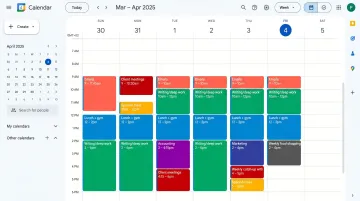
SkedPal supports Google Calendar, Office 365, and iCloud. Multi-account sync is available on the Pro plan.
| Details | |
|---|---|
| Key Features | Natural language task entry, Time Maps, time budgeting, automatic slot-filling, multi-platform calendar sync |
| Best For | Individuals who want structured, budget-aware time blocking without manual calendar editing |
| Pricing | From $9.95/month (Core, billed annually); Pro at $14.95/month billed annually |
For businesses that also need AI to handle the inbound call side of appointment booking, you can Watch AI Call Flow Demo to see how Eva Speaks manages scheduling calls in real time.
Key Features to Look for in an AI Scheduling Assistant
Choosing the right AI scheduling assistant comes down to three areas: core functionality, integration fit, and security. Before committing to a tool, evaluate it against these requirements:
Must-Have Capabilities
- Syncs in real time with Google, Outlook, and Apple Calendar — confirm actual support, not just marketing listings
- Detects conflicts and reschedules automatically, rather than just flagging the problem for you to solve
- Accepts natural language input: typing "schedule a 90-minute deep work block Tuesday afternoon" should work without setup
- Protects focus time and time blocks — critical if your calendar fills with meetings easily
Integration and Compatibility
The best scheduling tool is the one that connects to your existing stack. Check for native integrations with:
- Project management tools (Asana, Notion, Linear)
- Team communication (Slack, Teams)
- Email clients (Gmail, Outlook)
- CRM or business-specific platforms
Also confirm multi-calendar support — professionals managing separate personal and work calendars will need this from day one.
Security and Privacy Considerations
Scheduling assistants access sensitive calendar and communication data. Before deploying at a business level, verify:
- Encryption at rest and in transit — Motion uses AES-256 and TLS/SSL; Sunsama uses TLS 1.2+ and AES-256 via MongoDB Atlas
- AI training data policies — Motion explicitly states it does not train on customer data; confirm equivalent language from any tool you're evaluating
- Access controls — look for SSO/SAML support, two-factor authentication, and least-privilege access architecture
- Prompt injection risk — AI assistants that read calendar data can be manipulated by malicious content in event descriptions; choose tools from vendors with documented security practices
Businesses that want to see how Eva Speaks handles the call-based side of scheduling alongside these internal tools can Request Live Demo.
AI Scheduling Assistants vs. Manual Scheduling vs. Online Booking Tools
Not every business needs the same approach to scheduling. Here is how the three most common methods compare across the dimensions that matter most:
| AI Scheduling Assistant (EvaSpeaks) | Online Booking Software | Manual Human Scheduling | |
|---|---|---|---|
| Features | Voice + text scheduling, 24/7, reminders, CRM sync | Self-service booking form, calendar sync | Phone/email, staff-coordinated |
| Best-fit Business Size | SMB to mid-market | Tech-comfortable audiences | Any size |
| Key Strengths | Handles calls + bookings 24/7, zero missed scheduling | Self-service, patient/client driven | Full flexibility, relationship |
| Implementation Complexity | Low - calendar/CRM connectors | Low | None |
| Integration Capability | Google Calendar, CRM, EHR, scheduling tools native | Limited integrations | Manual entry |
How We Chose the Best AI Scheduling Assistants
Evaluation Criteria
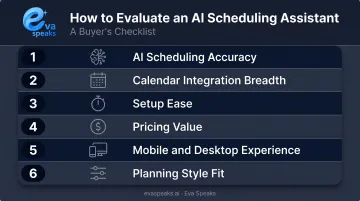
Each tool in this guide was assessed against six criteria:
- AI scheduling accuracy — does it reschedule intelligently, or just move blocks around?
- Calendar integration breadth — Google, Outlook, and iCloud support, not just one platform
- Setup ease — target under five minutes to a working schedule
- Pricing value — feature depth relative to monthly cost
- Mobile and desktop experience — tools used across devices need consistent UX
- Planning style fit — hands-off automation versus guided daily planning
Common Mistakes to Avoid
Buyers frequently select tools based on feature lists rather than testing actual rescheduling behavior. A scheduler that handles static blocks well may perform poorly when three meetings and two priority changes hit the same afternoon.
A related mistake: choosing a Google Calendar-only tool for a team that runs on Microsoft 365. Platform compatibility needs to be confirmed directly — not inferred from marketing language.
The right AI scheduling assistant is the one that fits your actual calendar ecosystem and holds up when plans change mid-afternoon.
Conclusion
The right AI scheduling assistant can reduce the hours lost to coordination overhead each week. But the choice hinges on what you're primarily solving for:
- Focus time protection → Reclaim AI or SkedPal
- Task and project scheduling combined → Motion
- Intentional daily planning with AI support → Sunsama
- Cross-platform task consolidation → Akiflow
Trial at least two shortlisted tools before committing. Pay attention to how each handles real conflicts — a meeting dropping mid-week, a deadline moving, overlapping commitments on the same afternoon. That stress-test reveals more than any feature comparison.
For businesses managing inbound calls alongside internal scheduling, there's a second layer worth addressing. EvaSpeaks operates as an AI communication layer on the customer-facing side of appointment coordination, handling:
- Answering calls 24/7 without staff involvement
- Booking appointments directly into Google Calendar or Calendly during live calls
- Routing inquiries to the right department or team member
- Qualifying leads in real time before handoff
EvaSpeaks connects to scheduling tools through standard calendar integrations, which means businesses don't need a separate booking system — the AI confirms appointments directly in the existing calendar during the live call, the same way a human receptionist would.
For healthcare practices, legal firms, property managers, and service businesses where phone-based scheduling remains a primary channel, pairing an internal AI scheduler with an AI receptionist means customer calls get handled the same way internal calendar conflicts do — automatically, without manual intervention. To explore how this works for your specific industry, you can Talk to an AI Communication Expert.
Frequently Asked Questions
Can AI help with scheduling?
Yes. AI scheduling assistants use machine learning and natural language processing to automate meeting booking, detect calendar conflicts, block focus time, and reschedule tasks automatically. This eliminates the back-and-forth that typically accumulates across email threads and manual calendar adjustments.
How much do AI scheduling assistants cost?
Paid plans among the tools in this guide range from $9.95/month (SkedPal Core, billed annually) to $34/month (Akiflow, billed monthly). Reclaim offers a permanent free plan; Motion, Sunsama, Akiflow, and SkedPal provide free trials. Advanced features like automatic rescheduling and project integration typically require a paid tier.
What is an AI scheduling assistant?
It's software that uses AI and natural language processing to automatically organize calendars, find optimal meeting times, protect focus blocks, and coordinate scheduling with minimal manual input.
What features should I look for in an AI scheduling assistant?
Prioritize: real-time calendar sync across your platforms, automatic conflict detection and rescheduling, natural language task input, focus time protection, and native integrations with tools you already use — Gmail, Outlook, Slack, or your project management platform.
Do AI scheduling assistants work across multiple calendar platforms?
Most tools are optimized for one platform — typically Google Calendar. Motion and SkedPal are verified to support Google Calendar, Outlook/Office 365, and iCloud simultaneously. Reclaim supports Google and Outlook but not native Apple Calendar. Confirm platform compatibility directly with the vendor before committing.
Are AI scheduling assistants secure for business use?
Enterprise-grade tools offer encryption at rest and in transit, SSO/SAML support, and role-based access controls. The critical check is the vendor's AI training data policy — confirm your calendar data isn't used to train models. Motion explicitly states it does not train on customer data; Eva Speaks allows customers to opt out by contacting privacy@evaspeaks.ai.