Introduction
A potential customer calls your HVAC company at 7 PM with a broken furnace. Nobody answers. Within minutes, they've called your competitor.
This scenario plays out constantly in home services. According to Invoca's 2024 home-services analysis, 27% of inbound calls go unanswered, and less than 3% of callers sent to voicemail actually leave a message.
The urgency gap is just as wide on the response side. Jobber's 2026 Home Service Trends Report found that 56% of customers expect a reply within one hour, yet only 20% of service businesses meet that standard.
Automated communication closes that gap. Done poorly, though, it makes your business feel like a call center, and home service customers are already inviting strangers into their homes. They need to trust you.
This article covers the highest-value touchpoints to automate, best practices for keeping automation personal, common mistakes to avoid, and how to measure whether it's actually working.
Key Takeaways
- 27% of home-service calls go unanswered — automation recaptures those leads before they call a competitor
- Automate booking confirmations, technician ETAs, post-job follow-ups, and missed-call responses first
- Personalize every message with the customer's name, service type, and technician name
- Every automated flow needs a clear path to a real person, especially for urgent situations
- Track no-show rates, missed call recovery, review volume, and CSAT to prove the automation is working
Why Home Service Businesses Need Automated Customer Communication
Home service companies face a staffing problem that most industries don't. Your team is simultaneously on job sites, dispatching technicians, answering phones, and chasing down invoices. Nobody's sitting at a desk waiting for the next call.
That creates three compounding problems:
- Coverage gaps — peak-season call surges overwhelm small office teams
- After-hours abandonment — customers call evenings and weekends when no one picks up
- Slow follow-through — post-job reviews, reminders, and seasonal outreach get skipped because there's no time
The Trust Factor Is Different in Home Services
Unlike most service industries, home services require customers to let strangers into their homes. That changes the communication stakes. A missed callback signals how you'll treat customers once you're inside. Poor communication reads as a preview of poor service — and for many homeowners, that's enough to call a competitor.
Housecall Pro's 2025 survey of 1,040 U.S. homeowners found that 97% of homeowners value fast response times and transparent pricing. The same survey found 53% are comfortable with AI handling initial inquiries if it improves response speed.
More than half of homeowners will accept an AI response — as long as it means they don't get sent to voicemail.
Key Communication Touchpoints to Automate
Automation works best at predictable, repeatable moments — the points where the message is essentially the same every time. Those are exactly the moments worth systematizing first.
Booking Confirmations and Reminders
The moment a customer books, they want confirmation. An immediate automated confirmation — via SMS or email — validates their decision and sets expectations. Without it, doubt creeps in: Did that actually go through?
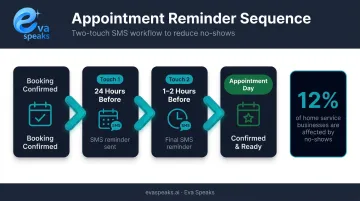
Reminder sequences before the appointment also pay off directly. No-shows affect 12% of home service businesses according to Jobber, and adjacent research on appointment reminders consistently shows attendance improvements when reminders are sent 1–7 days in advance. A two-touch sequence (24 hours before + 1–2 hours before) is a practical starting point for most trades businesses.
See how AI call flows work in practice. Watch AI Call Flow Demo
Technician Dispatch and ETA Updates
59% of homeowners expect text updates as a job progresses, and 35% report frustration over late arrivals — both from Housecall Pro's 2025 homeowner survey. A simple "Your technician is on the way — estimated arrival in 30 minutes" message addresses both issues at once.
These notifications can trigger automatically from scheduling software when a technician is dispatched. Including the technician's name and photo adds an extra layer of reassurance: 58% of homeowners say a technician photo or ID before a visit makes them feel safer.
Post-Service Follow-Ups and Review Requests
After a completed job, automate three things:
- A thank-you message with any relevant care or warranty instructions
- A review request (the highest-ROI touchpoint for local reputation)
- An optional feedback survey for internal quality tracking
On timing: BrightLocal's 2025 Local Consumer Review Survey found that consumers expect review requests from trades and service businesses 3 days to 1 week after the experience — not immediately. And the news on review willingness is good: 96% of consumers are open to writing a review when asked, with 40% most likely to respond via email.
Seasonal and Maintenance Reminders
The same follow-up logic applies to recurring demand. HVAC, lawn care, pest control, and similar businesses have natural seasonal cycles — and automated outreach tied to those cycles turns one-time customers into recurring clients without manual effort each year.
Set these up once in your CRM or scheduling platform. After that, timing handles itself.
Missed Call and After-Hours Handling
This is where revenue loss is most direct. When someone calls after hours and gets voicemail, they're almost certainly calling a competitor next. An automated response that acknowledges the missed call and offers a callback time or a self-scheduling link is far better than silence.
For businesses that need 24/7 coverage, AI-powered call handling can go further:
- Answer inbound calls immediately, regardless of hour
- Qualify the caller's need before routing
- Escalate urgent situations to an on-call technician
- Log call details for morning follow-up
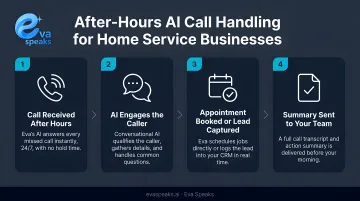
EvaSpeaks, for example, handles this entire flow — configurable to your actual business hours and escalation thresholds — without requiring a human on standby. EvaSpeaks also supports outbound reminder campaigns for appointment confirmations and re-engagement, which addresses the seasonal and maintenance reminder use cases that home services businesses typically handle through manual outreach or separate marketing tools.
See how AI keeps your business available around the clock. See How AI Handles After-Hours Calls
Here is how automated AI communication compares to manual and basic automation approaches for home services businesses:
| AI-Powered Automation (EvaSpeaks) | Basic Automated Tools | Manual Staff Communication | |
|---|---|---|---|
| Features | Booking, reminders, after-hours, CRM sync | Scheduled SMS/email blasts | Phone calls, written follow-ups |
| Best-fit Business Size | SMB to growing service businesses | Any size | Very small operations |
| Key Strengths | Consistent, 24/7, no dropped balls | Low-cost for simple tasks | Personalized touch |
| Implementation Complexity | Low - no-code setup | Low | None |
| Integration Capability | CRM, scheduling, field service tools | Limited | Manual entry |
Best Practices for Automated Customer Communication
Personalize Every Automated Message
Generic automation is obvious and off-putting. At minimum, every automated message should include:
- Customer's first name
- Specific service booked or completed
- Assigned technician's name (for dispatch and confirmation messages)
More advanced personalization — referencing prior service history or equipment — builds even stronger rapport. The difference between "Your appointment is confirmed" and "Hi Marcus, your HVAC tune-up with Jason is confirmed for Thursday at 2 PM" is clear and meaningful.
Not sure which automation setup fits your workflow? Get a Customized Workflow Recommendation
Match the Channel to the Context
Different moments call for different channels:
| Moment | Best Channel | Why |
|---|---|---|
| ETA updates, reminders | SMS | Time-sensitive, read immediately |
| Post-job summaries, seasonal offers | Works well for longer content and attachments | |
| Complex or urgent inquiries | Voice / AI call handling | Nuance and urgency require conversation |
With 91% of U.S. adults owning a smartphone, SMS reach is essentially universal for home service customers. But don't default to SMS for everything — post-job documentation and seasonal promotions land better via email.
Keep Messages Concise and Action-Oriented
Home service customers are often reading on mobile while managing their day. Every automated message should:
- Have one clear purpose
- Include one clear CTA — confirm appointment, leave a review, schedule next service
- Be short enough to read in 10 seconds
Long messages get skimmed or ignored. If you need more than three sentences, consider whether that content belongs in an email rather than a text.
Always Include a Human Escalation Path
No automated flow should trap a customer. Every message — especially post-service messages and ETA notifications — should make it easy to reach a real person.
For inbound calls, this means configuring escalation rules that route to a live agent when a caller indicates urgency. Eva Speaks' call routing service supports customizable call-flow scripts and routing rules, so businesses can define exactly when and how a call escalates beyond the AI layer. An active pipe burst or a no-heat emergency in January cannot end with a voicemail.
Align Automation with Your Brand Voice
Reliable escalation paths keep customers safe — but consistent tone keeps them loyal. Every platform ships with default templates, and they all sound like it. Before going live, rewrite them to reflect how your team actually talks: friendly, specific, and on-brand.
EvaSpeaks' configurable call-flow scripts let businesses tailor the AI's conversational style rather than accepting generic defaults. That same discipline applies to SMS templates and email sequences — edited defaults outperform untouched ones every time. Because EvaSpeaks' call-flow scripts are managed through a non-technical admin dashboard, home services businesses can update scripts for seasonal changes — a summer storm script for HVAC, a winter heating emergency script — without needing to involve a developer or contact their software vendor.
Test and Iterate Regularly
Go through your own automated flows as a customer would, at least once per quarter. Check for:
- Outdated phone numbers, pricing, or service area references
- Broken links in email or SMS messages
- Sequences that fire at the wrong time or too frequently
Business information changes, and automation doesn't update itself. A booking confirmation that references a service area you no longer cover does more harm than no message at all.
Mistakes to Avoid
Over-Automating Sensitive Touchpoints
Automation handles routine moments well. It handles emotionally charged ones poorly. Don't automate:
- Responses to complaints or negative feedback
- Follow-up after a service dispute
- Callbacks for callers who expressed frustration or urgency
These require human judgment. Route them to a person and respond directly.
Ignoring TCPA Compliance
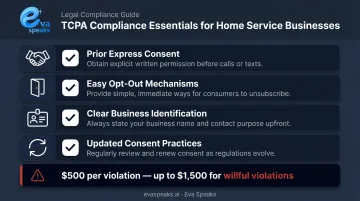
For any business sending automated texts or making automated calls in the U.S., the Telephone Consumer Protection Act applies. The stakes are real: TCPA statutory damages are $500 per violation, with courts able to triple that amount for willful violations.
The basics every home service business must have in place:
- Prior express consent before sending automated SMS messages
- Easy opt-out mechanisms in every message (e.g., "Reply STOP to unsubscribe")
- Clear business identification in automated voice messages
- Updated consent practices — the FCC strengthened consumer revocation rights in 2024, meaning customers can opt out by any reasonable means
Given ongoing TCPA rulemaking activity, consult a compliance professional before launching large-scale automated SMS campaigns.
Skipping Ongoing Maintenance
Automation requires maintenance. Business hours change. Service areas expand. Technicians leave. Any of these changes can break an automated flow or quietly feed customers wrong information.
Build a quarterly review into your operations calendar. At minimum, check:
- All automated messages reflect current hours, service areas, and staff
- No flows have stopped triggering without anyone noticing
- Opt-out and consent records are current
Skipping this step turns a working system into a liability.
How to Measure the Success of Your Communication Automation
Before implementing automation, document your current baselines. Without them, you're guessing at improvement.
Key metrics to track:
| Metric | What It Measures |
|---|---|
| No-show rate | Whether reminders are reducing missed appointments |
| Missed call recovery rate | How many after-hours leads are captured vs. lost |
| Post-service review volume | Whether review request automation is generating more reviews |
| Inbound "where is my technician?" call volume | Whether ETA notifications are reducing status-check calls |
| CSAT score | Overall customer satisfaction, pre- and post-automation |
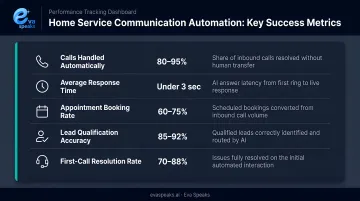
Track each metric for at least 60–90 days before drawing conclusions. Automated communication changes customer behavior gradually, not overnight.
Don't Ignore Qualitative Signals
Numbers tell part of the story. Qualitative signals fill in the gaps:
- Customer complaints specifically about communication (logged in reviews or support tickets)
- Staff reports of repetitive "where are they?" or "did you get my message?" calls
- Repeat booking rates, which indirectly reflect customer confidence in your communication
Jobber's 2024 data shows that clear communication drives satisfaction for 32% of home service customers — second only to workmanship quality. That's a measurable business outcome, and one worth tracking from day one.
Want expert advice on your communication strategy? Talk to an AI Communication Expert
Frequently Asked Questions
What are examples of automated customer communication for home services?
The most common examples: appointment booking confirmations, technician ETA texts, post-job review requests, seasonal maintenance reminders, and missed-call auto-responses with scheduling links. Each targets a predictable, repeatable moment in the customer journey where a timely message adds clear value.
What is the 10/5 rule in customer service?
The 10/5 rule — documented by hospitality standards firms like Coyle Hospitality — says staff should make eye contact and smile within 10 feet of a guest, then offer a verbal greeting within 5 feet. Automated communication applies the same logic: reach out before customers need to ask.
What types of messages can home service businesses automate?
SMS appointment reminders, email booking confirmations, AI-powered phone greetings, dispatch and ETA notifications, post-service feedback surveys, and seasonal promotional outreach. The best platforms let you configure each touchpoint separately instead of locking you into a single message format for every situation.
How do I avoid making automated messages feel impersonal?
Use personalization tokens — customer name, service type, technician name — in every message. Write in a conversational tone that matches how your team actually speaks, and avoid transactional language like "Your service request #4821 has been processed." Specific and warm beats formal and generic.
Should I automate emergency service calls for my home service business?
Emergency calls should never go through a full self-service flow. The right approach: an automated acknowledgment that the call was received, followed by immediate routing to an on-call technician or live agent. AI platforms can triage urgency in real time, but that escalation path to a human is non-negotiable.
What metrics show that communication automation is working?
Watch for: lower no-show rates, higher post-service review volume, reduced inbound "status check" calls, improved missed call recovery, and rising CSAT scores. Track each metric against your pre-automation baseline for at least 60–90 days before evaluating results.