A 2024 Gartner survey of 187 customer service leaders found that 85% plan to explore or pilot customer-facing conversational AI in 2025. That's not a fringe experiment anymore — it's a mainstream operational priority.
This guide covers what AI call center automation actually means in practice, which capabilities matter most, how to implement them without disrupting operations, and what to look for when evaluating solutions. Whether you're starting from scratch or looking to expand an existing deployment, the goal is to give you a clear, actionable framework — not hype.
Key Takeaways
- AI call center automation uses NLP, machine learning, and LLMs to handle routine interactions while supporting human agents in real time
- Key capabilities — intelligent routing, virtual agents, real-time transcription, agent assist, and sentiment analysis — work together to reduce handle time and improve resolution rates
- McKinsey estimates GenAI could deliver productivity gains worth 30–45% of current customer operations costs
- Successful implementation starts with defining specific goals, auditing workflows, and choosing tools that integrate with existing systems
- Human-AI collaboration drives the best results: AI handles the repetitive work, agents focus on complex, high-value interactions
Watch how AI customer service automation works on a real call. Watch AI Call Flow Demo
What Is AI Customer Service Automation in Call Centers?
AI customer service automation applies machine learning, natural language processing (NLP), and large language models (LLMs) to handle customer interactions and back-office workflows, either end-to-end or in support of human agents.
There are two distinct modes that most call centers use together:
- Full automation — tasks AI handles without human involvement (call routing, FAQ responses, appointment scheduling, account lookups)
- AI-assisted workflows — AI running in the background during live calls, providing agents with transcriptions, suggested responses, and real-time coaching
Beyond Rule-Based IVR
Traditional IVR systems work from rigid menus. Callers press 1 for billing, 2 for support, and so on. Modern AI-powered systems understand natural language, retain context across a conversation, and handle multi-step requests without forcing callers through constrained menus.
By 2028, Gartner projects that at least 70% of customers will use a conversational AI interface to begin their service journey. That shift is already underway — and the adoption data reflects it.
What AI Automation Is Not
Expanded AI capability tends to raise one question immediately: does this replace agents? The evidence says no. Gartner predicts that 50% of organizations that planned significant workforce reductions due to AI will abandon those plans by 2027. The practical payoff is redirected human effort: agents spend less time on repetitive, low-complexity tasks and more on interactions that require judgment, empathy, and real problem-solving.
One scope note: This guide focuses primarily on voice-based call centers. Contact centers handling omnichannel interactions (chat, email, social) follow the same principles but involve additional integration complexity.
Core AI Automation Capabilities Every Call Center Needs
Intelligent Call Routing
AI routing goes well beyond "press 1 for sales." The system analyzes caller history, intent signals, current queue conditions, and individual agent skill profiles to match each call to the right destination in real time. The result is fewer unnecessary transfers and better first-call resolution — callers reach agents who are equipped to help from the start.
Conversational AI and Virtual Agents
LLM-powered virtual agents handle routine requests without any human involvement, around the clock. That includes:
- FAQs and basic account inquiries
- Order status and appointment scheduling
- Password resets and common self-service tasks
Unlike older chatbot-style systems, LLM-based agents hold context across a conversation and handle unexpected phrasing without losing the thread.
Eva Speaks' AI-enabled call handling integrates LLMs with text-to-speech and speech-to-text processing to manage calls, route messages, and deliver transcriptions through a single coordinated system. For teams that want to automate routine inbound volume without the overhead of a full enterprise CCaaS platform, Eva Speaks offers a practical middle ground — configurable call flows and routing rules that can be set up without dedicated engineering resources.
See how AI automates customer service across your call center. Explore AI Call Automation
Real-Time Transcription and Call Summarization
AI transcription converts spoken conversation to text as the call happens. At the end of the interaction, the system auto-generates a structured summary with key points and action items, eliminating the manual note-taking that eats into after-call work time.
Forrester flagged call summarization as one of the highest-interest GenAI additions in 2024, noting that AI-generated summaries consistently outperformed manual agent notes in completeness and accuracy. Eva Speaks includes real-time transcription as part of its core call handling layer, with output quality consistent with what that Forrester research identified.
Real-Time Agent Assist and Coaching
During live calls, AI surfaces relevant knowledge base content, compliance reminders, and suggested next steps so agents don't need to pause the conversation to search. Agents stay in the conversation instead of putting customers on hold.
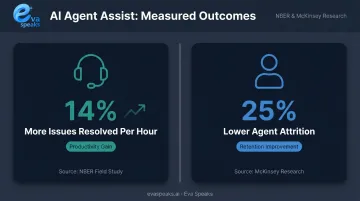
The productivity data here is concrete: an NBER field study found AI-assisted agents resolved 14% more issues per hour compared to agents working without AI support. That same McKinsey-cited research also showed a 25% reduction in agent attrition, a downstream effect of lower cognitive load on agents.
Sentiment Analysis and Conversation Intelligence
AI monitors emotional signals in real time during calls, detecting frustration, confusion, or escalation risk before a call derails. Supervisors get alerts on flagged interactions and can intervene or coach in the moment.
This data also feeds quality assurance and training programs. Analyzing patterns across hundreds of calls surfaces recurring friction points, knowledge gaps, and compliance risks that manual spot-checks would miss entirely.
Key Benefits of AI Call Center Automation
Operational Efficiency and Cost Reduction
Automating high-volume, repetitive tasks (call deflection, data entry, after-call admin) directly reduces average handle time and the staffing required to maintain service levels. McKinsey's research estimates GenAI could generate productivity value equal to 30–45% of current customer operations function costs. Gartner's longer-range projection puts the operational cost reduction at 30% by 2029 as agentic AI matures.
Three compounding factors drive those savings:
- Fewer interactions require a human agent at all
- Resolutions on agent-handled calls happen faster
- Post-call admin time drops significantly
Improved Customer Experience
Faster routing, 24/7 availability, and shorter wait times all contribute to better CSAT. AI also enables personalization at scale by pulling customer history and context in real time so agents (and virtual agents) don't start from scratch on every call.
One important caveat: 64% of customers told Gartner they'd prefer companies didn't use AI in customer service at all. That finding doesn't argue against AI adoption. It argues against poorly designed automation with no clear escape route to a human. Customer experience gains are real, but they depend on building AI journeys that feel helpful, not obstructive.
Better Agent Experience and Retention
This benefit is underappreciated. Removing tedious tasks and providing real-time guidance reduces agent cognitive load. McKinsey's research on AI-assisted support found 25% lower agent attrition in organizations using AI tools , a notable finding for an industry that routinely struggles with turnover.
When agents spend less time on rote work and more time on genuinely interesting problems, retention improves. That reduces recruiting and training costs while preserving institutional knowledge.
Ready to see it live for your call center? Request Live Demo
How to Implement AI Automation in Your Call Center
Step 1 — Define Objectives Before Choosing Tools
Start with specific, measurable goals. "We want to reduce average handle time by 15%" is useful. "We want to improve customer experience" is not. Without clear targets, teams end up adopting AI features that don't address real operational gaps — and can't demonstrate ROI when it counts.
Step 2 — Audit Workflows and Identify Automation-Ready Tasks
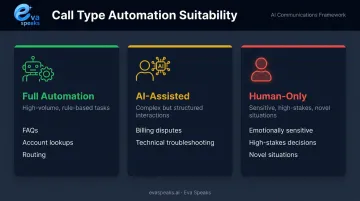
Map call types by volume and complexity, then rank them by automation suitability:
- Best candidates: High-volume, repetitive, rule-based (FAQs, account lookups, routing)
- AI-assist candidates: Complex but structured (billing disputes, technical troubleshooting)
- Human-only: Emotionally sensitive, high-stakes, or novel situations
Gartner identifies agent assist and call summarization as the highest-feasibility, highest-value starting points — useful guidance for teams deciding where to begin.
Step 3 — Choose Tools with Integration in Mind
AI tools that can't connect to your CRM, ticketing system, or telephony infrastructure won't deliver their potential. Integration depth should be evaluated before features.
Customizable call-flow scripts and routing rules matter here too. Eva Speaks, for example, lets businesses configure call flows, routing logic, and office hours to match real operational needs, reducing the setup time and technical effort typically associated with deploying AI in existing environments.
Step 4 — Manage the Human Side of the Rollout
Change management is where many implementations stall. A few practices make a meaningful difference:
- Involve agents early so they understand what's changing and why
- Communicate clearly that AI is there to support them, not replace them
- Designate internal champions who can model effective use for peers
- Prioritize hands-on training over mandated compliance — buy-in drives adoption, compliance alone produces workarounds
Step 5 — Establish Baselines, Monitor KPIs, and Iterate
Track these metrics from day one:
| KPI | What It Measures |
|---|---|
| Call deflection rate | % of interactions resolved without a human agent |
| Average handle time (AHT) | Time per interaction including after-call work |
| First-call resolution (FCR) | Issues resolved in a single interaction |
| CSAT / NPS | Customer satisfaction signals |
| Escalation rate | AI-to-human transfers as % of total interactions |
| Cost per interaction | Fully-loaded cost efficiency |
Establish baselines before deployment. Revisit KPIs monthly in the first quarter, then quarterly after that — early data often reveals which automations need tuning before problems compound.
Choosing the Right AI Automation Solution
Key Evaluation Criteria
Before comparing features, verify these non-negotiables:
- Scalability — Can it handle volume spikes without performance degradation during peak hours?
- Integration depth — Does it connect natively to your CRM, ticketing system, and telephony stack?
- Customization — Can call flows and routing rules be configured without heavy engineering work?
- Compliance — Does it meet your applicable frameworks (HIPAA for healthcare, CCPA for California operations, state privacy laws for multi-state businesses)?
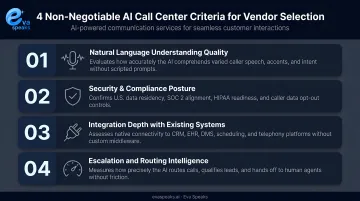
On the compliance front, for example, Eva Speaks stores all data in U.S. data centers, meets applicable federal and state privacy laws, and lets businesses opt out of AI model training — a meaningful detail for organizations with strict data governance requirements.
Feature Checklist
Once a vendor clears those criteria, dig into the specifics. Make sure you can confirm:
- Conversational AI quality (test with real call scenarios, not demos)
- Real-time transcription accuracy under different audio conditions
- Agent assist functionality and knowledge base integration
- Sentiment analysis and supervisor alerting
- Reporting dashboards with the KPIs your team actually uses
- Omnichannel support if you handle non-voice interactions
Build vs. Buy
With your feature requirements in hand, one decision remains: build or buy.
Off-the-shelf solutions suit most teams. Deployment is faster, ongoing maintenance falls to the vendor, and the core capabilities are already proven in production. Custom builds make sense only when workflows are genuinely unusual and no configurable platform can accommodate them.
For most call centers, the right answer sits in between — a platform with flexible call-flow configuration that avoids the cost and timeline of full custom development while still adapting to your specific routing logic.
Here is how AI voice automation, chatbot-based, and human-only customer service approaches compare for call center automation:
| AI Voice Automation (EvaSpeaks) | Chatbot / Virtual Assistant | Human Call Center | |
|---|---|---|---|
| Features | Full voice conversation, 24/7, scheduling, CRM sync, real-time transcription | Text chat, FAQ deflection, basic ticket creation | Human agents, full interaction |
| Best-fit Business Size | SMB to mid-market | Any size | Any size |
| Key Strengths | Voice-first, 24/7 coverage, consistent, no overages | Low cost, async, self-service | Full empathy, complex situations |
| Implementation Complexity | Low | Low to Medium | None (hire) |
| Integration Capability | CRM, ticketing, scheduling native | CRM, helpdesk | Manual or CRM |
Want a custom automation plan for your team? Get a Customized Workflow Recommendation
Common Challenges and How to Overcome Them
Data Quality and AI Accuracy
AI performs in proportion to the quality of its underlying data. Incomplete CRM records, inconsistent call tagging, and disorganized knowledge bases all degrade AI output — routing errors, inaccurate suggestions, poor transcription context. The fix isn't more AI; it's cleaner data foundations.
Practical steps:
- Audit CRM data completeness before deployment
- Establish consistent call categorization and tagging conventions
- Structure knowledge base content for machine retrieval, not just human readability
- Build regular model review cycles into operational cadence
Balancing Automation with the Human Touch
Push too many interactions through AI without clear escalation paths, and customers notice. Gartner's 2024 survey found that 64% of customers would prefer companies didn't use AI at all — a direct signal that poorly designed automation erodes trust, not builds it.
The design principle that matters most is context-preserving handoff. When a virtual agent transfers to a human, that agent should receive the full conversation history, detected intent, and relevant customer data — so the customer never has to repeat themselves.
A well-designed handoff includes:
- Full transcript of the AI interaction
- Detected intent and any unresolved issues
- Relevant account or CRM data surfaced automatically
- A warm transfer message that frames the context for the agent
Frequently Asked Questions
What is AI customer service automation in a call center?
It's the application of AI technologies — NLP, machine learning, and LLMs — to automate routine customer interactions and support human agents in real time. It covers both fully automated tasks (like call routing and FAQs) and AI-assisted workflows where the AI works alongside a live agent.
Will AI replace human call center agents?
No — and the data backs that up. AI handles high-volume, repetitive interactions while human agents focus on complex, sensitive, or emotionally nuanced situations. Gartner predicts half of organizations expecting large workforce reductions from AI will reverse those plans by 2027.
What types of calls can AI handle automatically?
FAQs, account inquiries, order status, appointment scheduling, password resets, and basic troubleshooting are well-suited to full automation. AI performs best on structured, predictable requests with defined resolution paths. Complex, multi-issue, or emotionally charged calls still benefit from human handling.
How does AI automation reduce call center costs?
AI cuts costs through call deflection (fewer interactions requiring a human agent), reduced average handle time, and less after-call admin work. The result: higher call volumes without a proportional increase in headcount or spend.
How long does it take to implement AI automation?
Simple deployments — a conversational IVR or FAQ bot — can go live in weeks. Full AI integration with CRM, custom call flows, and agent assist typically takes several months. Starting with high-volume, low-complexity use cases reduces risk and gets you to measurable results faster.
What metrics should I track to measure success?
Call deflection rate, average handle time (AHT), first-call resolution (FCR), CSAT/NPS, escalation rate, and cost per interaction. Establish baselines before deployment — without them, you can't measure what actually changed.