Introduction
Enterprise support teams are caught between two forces pulling in opposite directions: customer expectations keep rising, while headcount budgets stay flat. According to McKinsey, 57% of customer care leaders expect call volumes to increase over the next one to two years — yet hiring your way out of that problem is neither sustainable nor fast enough.
The human cost is real too. ICMI reports only 54% of agents stay beyond two years, and replacing one agent can cost over $35,000 in recruiting and training alone. Repetitive, high-volume calls accelerate that churn.
AI customer service for enterprise is a different challenge than simple automation. It requires handling compliance requirements, deep CRM integrations, multichannel complexity, and coordinating AI and agent workflows across the organization. A basic chatbot or legacy IVR doesn't come close to addressing that.
This guide is built for teams navigating that complexity. It covers:
- Core AI capabilities for enterprise teams
- High-value use cases by industry
- How to evaluate platforms
- A practical implementation roadmap
- How to measure and prove ROI
Enterprise teams evaluating these platforms can Request Live Demo to see how AI call handling integrates with their existing workflows.
What Is AI for Customer Service in the Enterprise Context?
Beyond Chatbots and IVR Menus
Enterprise AI customer service refers to intelligent systems that use natural language processing (NLP), machine learning, and large language models (LLMs) to automate and augment interactions across voice, chat, and email. The critical distinction: these systems understand intent and respond dynamically, rather than following rigid menu scripts.
Traditional IVR forces callers through keypad menus. Legacy chatbots match keywords to pre-written answers. Neither handles deviations from the expected path. Modern AI systems do, because they process language rather than just pattern-matched inputs.
Gartner's 2024 survey of 187 customer service leaders found 85% will explore or pilot customer-facing conversational GenAI in 2025. For voice specifically, 44% are exploring, 11% piloting, and 5% already deployed.
The Technology Stack
These systems combine several components that work in concert:
- Speech-to-text (STT) — converts spoken audio into text in real time
- Natural language understanding (NLU) — identifies the caller's intent within that text
- LLMs — generate contextually appropriate, dynamic responses
- Text-to-speech (TTS) — converts the AI's response back into natural-sounding audio
- Workflow execution — triggers backend actions (lookups, updates, escalations) based on the conversation
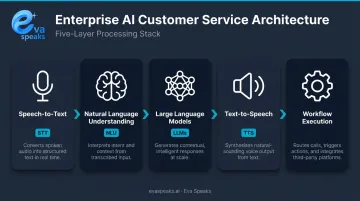
Understanding this stack matters because enterprise deployments don't just need these components — they need them to operate reliably at scale, under compliance constraints, and with deep integration into existing systems.
Why Enterprise Requirements Are Different
SMB automation tools rarely address what enterprise deployments actually need:
- Compliance: SOC 2 Type II, HIPAA, GDPR, PCI DSS — depending on industry
- Integration depth: Two-way CRM sync during a live call, not just post-call logging
- Scale: Multi-brand, multi-region deployments with consistent logic across them
- Oversight: Configurable escalation thresholds and human fallback at every stage
Core AI Customer Service Capabilities for Enterprise Teams
AI Voice Agents
AI voice agents handle inbound calls autonomously — detecting caller intent, generating real-time responses via LLM, and resolving routine requests without a human agent. When a call exceeds the AI's scope, a warm handoff transfers the caller to a human agent along with full conversation context, so the customer never has to repeat themselves.
McKinsey cites one energy company that integrated an AI voice assistant and reduced billing-call volume by approximately 20%, while cutting authentication time by up to 60 seconds per call. At enterprise call volumes, even modest per-call savings add up to significant cost reduction within months.
EvaSpeaks supports this with AI-enabled call handling that integrates LLM, STT, and TTS — with configurable call-flow scripts, office-hours controls, and escalation rules adapted per workflow. As the enterprise AI market accelerates, EvaSpeaks represents an accessible entry point: businesses can deploy it as a voice AI layer without committing to a full CCaaS platform replacement, which is why it appears in both SMB and enterprise contexts.
AI Chat and Conversational Agents
AI chat agents handle real-time digital conversations across web, mobile, and messaging platforms. The key difference from FAQ bots: they retain context across multi-turn conversations and connect to backend systems to actually resolve issues.
ContactBabel reports that 1 in 9 web chats is already handled entirely by automated AI — a share that will grow as LLM quality improves.
AI Email Automation and Triage
AI classifies inbound emails by intent and urgency, then takes action:
- Drafts responses for agent review before sending
- Routes complex or sensitive cases to the right team
- Flags high-urgency tickets for immediate attention
The result: response times drop from hours to minutes, and agents focus only on cases that genuinely need human judgment.
Agent Assist and Copilot Tools
Some interactions — sensitive disputes, complex technical issues, high-value accounts — are better handled by a human with AI support. Agent-assist tools sit alongside the human agent, surfacing relevant knowledge articles, suggested responses, and customer history in real time.
Deloitte research found companies deploying generative AI in this mode are 35% less likely to report that agents feel overwhelmed by information during calls. That's a direct reduction in the cognitive load that drives burnout.
Agentic Workflows and Backend Automation
Agentic AI takes multi-step actions within a single conversation — without human involvement. A single customer interaction might trigger:
- Pulling order history from a backend system
- Processing a return or exchange
- Updating a CRM record with the outcome
- Sending a confirmation to the customer
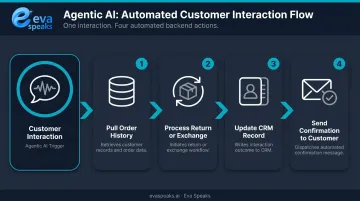
This is where enterprise teams unlock the highest deflection rates. McKinsey frames it as a shift from reactive issue resolution to proactive, end-to-end problem handling — where the AI owns the entire process, not just the conversation. You can Watch AI Call Flow Demo to see agentic AI handling a complete multi-step call interaction.
Key Use Cases Across Enterprise Industries
Contact Center Automation
High-volume, repeatable inquiries (order status, billing questions, password resets, account lookups) are the clearest starting point for AI. McKinsey estimates AI-driven automation could enable 40–50% fewer agents while handling 20–30% more calls within two to three years.
Cost data from ContactBabel (citing McKinsey's global AI survey) shows tangible results are already happening: 8% of businesses have seen 20%+ cost decreases in service operations from AI adoption, with another 12% reporting 10–19% decreases.
Healthcare
Voice AI in healthcare addresses scheduling, patient reminders, and intake triage , but HIPAA compliance is non-negotiable. Per HHS guidance, any cloud vendor that creates, receives, maintains, or transmits electronic protected health information (ePHI) must operate under a Business Associate Agreement (BAA).
Before deploying any AI voice solution for patient interactions, confirm this BAA coverage extends to the full call path, not just the application layer.
Financial Services
AI handles account inquiries, fraud alert notifications, and loan status updates with measurable efficiency gains. Key compliance considerations include:
- Call recording storage: Recordings capturing payment card data fall under PCI DSS requirements, with specific rules on access controls and retention
- Voice biometrics: Authentication via voice adds a security layer without slowing down the caller experience
Retail and E-Commerce
Where regulated industries wrestle with compliance, retail's primary challenge is volume. Peak seasons and promotional events flood contact centers with order tracking and returns inquiries. AI absorbs that surge without headcount scaling, maintaining consistent service levels regardless of demand.
ContactBabel identifies retail as one of the sectors with the highest AI adoption intent among businesses not yet using it — a signal that contact center investment in this space is accelerating, not hypothetical.

What to Look for in an Enterprise AI Customer Service Platform
Evaluating platforms at enterprise scale requires looking beyond demo performance. Five criteria matter most:
1. Omnichannel Integration and Unified Workflow Logic
The platform should handle voice, chat, and email through a shared agent architecture — consistent automation logic, customer context, and reporting across every channel. Siloed channel tools create inconsistent experiences and reporting gaps. Look for customizable routing rules and call-flow scripts that can be adapted per brand, region, or use case.
2. LLM Integration Quality and Real-Time Response Capability
Dynamic response generation (not keyword matching) is the baseline requirement. For voice specifically, latency matters. McKinsey notes that generative AI still struggles in voice contexts due to latency, while performing better in asynchronous channels. Ask vendors to demonstrate real-time LLM response performance under production conditions — not just controlled demos.
3. Enterprise Security and Compliance Posture
Confirm the platform meets the standards relevant to your industry. Key questions:
- Does the vendor offer a BAA for healthcare deployments?
- Does compliance coverage extend to the full call path, including telephony and recording layers?
- Where is data stored, and what controls exist over AI training data use?
Eva Speaks stores data in U.S. data centers, uses PCI-compliant payment processors, and offers customers opt-out controls for AI model training data use. Reach out to their team directly at privacy@evaspeaks.ai for current certification details.
4. CRM and Tech Stack Integration Depth
Verify real two-way data sync during a live interaction, not just post-call logging. Integration quality only matters if the underlying knowledge base is current — Gartner found that 61% of service leaders have backlogs of knowledge articles needing edits, and more than one-third lack a formal update process. Even the best AI platform produces poor responses when fed outdated content.
5. Pricing Model Transparency and Total Cost of Ownership
Compare per-minute, per-conversation, and per-resolution models at your actual production volume. Headline rates rarely reflect what an enterprise pays at scale. Include these in your TCO calculation:
- Telephony fees
- Compliance add-ons
- Integration and implementation overhead
- Ongoing maintenance and support costs
Enterprise teams that want a cost model built around their specific interaction volume can Get a Customized Workflow Recommendation.
How Enterprise Voice AI Solutions Compare
Here is how AI-native, rule-based, and legacy voice solutions compare for enterprise support teams:
| AI-Native (EvaSpeaks) | Rule-Based Cloud CCaaS | Legacy On-Premise IVR | |
|---|---|---|---|
| Features | LLM-powered conversations, dynamic routing, CRM sync, 24/7 | ACD, skill routing, omnichannel | Fixed IVR trees, queue management |
| Best-fit Business Size | SMB to scaling enterprise | Mid-market to large enterprise | Large enterprise |
| Key Strengths | Fast deploy, predictable cost, scales without IT | Full CCaaS feature set, proven | Maximum control, on-premise | | Implementation Complexity | Low - days | Medium to High | Very High | | Integration Capability | CRM, EHR, scheduling native | Custom enterprise integrations | Custom dev required |
How to Implement AI Customer Service: A Practical Roadmap
Phase 1 — Define Goals and Identify High-Value Use Cases
Start narrow. Identify two or three support interactions that are:
- High volume
- Highly repeatable
- Resolvable without escalation in most cases
Order tracking, password resets, and appointment booking are common starting points. Set measurable pilot goals (resolution rate, escalation rate, CSAT) before writing a single line of configuration. Broad automation targets make ROI harder to prove and failures harder to diagnose.
Phase 2 — Run a Scoped Pilot Before Full Deployment
A good pilot looks like this:
- Start small: 50–100 interactions, not full call volume
- Define success criteria upfront: containment rate, CSAT, escalation rate
- Test integrations under real conditions: CRM sync, routing logic, edge cases
- Validate knowledge base quality: gaps here will surface immediately in live calls
Knowledge base quality is the most common pilot failure point. Research consistently shows that more than one-third of organizations have no formal process for retiring outdated articles — audit and clean your knowledge base before go-live, not after the first wave of misfires.
Once the pilot hits your success thresholds, scaling follows a predictable progression. Successful enterprise deployments move through three stages:
Phase 3 — Scale Gradually with Human-AI Collaboration Guardrails
- AI-assisted (copilot) — AI surfaces suggested responses and retrieves context during live interactions; agents make every final decision
- Semi-autonomous — AI resolves a defined set of interaction types end-to-end, routing anything outside those parameters to a human
- Fully autonomous — AI manages complete interaction cycles across approved use cases, with agents focused on complex or sensitive cases
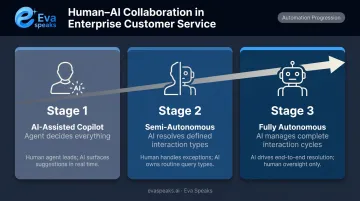
At each stage, maintain configurable escalation thresholds and real-time oversight. Agent capacity planning shifts at each stage too. As automation absorbs routine volume, agents move toward interactions where human judgment, empathy, or accountability genuinely matter.
Measuring ROI and Success Metrics
Primary KPIs to Track
| Metric | What It Measures |
|---|---|
| Containment / self-service rate | % of interactions resolved without human escalation |
| First-contact resolution (FCR) | % resolved in a single interaction |
| Average handle time (AHT) | Duration per interaction, including wrap-up |
| CSAT / NPS | Customer satisfaction and loyalty signals |
| Cost per interaction | Fully-loaded cost divided by interaction volume |
Here's a measurement gap that undermines most AI deployments: ICMI data shows only 14% of contact centers currently measure deflection rate and 13% measure self-service accessibility — meaning most teams lack the baseline infrastructure to prove AI ROI. Fix your measurement framework before deployment, or you won't be able to show results to leadership.
Building the Business Case
The ROI calculation for leadership has two components:
- Direct cost savings: (Cost per human-handled interaction × deflected volume) minus platform cost. This is your headline number for finance.
- Coverage value: 24/7 availability and reduced overtime during peak periods add savings that rarely show up in standard cost models.
- Operational quality: Reduced agent burnout, faster response times, and consistent service at scale — harder to quantify, but real factors in retention and brand perception.
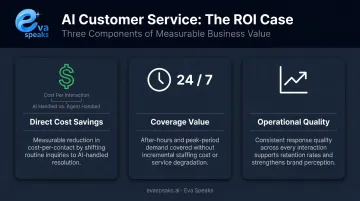
On cost reduction ranges: ContactBabel's data (citing McKinsey) shows 8% of businesses achieved 20%+ cost reductions in service operations from AI adoption. Note that vendor-commissioned ROI studies typically report higher figures — treat those as upper-bound scenarios, not baselines. Teams that want to validate ROI projections for their specific environment can Talk to an AI Communication Expert.
Frequently Asked Questions
How can support teams use enterprise-ready voice AI solutions to automate customer support tasks?
Voice AI automates high-volume inbound calls by detecting caller intent, generating real-time responses, and resolving routine requests — billing inquiries, order status, appointment scheduling — without a human agent. Complex or sensitive calls escalate to human agents with full conversation context already transferred.
How much do enterprise AI customer service solutions cost?
Pricing varies by model (per-minute, per-conversation, per-resolution) and scale. Entry-level deployments start in the hundreds of dollars monthly; large enterprise contracts reach six figures annually. Total cost of ownership typically runs higher than the headline rate once telephony fees, compliance add-ons, and integration work are factored in.
Which voice AI technology is best for managing enterprise support calls?
The best fit depends on your priorities. Organizations needing real-time LLM-powered responses, deep CRM integration, and compliance coverage should evaluate platforms on low-latency voice performance under production conditions, with compliance that extends to the full call path.
Are there AI customer service agents that operate 24/7?
Yes. AI customer service agents across voice, chat, and email operate continuously without downtime. This makes them particularly valuable for after-hours coverage and global support operations where staffing human agents around the clock is cost-prohibitive.
What is the difference between AI customer service tools and traditional IVR systems?
Traditional IVR routes callers through fixed menus and keypad inputs. AI tools use NLP and LLMs to understand natural speech and resolve issues dynamically — so a caller saying "I need to check my order from last Tuesday" gets a direct answer instead of being told to press 2.
How long does it take to implement AI for enterprise customer service?
Narrow single-use-case deployments typically go live in two to four weeks. Complex implementations involving CRM integration, telephony, compliance workflows, and multi-channel orchestration generally take two to three months. Knowledge base preparation and integration testing are the most common timeline drivers.